
Are you tired of your contact center failing when call volume spikes? Old phone systems drop calls, and long contracts make you pay for seats nobody uses.
We faced this exact trap. Our fix was Amazon Connect, an AWS cloud contact center built on serverless parts. Capacity grows with demand, you pay only for the minutes and messages you use, and built-in AI helps agents answer faster.
This guide explains how Amazon Connect works, what its AI can and can't do, and what it costs at 50 and 200 agents. We also share where it tripped us up, so you can avoid the same mistakes.
Understanding the mechanics of this platform is essential when evaluating the best enterprise contact center solutions available in the market today.
What Is Amazon Connect?
Amazon Connect is an online contact center from AWS. All voice, web, SMS, and email interactions pass through this platform, both inbound and outbound.
Amazon created it for its own retail support agents because of massive surges in traffic. Picture a holiday sale, when millions of people write in at once. A system that survives that day can survive your busy day too.
After that, AWS has introduced AI capabilities into the routing, analytics, and agent-assistance layers. Consequently, AI is no longer an add-on but a feature included within the base product itself.
Before, we had to glue a bot vendor onto our phone system and hope the two stayed friends. Now the pieces live in one place.
Who is it for? Teams that already run on AWS. CTOs and engineering directors who prefer crafting a custom customer experience over purchasing an out-of-the-box solution. If that’s you, keep reading. If you’re looking for an out-of-the-box phone system, jump ahead to the section about when Connect isn’t right for you.

How Amazon Connect Works: Architecture Overview
Old phone systems run on physical switches and fixed server racks. Connect runs on event-driven, serverless parts.
That changes how you design a customer call. Nothing sits around waiting. Small pieces wake up when something happens, do their job, and go back to sleep. Here are the pieces.
Contact Flows
Contact flows hold all your routing logic. Consider them the brain of the operation.
They are created using a drag-and-drop interface. It is you who decides what will happen after the call has been answered.
The choices that you get to make include playing a welcome message, giving menu options, checking the time, and queuing the caller. Each of these is a block that you assemble.
Here's what we liked. Voice and chat share the same data layer, so one flow can handle both a phone call and a web chat.
Queues and Routing Profiles
Once a flow knows why the customer called, it drops them into a queue. Routing profiles decide which agents serve which queues.
That gives you skills-based routing. A hard technical question goes to a senior engineer. A password reset goes to the general desk. When volume shifts, you change the profiles on the fly.
This mattered a lot to us. Before, a senior engineer spent half the morning on password resets. That's a waste of a good engineer. Now the right person gets the right call, and customers stop bouncing between agents.
Lambda Integration
A contact flow can't look up data on its own. If you want to check an account number, see inventory, or update your CRM, the flow has to call an AWS Lambda function. Lambda runs your code and returns the answer.
Here's the catch. Connect gives Lambda eight seconds, and it's a hard limit. If your database takes 8.1 seconds to answer, the call falls into an error branch. Meanwhile, the caller hears dead silence.
We had that happen on a live line. A customer waited, heard nothing, and hung up. We only found out later, when the complaint landed in our inbox. Eight seconds sounds like plenty until a busy database takes its time. Nothing feels worse than silence on a phone call.
According to PwC, 32% of customers would stop doing business with a brand they love after one bad experience, and the figure is 49% in Latin America.
Here's how we fixed it:
- We wrote small Lambda functions that do one job each.
- We used Node.js because it starts fast.
- We cached the data we looked up most often, so answers came back in well under a second.
If you take one thing from this article, take this: design for speed before you go live.
Lex Bots
Amazon Lex adds chatbots and smart IVR to your flows. AWS also added Amazon Nova Sonic, a speech-to-speech model.
Older voice bots had that awkward pause after you spoke. You'd say something, wait, and wonder if the bot heard you.
Gartner’s study shows that only 14% of customer service issues are fully resolved in self-service, and only 36% even when customers call the issue "very simple."
Callers hated that pause, and so did we. Nova Sonic mostly removes it. The model picks up on tone and handles interruptions. The newer Nova 2 Sonic supports seven languages, and it can switch between them in one conversation.
Kinesis Streams
Every interaction creates a Contact Trace Record, or CTR. This is the record of the events that occurred during this engagement, such as who called, which queue he/she called, the waiting time before being put through, and to whom he/she finally got through.
For storing these files, you make use of Amazon Kinesis Data Firehose to move these files to the data lake in Amazon S3.
Subsequently, the analysis of this information is done using Amazon Athena, and visualization of the results is made using Amazon QuickSight.
Core Amazon Connect Features
The agents operate in one browser-based software known as the Contact Control Panel (CCP). The only thing that they require is a headset and an internet connection.
Since the CCP uses WebRTC, the audio is processed using the browser. No desk phones and no installs. New hires can start on day one without waiting for hardware.
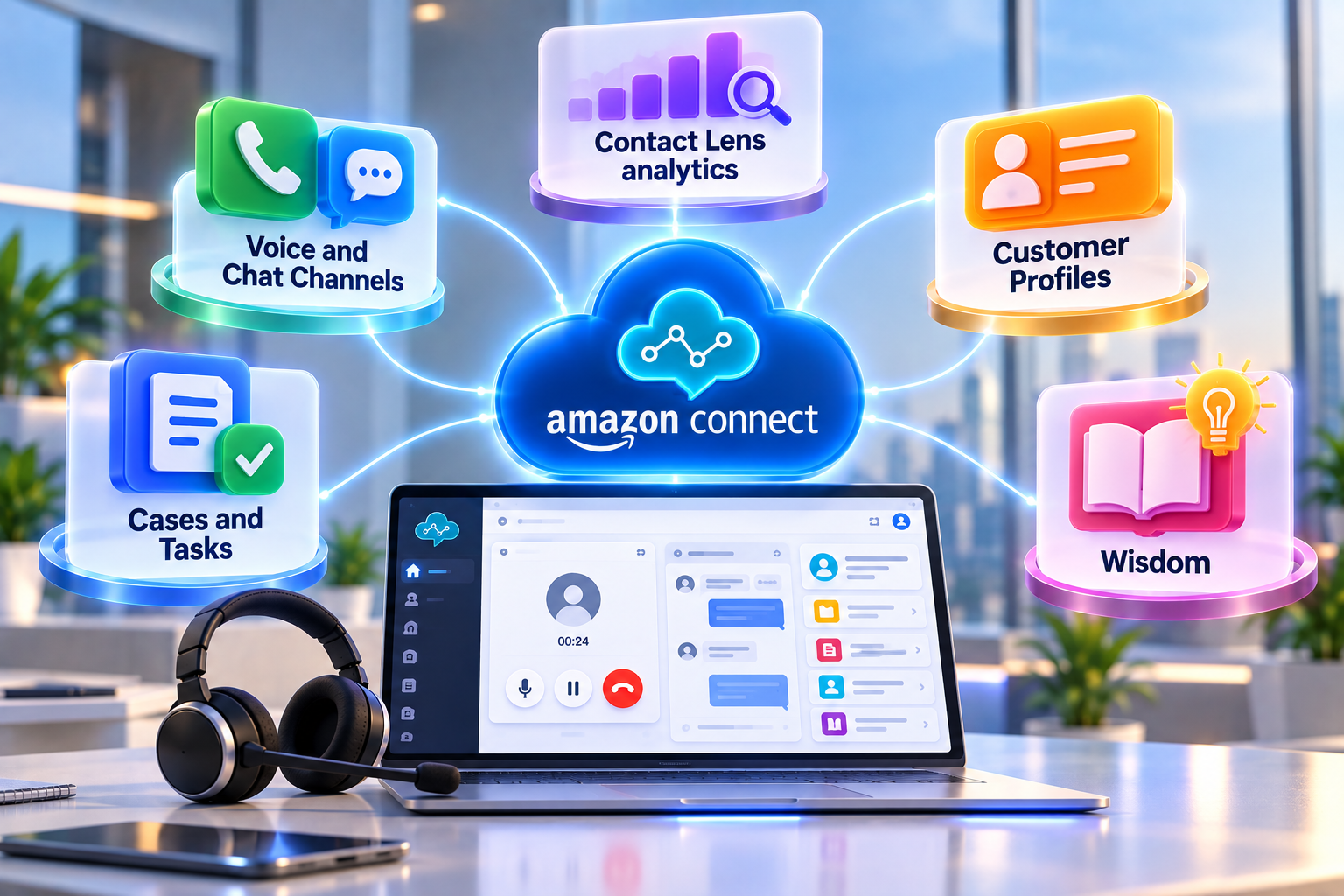
Voice and Chat Channels
Agents handle every channel in the same window, which cuts down on switching between screens.
Every screen switch costs a few seconds, and a few seconds add up over a full shift. With one window, agents keep their eyes on the customer, not on their tabs.
Contact Lens analytics
Most QA teams review fewer than 3% of calls by hand. That means most of what your customers say never gets heard. Contact Lens uses natural language processing to review all of them.
You get live transcripts, sentiment scores, and compliance checks. If a customer suddenly turns angry, a supervisor gets an alert before the call blows up into a formal complaint.
Customer Profiles
Agents lose a lot of time hunting for customer info across five windows. Customer Profiles pulls data from tools like Salesforce, Zendesk, and ServiceNow into one view. The feature also merges duplicate records. If someone calls from a new number but gives a known email, the system links the call to the right history. Customers hate repeating themselves. This ends that.
Cases and Tasks
Not every problem ends on the first call. Cases let agents track long, multi-step issues without leaving the CCP.
Say a customer emails a 50-page loan application. Connect creates a Task and routes it to an open loan officer, using the same logic that routes phone calls. Work stops sitting in a shared inbox waiting for someone to notice.
Wisdom
This began as a simple knowledge-base search tool. Today, Wisdom is the base for the generative AI features below. Think of it as the foundation under a house. You don't see much of it, but everything else stands on top.
Amazon Connect AI Features: Q in Connect and Agentic Capabilities
Buyers today want AI that does real work, not AI that makes a nice demo. AWS built the platform around that idea.
What Q in Connect Does
Amazon Q in Connect is an AI co-pilot for your human agents. The tool listens to live calls and chats. Q uses retrieval-augmented generation (RAG) to pull answers from your Amazon Bedrock knowledge bases.
So the agent doesn't dig through a PDF manual while the customer waits. The step-by-step answer shows up on screen. After the call, Q writes a summary of the issue, the actions taken, and what needs follow-up.
Q can also act. Through Bedrock AgentCore and the Model Context Protocol (MCP), AI agents can trigger actions in other systems. You write the rules in plain language.
A Gartner survey of 5,728 customers found 64% would prefer companies not use AI in customer service.
What It Doesn't Do
The AI is built for automation, knowledge lookup, and live guidance. Coaching stays a human job.
Contact Lens can score calls but has no deep workforce engagement tools. There are no long-term performance plans that track an agent over months. A score tells you a call went badly. A score can't sit down with an agent and help them get better.
What Still Needs a Third-Party Layer
This gap hit us. If you believe quality and coaching drive customer happiness, the native tools feel thin. AWS treats quality management as one module among many.
Most teams we know add outside software for coaching, advanced scheduling, and compliance audits. Many of those tools are on the AWS Marketplace. Budget for this from day one so the cost doesn't surprise you later.
Amazon Connect Pricing: A Worked Example
This is the part that made our finance team happy. No upfront fees, no seat licenses, no minimum volume, and no long-term lock-in.
You pay for what you use. Our finance lead used to ask one question every quarter: why are we paying for seats nobody uses? With Connect, that question goes away.
AWS has simplified pricing. Voice routing now comes bundled with the AI features (Contact Lens, Q in Connect, Lex bots, and agentic AI) at one flat rate of $0.038 per minute.
Costs scale in a straight line. Double the agents, and the bill doubles. Compare that with older CCaaS platforms, which often charge $150 to $250 per seat every month.
They charge that whether the agent takes one call or a hundred. One warning. The table doesn't show your other AWS bills. Call recordings and CTRs pile up in S3.
Kinesis streaming and Athena queries cost money too. At high volume, those costs add up, so someone needs to own them.
We learned that by finding a surprise on an invoice. Set up cost alerts early, and give one person the job of watching the bill.
Amazon Connect vs. Genesys vs. Five9 vs. Twilio Flex
The right pick depends mostly on your engineering muscle. Some platforms are finished products and others are toolkits.
Genesys is a polished, all-in-one product. You don't need a team of cloud architects. The price is recurring seat licenses. For a team that wants features this quarter, not next year, that trade can make sense.
Five9 is the benchmark for outbound predictive dialing, so sales teams love it. But government contractors and regulated healthcare firms often rule it out. The reasons are the missing FedRAMP authorization and long minimum contracts.
Twilio Flex is a blank canvas. Your developers build the whole agent screen in React. You get total control, and you also need a lot of developer time. Plan for a long rollout.
Amazon Connect has the same pay-as-you-go model and deep backend hooks as Twilio. But you also get a visual flow designer and a ready-made agent workspace, so you launch faster.
Amazon Connect Pros and Cons
Here's the honest version. Some of this we loved. Some of it cost us weekends.
Pros
No lock-in: Connect scales with demand. If support volume jumps, capacity increases automatically; when volume drops, costs can decrease without renegotiating contracts.
The AWS ecosystem: Connect integrates with Amazon Bedrock, DynamoDB, and Lambda. Teams already familiar with AWS can use tools they know without adopting an entirely new platform.
Fault tolerance: Amazon Connect Global Resiliency can help move calls and agent logins to a healthy second region during regional disruptions, supporting continuity when customers need assistance.
Cons
You build a lot yourself: Connect mainly handles call routing. CRM screen pops, custom analytics, and reports require your team to build and maintain them. It’s a toolkit, not a finished product.
You need cloud skills: Teams must handle JSON, IAM security policies, and serverless code. Traditional telecom teams may need training or additional expertise.
Reporting is basic: Built-in dashboards are not always enough. In-depth information is usually obtained by exporting data to S3 and creating BI dashboards using Athena and QuickSight.
How to Set Up Amazon Connect (Step by Step)
A basic instance takes minutes to create. A production-ready one takes real planning. Here's the order that worked for us.
- Create the instance: In the AWS console, create a new instance and pick your identity setup. Most teams use SAML 2.0 for single sign-on through Okta or Azure AD.
- Set up storage: The wizard creates S3 buckets for recordings, chat transcripts, and exports. Turn on encryption with AWS KMS right away. Call recordings hold private data, so lock them down from the start. IBM's 2026 report puts the global average cost of a data breach at $4.99 million, up 12% and a record high. Higher detection, escalation, and lost-business costs drove the rise.
- Claim phone numbers: Search for toll-free or local DID numbers. They're ready instantly.
- Build queues and routing profiles: Set your business hours. Create a queue for each support tier. Then assign agents to queues by skill.
- Build your contact flows: Drag blocks onto the canvas to play greetings, capture keypad input, and call Lambda functions. Keep each flow small and easy to read. Big tangled flows are hard to debug at midnight.
- Embed the workspace: For organizations utilizing deep call center integrations, the native Contact Control Panel is embedded directly into the daily workspace.
- Test hard before launch: Try edge cases. Force Lambda timeouts. Check that AI intent detection routes callers correctly and doesn't drop anyone.
Don't skip step 7. That's where we found our silent-call bug.
When Amazon Connect Is the Wrong Choice
Connect is a poor fit for a 15-person company that only wants a simple office phone system. Without cloud engineers or a managed service partner, IAM permissions and serverless functions can overwhelm a small IT team, and the time spent fighting the tool is time not spent helping customers.
Connect also struggles with lift-and-shift moves from an old PBX. The platform is built for customer experience, not internal office calling. Internal extension dialing and receptionist consoles don't work well here.
If your business won't change its old processes to fit an event-driven design, a packaged suite like Genesys or RingCentral is the smarter buy.
Want to see Amazon Connect working for your contact center? Book a demo.
FAQ’s About Amazon Connect
What is Amazon Connect used for?
Enterprises use Connect to run customer service, IT help desks, and outbound sales teams. The platform handles voice calls, web chat, and messaging in one place, while built-in AI automates routine tasks and supports live agents during conversations.
Does Amazon Connect replace a PBX?
Connect replaces the customer-facing parts of a PBX, including auto-attendants, call queues, and agent routing. Internal calling is a different matter, since the platform isn't built for dialing a coworker's four-digit extension. Most companies run their contact center on Connect and keep a tool like Teams or Zoom for internal calls.
How much does Amazon Connect cost?
Pricing follows usage. The AI-inclusive rate today is $0.038 per voice minute and $0.010 per chat message, with no upfront fees, seat licenses, or monthly minimums. Telecom fees for number rental and carrier minutes are billed separately, and they stay small.
Does Amazon Connect integrate with Salesforce?
Yes, through Salesforce Service Cloud Voice or the Amazon Connect CTI Adapter. Either option places the softphone inside Salesforce, creates Voice Call records automatically, and syncs live transcripts to the CRM.
What is the AWS Lambda timeout in Connect?
Synchronous calls get eight seconds, and the limit is hard. When a function runs longer, the flow drops into the error branch, and callers hear silence unless you plan for it.
How is Amazon Connect different from Twilio Flex?
Both platforms are cloud-native and scale well, but they demand very different amounts of work. Flex requires your developers to build the interface and routing logic in React and Node.js. Connect ships with a visual flow designer and a ready-made agent workspace, so your team writes less code.
What is Amazon Q in Connect?
Q in Connect is a generative AI assistant that listens to live customer conversations, identifies intent, and searches your knowledge base. Agents see suggested answers on screen, and Q writes the post-call summary, which cuts after-call work.
Does Amazon Connect require coding?
Not for basic setup, standard routing, or simple IVR, since the visual builder covers all three. Advanced work is different. Database lookups, CRM updates, and custom reports usually call for Python or Node.js running in Lambda.



.png)