

Call center shrinkage is the percentage of paid, scheduled hours your agents cannot take calls. This number decides if your staffing plan will actually work.
That said, the reality is that most centers run shrinkage above 30 percent!
Why? Well, most companies still schedule based on guesswork.
This is a gap where service levels fall short.
This guide covers the formula, the benchmarks, and how Thunai's AI closes that gap.
What is Call Center Shrinkage?
Call center shrinkage is the gap between the hours you pay for and the hours agents spend on customer calls. This typically refers to breaks, meetings, training, outages, and time off all cut into scheduled hours.
WFM teams often refer to this margin as a planning buffer. This buffer turns a theoretical Erlang C staffing number into a schedule that works. Erlang C assumes agents are always available. Real call centers do not work that way.
Take an eight-hour workday. Thirty minutes for lunch. Thirty minutes in training. Fifteen minutes fixing a frozen laptop.
That hour and fifteen minutes of paid time with no calls is shrinkage. This happens on every workday.

Why Shrinkage Matters in Workforce Management
Call center shrinkage, or even workforce shrinkage for that matter, is not a number you set once a year.
This number moves daily and by season. Get it wrong by even a few points, and your whole schedule falls apart, even if your call forecast is perfect.
Impact on service level and occupancy
Service level, occupancy, and shrinkage move together. Service level tracks how many calls you answer within your target, often 80 percent in 20 seconds. Occupancy tracks how much of an agent's time goes to active calls.
When shrinkage spikes without warning, fewer agents are left to cover the same call volume. Occupancy rises above a safe range. Push it above 85 to 90 percent for too long, and handle times stretch, errors rise, and service level falls.
Impact on cost, overstaffing, and understaffing
A 30 percent call center shrinkage rate does not mean hiring 30 percent more agents. This means scheduling roughly 43 percent more to hit your base number.
- Understaffing triggers SLA penalties, lost sales, and costly overtime.
- Overstaffing wastes payroll on idle agents. Over time, it also bores your best people until they quit, which raises recruiting and training costs again.
Types of Call Center Shrinkage
Treating call center shrinkage as one flat number does not help. Planners split it by where the time is lost, and by how predictable it is.
Internal vs external shrinkage
- Internal call center shrinkage happens while an agent is clocked in but not on a call. Huddles, coaching, training, outages, and admin work all count.
- External shrinkage happens before an agent even reaches the floor.
- Approved leave, holidays, sick days, tardiness, and no-shows all count. WFM teams put it simply: internal pulls you off the phones at work. External stops you from showing up at all.
Planned vs unplanned shrinkage
Planned call center shrinkage is scheduled weeks ahead. Training, breaks, and vacation all fall here. Planners slot it into slow periods to protect peak hours. Unplanned shrinkage is different.
- Outages, sudden sick calls, no-shows, and stretched breaks hit with no warning.
- This is the most damaging kind. Real-time compliance tracking exists for exactly this reason.
What Counts as Shrinkage? (common categories)
Breaks, lunch, meetings, training, coaching, after-call work, admin, absenteeism, sick leave, PTO, and system downtime.
Across a standard work year of about 2,080 scheduled hours per agent, these categories cut into it the most:
- Paid breaks and lunch: 8 to 12.5 percent, the single biggest recurring category.
- Training, initial and ongoing: 5 to 15 percent, heaviest after new-hire classes and launches.
- Annual leave and PTO: Around 5.8 percent.
- Team meetings and huddles: 3.8 to 5 percent.
- Public holidays: About 3.8 percent.
- Admin tasks: Around 2.5 percent.
- Sick leave and absenteeism: 2.3 to 12 percent, the least predictable line.
- Coaching and system downtime: Around 1.3 percent each.
After-call work is not clearly either/or. This work counts as handle time, not shrinkage.
But the moment agents stretch it out to dodge the next call, it becomes unauthorized call center shrinkage.
How to calculate call center shrinkage (formula)
Miscalculate this by three points, and every interval in your weekly schedule pays for it.
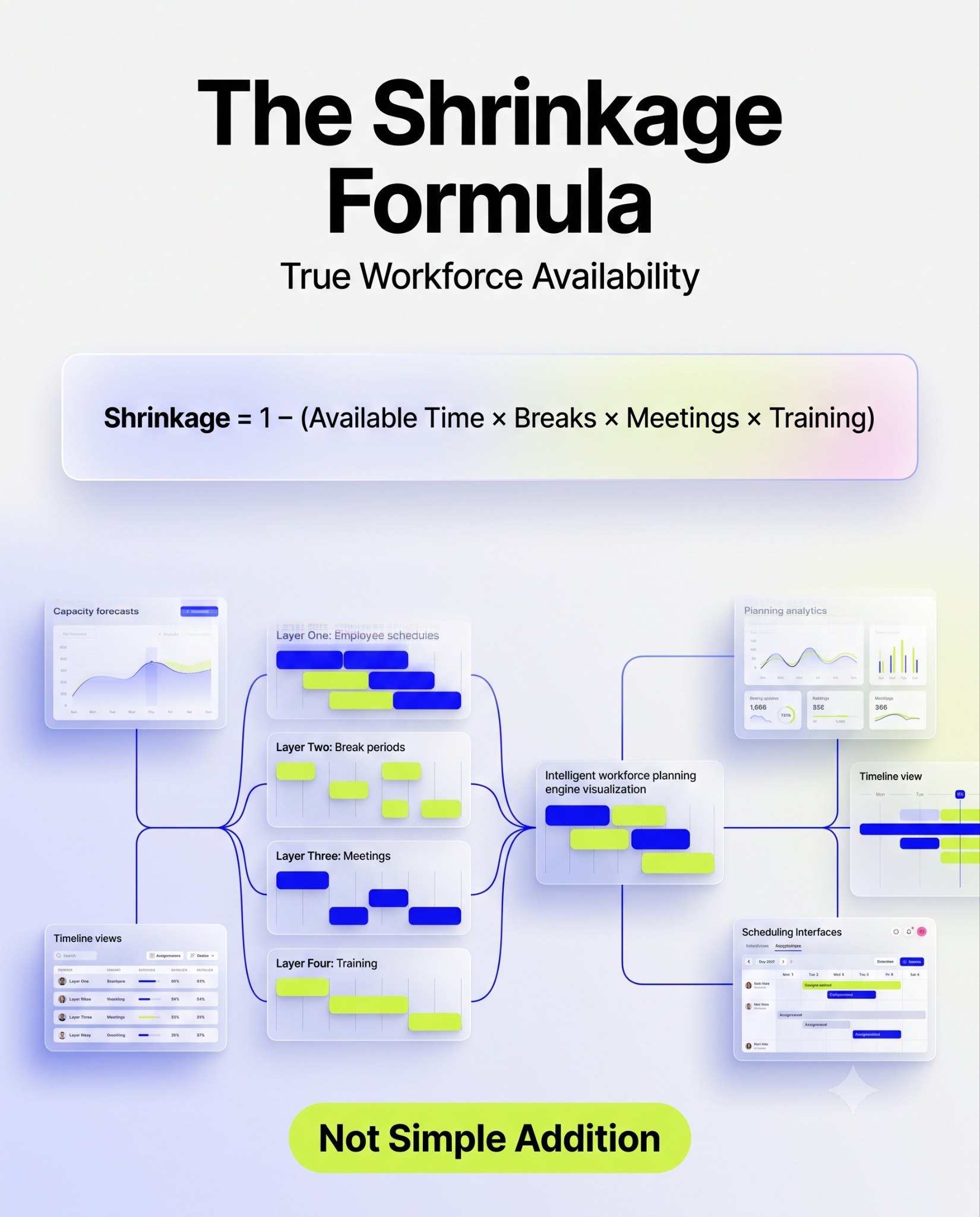
The standard formula divides total unproductive hours by total scheduled hours, times 100.
Simply adding category percentages seems easy. 10 plus 10 plus 5 plus 5 equals 30 percent. But this double-counts lost time.
An agent absent all day cannot also miss a meeting that same day. The multiplicative formula fixes this: 1 minus [(1 minus absence) times (1 minus breaks) times (1 minus meetings) times (1 minus training)].
On the same numbers, it gives 26.9 percent. On a large team, that gap is worth millions in payroll each year.
Worked example, step by step
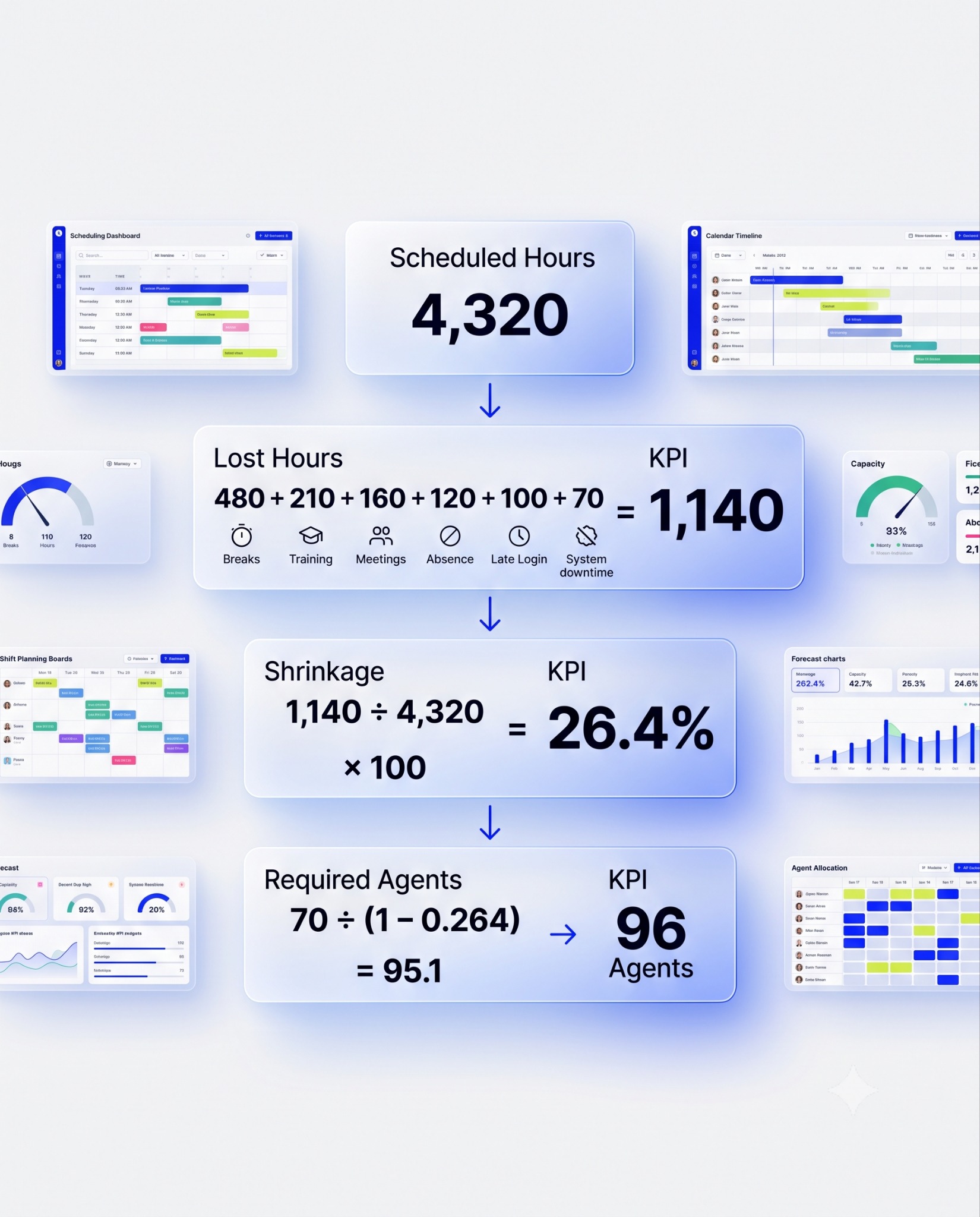
Picture a BPO center with 80 agents working 9-hour days, six days a week: 4,320 scheduled hours.
The compliance tracker logs 480 hours of breaks, 210 hours of absenteeism and sick leave, 160 hours of training, 120 hours of coaching and huddles, 100 hours of late log-ins, and 70 hours of system downtime. That is 1,140 unproductive hours in total.
1,140 divided by 4,320, times 100, equals 26.4 percent shrinkage.
Say an Erlang calculator says you need 70 agents live. Adding 26.4 percent gives you roughly 88 agents. That number is too low.
The correct move is to divide: 70 divided by (1 minus 0.264) equals 95.1. You need 96 agents scheduled to keep 70 active at any moment.
Daily vs interval shrinkage
A flat annual average hides the real pattern. Absenteeism spikes Mondays and Fridays. Coaching clusters mid-week. Training spikes hit hardest after new-hire classes.
Within a single day, the rate also swings sharply. A 9:00 to 9:30 slot might run 22 percent. The next slot, 9:30 to 10:00, is loaded with breaks and huddles and jumps to 36 percent.
Plan off a blended average, and you will understaff the exact interval that hurts the most.
What is a good shrinkage percentage? (benchmarks)
There is no single perfect number for call center shrinkage.
Local labor laws and industry complexity change what is possible. That said, the global average sits between 30 and 35 percent.
Numbers under 20 percent usually mean something is being measured wrong. They rarely mean the operation runs unusually well. Numbers above 40 percent signal a deeper problem worth auditing.
- Outbound sales: 25 to 30 percent.
- Inbound customer service: 30 to 35 percent, the standard baseline.
- Technical support: 32 to 38 percent, harder calls need more recovery time.
- Work-from-home and hybrid: 32 to 38 percent.
- Healthcare and financial services: 33 to 40 percent, due to compliance training.
Common causes of high call center shrinkage
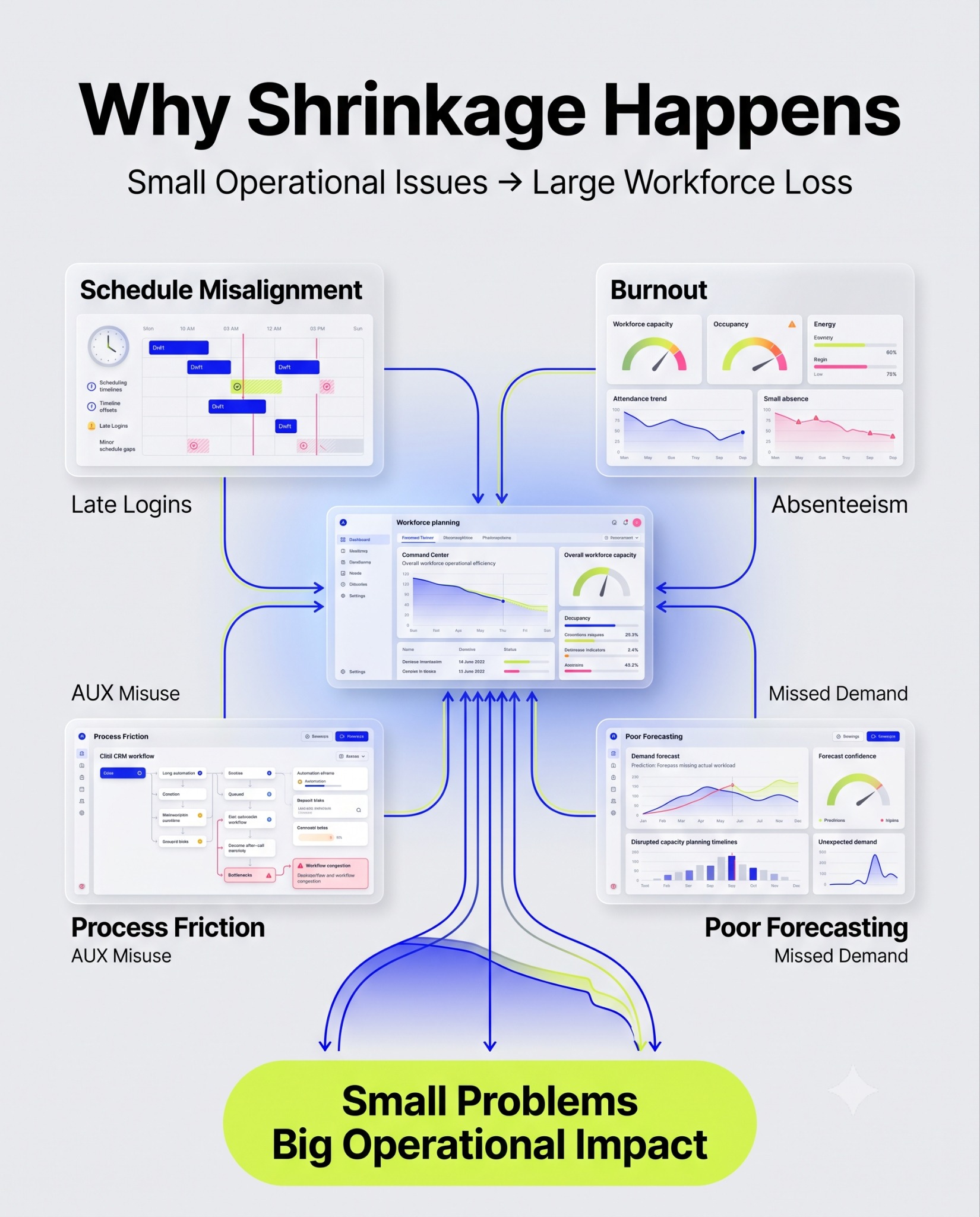
High call center shrinkage is rarely one big incident. Several small habits usually cause it.
- Schedule misalignment: Rigid schedules push agents toward logging in late or stretching breaks by a few minutes, and across hundreds of agents that adds up fast.
- Absenteeism linked to burnout: Pushing occupancy past 90 percent to cover spikes adds to agent fatigue, which shows up later as sick leave and turnover.
- AUX misuse and process delays: Clunky CRMs stretch after-call work, and without visibility, agents learn to hide in training or admin states to skip a hard call.
- Static forecasting: Ignoring seasonal spikes, flu season or a big launch, guarantees interval-level misses.
How to reduce call center shrinkage
Call center shrinkage cannot hit zero. Agents need breaks and training to stay sharp. The goal is to cut the part that is unnecessary.
Improve forecasting and scheduling accuracy
Move off manual spreadsheet math. Use algorithmic forecasting that accounts for seasonality down to the 15-minute interval.
Flexible scheduling options, such as split schedules and self-scheduling within set boundaries, close the gap between supply and real demand in terms of call center shrinkage.
Unapproved absences drop when agents get some say in their schedule.
Tackle absenteeism and schedule adherence
Set clear shrinkage targets, say 28 percent total, and hold supervisors accountable for them.
Use compliance analytics to catch chronic Monday and Friday patterns early. Pair that with wellness support.
The burnout behind an absence matters as much as the absence itself.
Streamline after-call work with automation
Manual after-call work, typing summaries, updating CRM fields, logging codes, is one of the most controllable losses of available time. Automate it, and you remove the time cost. You also remove the reason agents stretch wrap-up time to dodge the next call.
Optimize meeting, training, and coaching time
Batch meetings together, shorten them, and schedule them in your slowest windows instead of peak hours.
Cross-train agents across voice, chat, and email. That way, call center shrinkage due to slow voice queue means a move to digital work, not idle time.
Use WFM and real-time monitoring tools
Real-time compliance tools flag a long break or an idle agent the moment it happens. Supervisors can fix it on the floor instead of during a review days later.
The more advanced platforms auto-adjust training or give overtime when the instant call volume spikes.
How Using AI Helps Reduce Shrinkage
AI changes call center shrinkage management from reactive cleanup to active prevention.
- Smarter use of idle time: When volume dips and an agent has a few spare minutes, AI can push a short coaching snippet into that gap instead of letting it sit wasted.
- Compliance nudges: Instead of a supervisor scanning dashboards all day, AI monitors desktop and call states directly and sends a quiet prompt if an agent drifts into an unscheduled break, no confrontation needed.
- Deflecting simple contacts: Conversational AI resolves high-volume, low-complexity requests without a human, which lowers total scheduled hours needed and shrinks the dollar impact of the shrinkage multiplier along with it.
Frequently asked questions
What is the shrinkage formula?
Divide total unproductive hours by total scheduled hours, then multiply by 100. For more precision, use the multiplicative formula: 1 minus the product of (1 minus each rate). This avoids double-counting overlapping absences.
What is the average shrinkage in a call center?
Most centers run between 30 and 35 percent. Outbound sales sits closer to 25 percent. Healthcare and financial services can reach 40 percent because of mandatory compliance training.
What is the difference between shrinkage and occupancy?
Shrinkage measures time an agent is completely unavailable: on break, in a meeting, out sick. Occupancy measures how intensely they work during the time they are available.
How do you reduce unplanned shrinkage?
Deploy real-time compliance tracking. Give agents flexible self-scheduling. Forecast with burnout in mind. Use automated alerts that flag tardiness or extended breaks right away.
How Thunai Automation Reduces Shrinkage and Cuts After-Call Work
Thunai AI for contact centers fixes call center shrinkage by targeting the largest controllable share of internal shrinkage directly: after-call work.
- For teams on Microsoft Teams Phone, Genesys, Nice, or any other CCaaS, CX automation using AI voice agents in 240+ languages makes solving L1 support a whole lot easier with AI voice translation.
- Thunai Brain sits at the center of the platform, pulling data from more than 35 enterprise systems, CRMs, wikis, telephony, and policy documents that you add to the system. With a contradiction resolution engine, this also allows your team to spot and confirm any contradictory information in your system.
- Thunai MCP (Multi-Connect Protocol) also helps resolve conflicting pulling information across platforms and sources. But more importantly, pushes the accurate info back into your CRM or ticketing system automatically.
- With AI Meeting Assistant, Thunai also generates a structured summary on its own, capturing intent, resolution, sentiment, and next steps, which can be written into your account or straight into CRM or ERP tools like Salesforce or NetSuite. Cutting an average of 1.5 hours of your time spent updating CRMs everyday.
- Thunai Omni also audits 100 percent of voice and chat interactions automatically. This removes the need to pull agents off the floor for manual QA.
Book a demo with our team today!




.png)