
Ever asked your company's search bar a normal question and got back nothing useful? That was our starting point.
We assumed the AI model was the hard part: pick a good one, write solid prompts, done. It wasn't.
The real challenge lay outside of the model in getting clean data out of dirty systems, keeping it up to date, ensuring proper access control, and avoiding having the AI make guesses when it actually didn’t have any idea what it was doing.
We tackled it the hard way through building, breaking, and then fixing in front of live customers.
What Is AI Enterprise Search?
Old-school search tools look for matching words. If you type "Q3 revenue shortfall" but the document says third-quarter financial miss, a normal search may come up empty.
These tools do not know the two phrases mean the same thing. They only compare the words. We ran into this often in our early days. A customer would say, " The search just doesn't work," but half the time, the real problem was a wording mismatch.
Enterprise search through AI technology addresses this issue by analyzing the meaning, rather than the words used. This tool connects to other applications that a business uses, including chat, file-sharing, ticketing, and customer data applications.
It then converts this content into machine-readable information. If a user asks a question, the system looks up what the user is allowed to view. It then provides the user with accurate answers instead of listing all the possible links.
The shift changes how people use company knowledge. You don’t have to look for information through directories and guess the right keywords; rather, you can formulate a question just like you’d ask a co-worker the same thing.
The one-sentence definition
AI enterprise search connects a company's scattered information, understands it by meaning instead of just keywords, checks permissions, and gives employees a direct, cited answer to their question.
AI Enterprise Search vs. Traditional Enterprise Search
Early on, we used to run demos side by side, old search versus ours for skeptical IT teams. The gap was obvious every single time.
Old search hands you a list of documents and leaves you to do the reading. Ours reads them for you and gives you the answer directly, with a source attached so you can double-check it yourself.
What surprised me most, watching people use both, is how much time gets wasted just reading through irrelevant documents with old search.
How AI Enterprise Search Works, Step by Step
Here's the pipeline we built, piece by piece, and where each part kept breaking until we finally got it right. None of these steps are optional.
1. Connectors and continuous sync
The first job is plugging into every tool a company already uses. This sounds simple, but it's where we underestimated the work the most. You'd think connecting to a chat app or shared drive is solved, but it's not.
Early on, our connectors checked for updates too often and got blocked by the tools we were connecting to. And other times, our check was infrequent, and the AI would give a response based on outdated data.
Okta reports that the average number of applications each business has is 101 as of 2025, breaking through the barrier of 100 for the first time.
Finally, we switched to real-time update notifications whenever possible to get updates in real-time.We only used periodic checks when a tool offered nothing better.
2. Chunking and embedding
To begin understanding the document, the system will first need to divide the document into pieces and convert these pieces into some form of comparable meaning for the AI. This sounds mechanical, but it's where quality gets won or lost.
PDFs and slide decks were our worst offenders. Tables fell apart. Headers got mixed into body text. Formatting that made sense to a human became a mess for the AI. We had to build a dedicated extraction step to keep documents readable before the rest of the pipeline could work.
According to Gartner, organizations will be able to build 80% of their generative AI applications for business on top of their current data management platforms by 2028.
Otherwise, it will contaminate everything downstream from the beginning. No amount of intelligent AI will save a document that was created incorrectly in the first place.
3. Permission-aware indexing: index-time vs. search-time merge
This is the part that genuinely kept me up at night, more than anything else in the system. Here's the problem: if you search all of a company's information first and hide restricted content later, you can also lose good results.
If the top matches are in a restricted folder, the person gets nothing even when a permitted answer exists somewhere lower down. We called this "context starvation." Customers would ask, "I know this information exists, why can't I find it?"
IBM’s report shows that 63% of organizations lack governance policies to manage AI or prevent shadow AI risks, and 97% of AI-related breaches occurred where proper access controls were missing.
The fix is to check permissions before searching. The system only looks at information a person is allowed to see. We rebuilt this part of our system twice before we trusted it.
4. Hybrid retrieval: vector + keyword + re-ranking
Meaning search is highly efficient in terms of comprehension but surprisingly inefficient in terms of searching for exact items such as error codes, names, and IDs.
This was made apparent by the experience we had with a client who was unable to locate an invoice number due to meaning search rather than character search.
So the system runs keyword search alongside meaning-based search. It finds exact matches, then blends both result lists based on their rankings.
A final pass uses a more careful model to reorder the top results and place the best answer first. This adds a small delay, but the accuracy is worth it.
5. RAG grounding and citation
After finding the correct information, the system will give it to the AI and tell it to respond based on that information alone.
It becomes possible for each answer to have a citation that would verify its accuracy without the need to trust the AI blindly.
The abstinence method becomes the main way to prevent AI hallucination within companies by having the system acknowledge its lack of knowledge rather than creating financial or operational information.
Language models become very convincing even when they should not be. But this behavior earned customer trust over time. People forgive a system that admits its limits. They stop trusting one that makes things up.
6. Agentic retrieval: multi-hop queries
Simple search breaks down on harder questions that need information from two different systems.
For example, "Did our support issues from last quarter line up with what we promised in the customer contract?" That kind of question cannot be answered with a single lookup.
To handle this, we built the system to break a big question into smaller steps. It searches one system, reviews what it finds, then searches another before combining everything into one answer.
This is slower than a simple search, and it took trial and error to get the system to break questions apart properly. But it's the only way to answer real business questions instead of simple lookups.
Why AI Enterprise Search Fails in Production
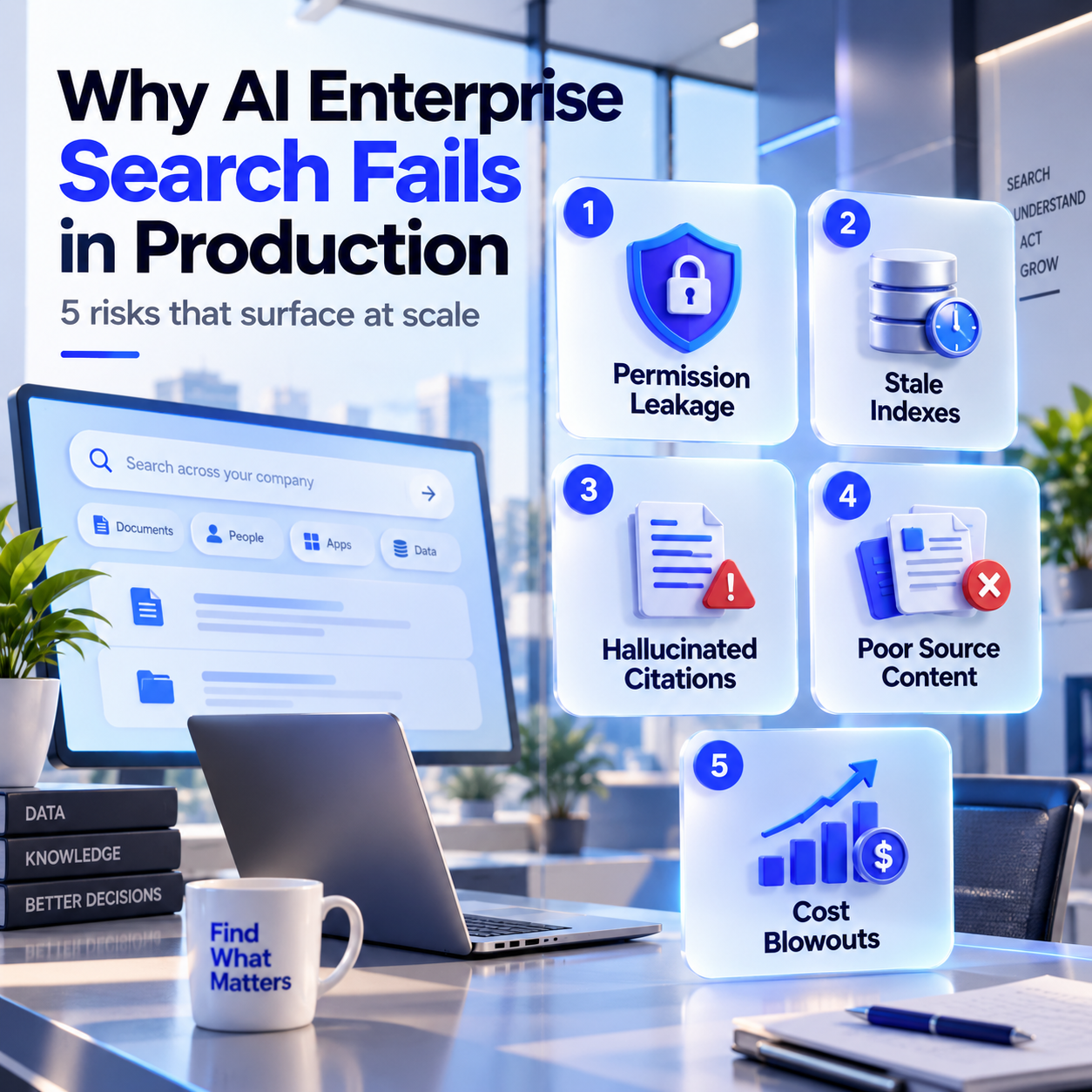
Permission leakage, stale indexes, hallucinated citations, low-quality source content, cost blowouts at scale
Every demo we ever gave looked perfect. We controlled the data, the questions, and the conditions. Here's what actually goes wrong once real companies with real, messy data start using the tool every day.
Permission leakage is the one that scares me the most. If the permission system and the search system ever drift out of sync even briefly, someone can end up seeing something they shouldn't. We treat catching this before it happens as the single most important thing we test before shipping anything new.
Stale indexes happen when the process that keeps information updated falls behind, maybe because a connector got temporarily blocked or a notification failed silently without anyone noticing. The AI then confidently answers using an outdated version of a policy or a document, and nobody realizes the problem until someone acts on the wrong information and it causes real confusion.
Hallucinated citations occur when the AI references an existing and authentic source as the citation, yet the content claimed by the AI is not mentioned anywhere in the source. The answer seems to be totally valid as the citation appears authentic. This issue is relatively difficult to detect, as everything about the answer appears to be correct at face value.
Low-quality source content is a problem we can't fully engineer our way around, no matter how good our system gets. If a company's own files are full of outdated drafts, half-finished notes, and conflicting versions of the same document, the AI will faithfully repeat that mess back with total confidence.
Cost blowouts happen because running this kind of system isn't cheap once real usage kicks in. The AI processing behind every single answer adds up fast, and companies are often genuinely surprised when their bill jumps significantly as more employees start actually relying on the tool day to day instead of just testing it occasionally.
Security and Governance Requirements
SOC 2, ISO 42001, GDPR, data residency, audit logging, PII redaction
Because this type of product affects everything that a business is aware of, the standards set for its safety are much higher than for other software products.
Here is what we had to be able to do correctly to even think about being taken seriously by big companies:
- SOC 2 shows that our underlying security measures and operational controls really do work when put to the test by third parties, as opposed to only working on paper.
- ISO 42001 is an emerging standard for addressing the specific risk management associated with AI technologies.
- GDPR and data requirements: Some clients mandate that their data remains physically located in a particular geographical area, influencing all of your fundamental decisions regarding how and where to store everything.
- Audit logging: we log everything that has been requested of us, the data that was retrieved from our system, as well as the answer that the system provided.
- PII redaction: Sensitive personal information gets scrubbed out before it's even processed by the AI, not cleaned up after the fact once it's already been seen.
None of this is optional if you actually want enterprise customers to trust you with their real, sensitive data.
Every one of these came from a real conversation with a customer who needed it before they'd sign anything.
What AI Enterprise Search Costs
Per-seat vs. consumption; indexing costs; TCO at 500 and 2,000 seats
Pricing in this space is confusing, and I don't think that's entirely an accident. Most vendors charge a fee per person, per month, and then add separate charges on top for the AI features themselves.
On top of that, there are setup costs, support costs, and the actual computing cost of running the AI behind the scenes, and that computing cost grows based on how much people actually use the tool, not simply how many seats a company purchased.
The honest advice I give anyone evaluating this kind of platform is don't just look at the sticker price per seat.
Ask directly what happens to the bill once your team is genuinely using the tool heavily, every day, not just poking at it during a trial.
That's where the real cost tends to show up, often much later than expected. Open-source, self-hosted options do exist, and they can be dramatically cheaper on paper, but you take on the ongoing work of running, maintaining, and updating everything yourself, which is its own real cost that's easy to underestimate.
Leading AI Enterprise Search Platforms
The market is currently divided between highly capitalized SaaS giants, modular open-source disruptors, and incumbent productivity suites retrofitting AI capabilities into their ecosystems. For organizations evaluating their options, cross-referencing capabilities against our broader guide to the best enterprise search software is critical for strategic alignment.
Brief comparison - Glean, Moveworks, Coveo, Onyx, Dust, Microsoft Copilot, Thunai
- Glean: Strong all-around search with a knowledge graph that maps how people, projects, and documents connect to one another. Easy to get running, but pricing is opaque, and it's aimed squarely at larger companies with bigger budgets. For a deeper competitive analysis, view our breakdown of Glean alternatives.
- Moveworks: Started as an IT support chatbot and has since expanded into search, and it can go a step further by actually taking actions, like provisioning software, directly from a chat conversation.
- Coveo: A more mature search firm that has added AI capabilities to its current search engine technology. It is particularly adept at customer-focused search, such as the type used by e-commerce websites.
- Onyx: Open source, it can integrate with multiple applications and is entirely self-hostable. Very well-suited for organizations that want to ensure their data never comes into contact with external servers.
- Dust.tt: Lets teams build their own specialized AI agents, each equipped with specific knowledge and specific tools. The pricing here is refreshingly clear and simple compared to most of the market.
- Microsoft Copilot: Embedded in the Microsoft 365 ecosystem itself, making it instantly recognizable to users who have already been using those services. Best suited to businesses that are already embedded in that ecosystem. Pricing for Microsoft 365 Copilot is set at $30.00 per month per user, yearly subscription.
- Thunai / GoSearch: GoSearch integrates seamlessly into Slack and Microsoft Teams, functioning as an LLM-agnostic agentic search layer without the prohibitive minimum contract values of legacy competitors. They represent the bleeding edge of the meta muse AI enterprise, emphasizing open model choice and deep workflow integrations over locked-in SaaS boundaries.
See how permission-safe AI search works on your own data. Book a demo.
FAQs About AI Enterprise Search
What is AI enterprise search?
AI enterprise search replaces keyword search with real understanding. It connects to a company's internal tools. It turns that content into something the AI can reason about. Then it answers employee questions directly, instead of just handing back a list of links to click through.
Is Microsoft Copilot an enterprise search tool?
Yes. Copilot Search does more than write text inside Office apps. It indexes a company's internal data. It can also pull in information from many outside tools. This makes it a full search layer across the whole organization.
How does hybrid search differ from vector search?
Vector search is great at understanding what you're really asking. But it can miss exact things, like part numbers or specific codes. Hybrid search fixes this. It runs a meaning-based search and a keyword search side by side. Then it combines both results. You get understanding and precision at the same time.
Why do naive RAG pipelines fail in enterprise environments?
They skip the hard parts. They don't check permissions before searching. They don't re-check result quality afterward. They don't keep data in sync with its source. Skip these steps, and you get leaked information, outdated answers, or confidently wrong summaries.
How much does a typical Glean deployment cost?
It's priced per person, per month. Extra charges get added for AI features. Most plans also require a minimum overall spend. This makes it a better fit for larger companies with bigger budgets.
Can an open-source tool like Onyx replace SaaS search?
Yes, if your team can run and maintain it. Onyx connects to many tools and can be fully self-hosted. Some industries need that level of data control. You skip per-seat license fees. In exchange, you take on the maintenance work yourself.
How do systems prevent permission leakage?
They check what a person can see before the search even starts. This way, the search never looks at content that person isn't allowed to view.
Does AI enterprise search prevent hallucinations?
It cuts them down a lot, but not to zero. The AI only uses information it actually retrieved from company documents. Every claim needs a citation. And it's trained to say "I don't know" when it really doesn't know. These are the main defenses we rely on.



.png)