
In 2026 major brands around the world were forced to face the fire of their consumers because of a lack of support amid an unexpected rise in tickets.
AI based customer support systems have now become a tool for enterprises to automate routine tasks, improve efficiency, and provide quick service to customers.
Let's see through it in more detail in our guide.
Kapture CX vs Thunai — What Each Platform Is Built to Do
Kapture CX is designed as an enterprise grade customer experience management platform built on a relational database layer. The platform pulls customer communications from email, live chat, social media, and voice calls, placing them into a structured console so human agents have a clear timeline of customer history.
It acts as a reliable, centralized system of record that guides agents through pre-set workflows and tracks service requests across physical and digital environments.
Thunai handles this problem from an entirely different angle which is operating an enterprise AI orchestration platform powered by an event driven second Brain. Instead of organizing tickets for human review, Thunai unifies unstructured company data taken from PDFs and training videos to live call audio and databases and turns them into autonomous digital workers.
This architectural difference is why Thunai vs Kapture CX isn't just a simple feature matchup, it's a choice between two completely different technologies.
Thunai does not rely on static scripts, it uses a knowledge first setup that actively cross references information and automatically resolves tasks across more than fifty business systems.
Let’s see some platform differences below:
Where Kapture CX Performs Well (And Where It Hits a Ceiling)
- In any unbiased Thunai vs Kapture CX evaluation, we have to recognize that Kapture CX delivers solid value for structured, physical world processes.
- For companies that handle field operations, warranty repairs, and physical service dispatching, Kapture CX offers specialized capabilities with impressive feature like sub ticketing systems.
- This tool lets the customer agent create multiple separate sub tickets from the original one that can be sent to various backend departments such as billing or warehousing and acts as an intermediary that ensures there are no communication problems, and the process is handled effectively without any lack of information.
- Additionally, the TCO of Kapture CX is smaller than the TCO (Total cost of ownership) of advanced programs like SAP or Salesforce, which says that the former software is very flexible and easy to customize as your company grows.
- The drawback of this system comes when you try to go beyond simple ticket routing and implement automated problem solving.
- Due to being designed for traditional batch processing, Kapture CX is inherently reactive and cannot perform complex actions on external databases independently.
- When ticket volume spikes, this reactive setup becomes a clear bottleneck, showing a primary difference in how Thunai vs Kapture CX manage scale.

Interface Friction, Reporting Gaps, and Scaling Limits
This brings us to a major pain point in the Thunai vs Kapture CX : interface friction and slow dashboards under heavy loads.
- Real world usage highlights distinct technical limitations in Kapture CX. Verified reviews on G2 and TechJockey show that during busy periods, users frequently face slow performance, lagging pages, and long reload times just to close out a ticket.
- A user named Navneet noted that "The only downside i would like to mention is that some times it takes very long time to reload or to close any ticket. " which directly hurts agent productivity when queue volumes are high.
- There are also notable gaps in reporting and analytics. Managers have pointed out that Kapture CX's dashboards can become messy and hard to read during high volume periods.
- Ken L.CEO , rated only 1 star and said “Managing customer data and tracking sales”.
- Users on G2 have backed this up, noting that some dashboards show incorrect numbers or delayed metrics when they need immediate data.
- Many customer support leaders reviewing Thunai vs Kapture CX complain about the lack of real time search inside the ticketing workspace. Kapture CX's global search only allows agents to look up cases using exact ticket IDs. If an agent needs to find a past ticket using a keyword or broad context, the system fails to surface it.
- Additionally, custom integration requests can be slow and setting up third party systems or integrating Kapture CX with legacy backend engines, such as Wings ERP, can involve complex manual development and long delay times.
How Thunai Closes the Gaps Kapture CX Leaves Behind
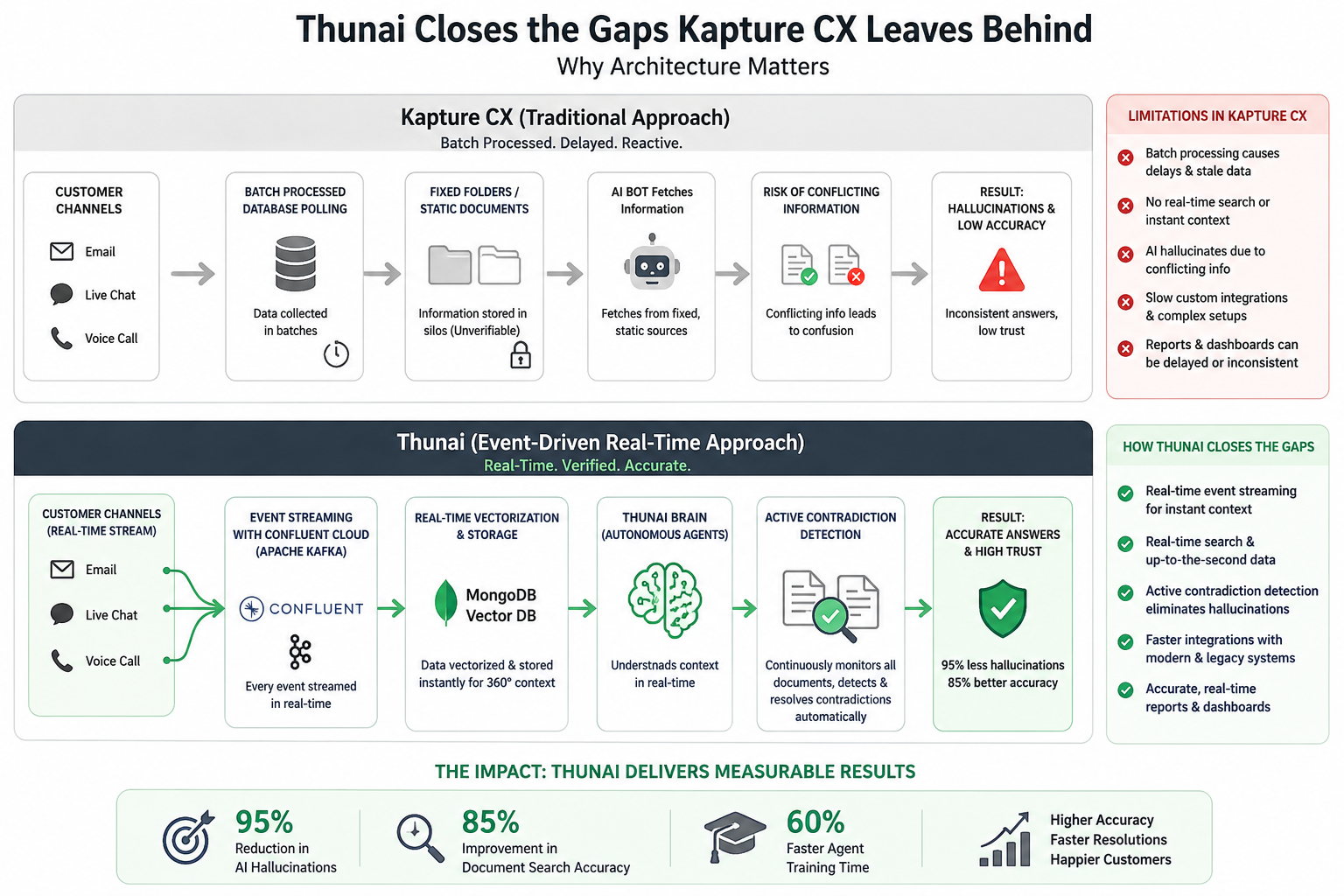
Let's analyze how the Thunai vs Kapture CX changes when you shift to an event driven architecture.
- Rather than using batch processed database polling, Thunai is built on Confluent Cloud and Apache Kafka. This means every customer email, live chat message, and voice call audio is streamed into the platform in real time.
- The data is immediately vectorized and stored in MongoDB Vector DB, allowing Thunai’s autonomous agents to react to events up to the second context.
- This real time streaming capability enables Thunai’s standout feature: active contradiction detection.
- Usually, in conventional systems, the AI bot fetches information from fixed unverifiable folders. In case there is a marketing brochure saying that the warranty period for the product is two weeks while another official document mentions the same product having a one month warranty period, the ordinary bot gets confused and hallucinates an answer.
- The Thunai Brain overcomes this problem by consistently monitoring all connected document folders for conflicting information and rectifying it before anyone else encounters it.
- This active verification layer reduces AI hallucinations by 95% and increases document retrieval accuracy by 85%, which represents a major technical milestone in the Thunai vs Kapture CX conversation.
Thunai Brain, Omni, and Co-Pilot — Built for What Legacy Platforms Miss
Comparing the core tools of Thunai vs Kapture CX, we find that Thunai operates as a cohesive, self learning ecosystem split into three highly advanced operational modules :
Thunai Brain:
Thunai Brain serves as your secure, self learning knowledge graph. By using its Multi-Connect Protocol (MCP), it connects to tools like SharePoint, Google Drive, Jira, and Salesforce with two way sync. It also uses strict data isolation to keep sensitive customer information secure.
Key benefits:
- Builds a centralized platform that learns on its own
- Provides access to precise information using integrated services
- Protects confidential and important client data.
Thunai Omni:
Thunai Omni controls all customer support related queries. Omni manages Level 1 tickets for voice, chat, and email support with an autonomy rate of 70% to 80%. Thunai omnichannel offers speech to speech translation with thunai multilingual with more than 150 languages with less than 100ms latency. Additionally, it monitors customer sentiment and notifies human managers when the customer is upset.
Key benefits:
- Handles up to 70 to 80% of routine client inquiries automatically
- Works with voice, chat, and email communication in more than 150 languages
- Understands emotions and handles escalated cases right away.
Thunai Sidekick (Real-Time Agent Assist):
This is a dedicated co-pilot for human agents during complex calls. Sidekick listens to the conversation in real time, automatically pulling up policy guidelines and previous customer history on the agent’s screen so they never have to put callers on hold. It also auto generates summaries and updates the CRM, completely eliminating manual after call work (ACW).
Key benefits:
- Offers live suggestions to agents when chatting with customers
- Automatically records calls and updates CRMs
- Decreases processing time.
This is why the real world execution of Thunai vs Kapture CX favors a proactive, learning model. Users are sharing incredibly positive feedback about these exact capabilities.
Furthermore,Yuvaraj M highlighted in G2 that the platform "genuinely reduces our daily load" and "neatly pulls everything together and gives us clear summaries, action points, and quick drafts whenever we need them".
These technical advantages lead to massive operational improvements. When Neuberg Diagnostics deployed Thunai, they saw a 95% reduction in AI hallucinations, an 85% improvement in document search accuracy, and cut their agent training times down by 60%.
Head to Head: How Both Platforms Stack Up on What Actually Matters
For calculating the instant financial benefit of Thunai vs Kapture CX, one needs to consider the direct costs and resolution rates. For calculating the ROI of transitioning from human led processes to autonomous solutions, the following graphical representation will be useful:
- This infographic explains how AI automation improves customer support savings and efficiency using two formulas.
- The first formula calculates yearly financial savings based on ticket volume, autonomous resolution rate, and the cost difference between human and AI support.
- With only 15% automation, Kapture CX saves about $101,700 annually, while Thunai’s 80% autonomous resolution generates nearly $440,700 in savings.
- The second formula measures overall support efficiency using automation rate, handover rate, semantic accuracy, and average handling time.
- By reducing manual handoffs and speeding up resolutions, Thunai achieves higher efficiency, lower operational costs, and better customer support performance.
How to Choose Between Them
When you analyze both Thunai and Kapture CX, it depends on your main objective. Both products are designed to address totally different issues.
Choose Kapture CX if:
- If your primary requirement is a highly customizable customer relationship management (CRM) database and ticketing system of record.
- If your team manages physical, real world service operations that require technician route tracking and dispatching tools.
- This scenario clearly favors Kapture CX if your Thunai vs Kapture CX strategy prioritizes human to human workflows and routing sub tickets across physical departments over end to end AI resolution.
- If you have the internal engineering resources to spend several months customizing a cost effective ticketing workspace.
Choose Thunai if:
- Choose Thunai if your goal is to maximize immediate deflection and handle Level 1 customer support autonomously.
- If your company's knowledge is scattered across different systems like Confluence, SharePoint, and Google Drive and requires a single, verified truth then thunai is your choice.
- If your customer service relies heavily on phone calls, requiring real time translation and sub 100ms voice agent latency.
- If you want to eliminate after call work and to reduce manual work by giving human agents instant, on screen guidance during complex live calls.
- If you need a secure, compliant AI system that integrates with your existing contact center software in under two days with zero code.
See how Thunai helps your team resolve customer issues faster and scale operations more efficiently. Book your demo now.
FAQs
What makes Thunai different from legacy search and automation platforms?
Thunai is different because it does not use search methods like other solutions. Thunai uses a kind of technology with Apache Kafka that is fast and always on. This means that it can look at the information and take action away. Thunai gets information from what customers and businesses are doing and puts it into the Thunai Brain.
How does the Thunai Brain minimize AI hallucinations?
The Thunai Brain is like a map of knowledge that is always getting better. Thunai checks the information again and again and to make sure it is correct. This helps Thunai not give information. The Thunai Brain stops up to 95 percent of information from happening.
Does Thunai offer pricing models scalable for growing enterprise workloads?
Yes, Thunai has pricing plans that can grow with companies. It also has options like more artificial intelligence power, storage and user licenses that can be used by as many people as needed.
What are the main integration and performance limitations of Kapture CX?
Some problems with Kapture CX are that it can be slow to load and it can take a time to show information. It can also have trouble working with systems when it is very busy.
How does Thunai Sidekick help human support agents during live customer calls?
Thunai Sidekick is like a helper for people who talk to customers on the phone. Thunai Sidekick gives them ideas and information about the customer. It also gives them information about what the company's rules are. After the phone call is over Thunai Sidekick gives a summary of what happened during the call. Thunai Sidekick is like a partner that helps people who talk to customers on the phone.