
Is your AI chatbot excellent at answering questions but structurally incapable of resolving a ticket?
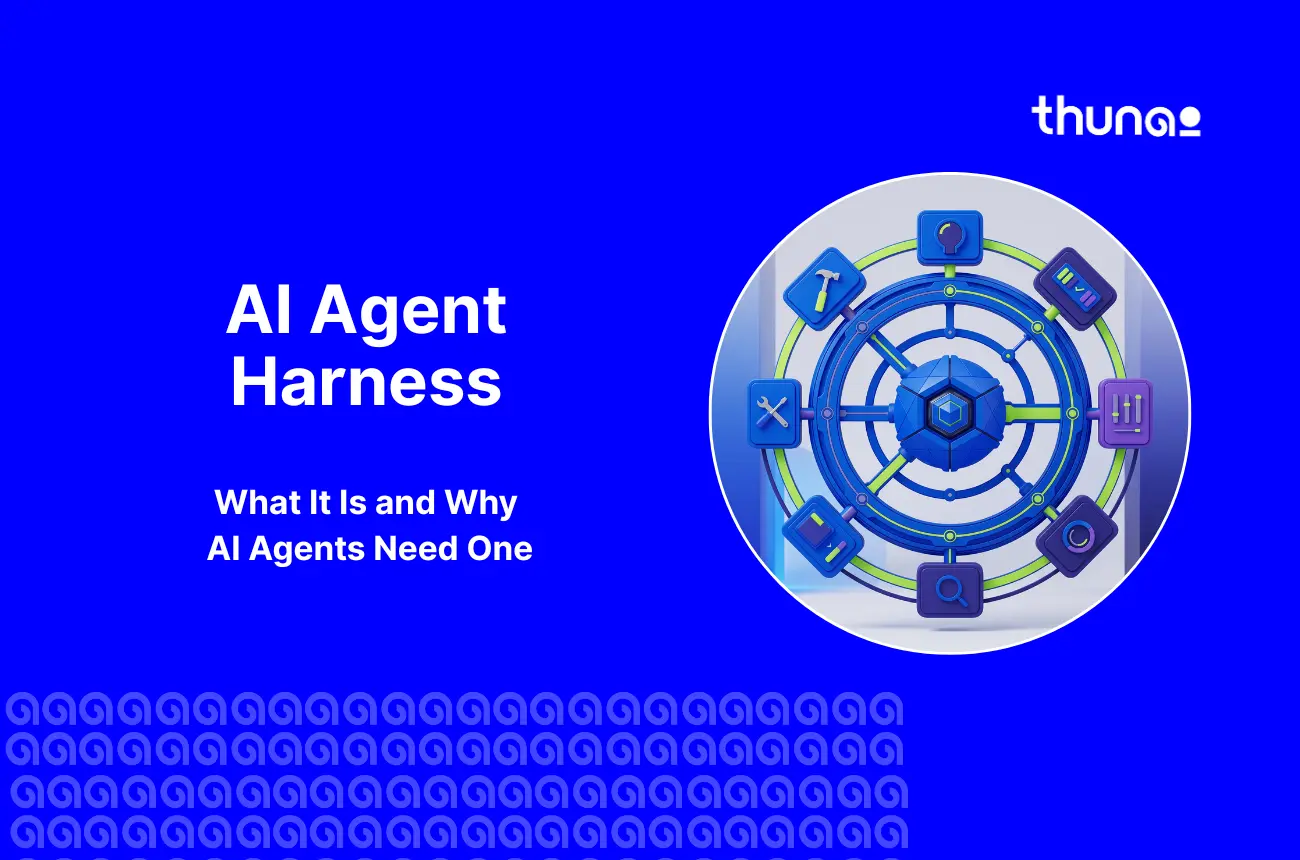
The issue here is not a model problem but an infrastructure problem, and the fix to that definitely has a name - an AI agent harness
In this article, we will cover what an AI agent harness is, how it differs from a raw LLM, how its execution loop works…
What Is an AI Agent Harness?
An AI agent harness is the software layer that runs around a large language model. The harness turns that model into a working, reliable, and bounded agent.
Architects often describe the relationship with a simple equation. The agent equals the model plus the AI agent harness.
Where the model handles the thinking, reads language, and reasons through tasks. However, the harness handles everything else.
It also supplies the execution loop, stored memory, a safe place to run code, tool connections, and the limits that stop the model from taking damaging actions.
This split matters more than it used to. Stanford HAI reports that 78% of organizations now use AI in at least one business function.
AI Agent vs. LLM
The difference between a raw LLM and a managed agent is the exact reason an AI agent harness is needed in production.
- A standalone LLM: This is a text-prediction engine and nothing more. The model keeps no record between API calls. The model cannot run the code it writes. The model cannot query a database or reach an outside system.
- An AI agent: This uses the LLM only as a reasoning engine. The agent works toward a goal over a longer period. The agent breaks a request into smaller tasks, plans an order for them, and adjusts based on what each step returns.
Because LLMs work on probability, they are prone to a failure called control-flow hallucination.
The model assumes a step succeeded before the check has actually run. Sometimes the model gets distracted by a small error and drops the main task completely.
A harness reduces that risk by applying fixed rules over a model that guesses. The harness tracks state.
What Does an AI Agent Harness Do?
The harness carries a defined set of duties. Engineers often group them under the ETCLOVG taxonomy, set out in research on diagnosing and repairing harness flaws.
That stands for Execution, Tooling, Context, Lifecycle, Observability, Verification, and Governance.
Why Do AI Agents Need a Harness?
Support is where a missing AI agent harness becomes clear asset to customers and users.
- LLMs Cannot Execute Multi-Step Tasks Alone: Real support work spans separate systems. An order lookup means matching front-end payment records against back-end fulfillment logs. A refund means checking return policy against purchase history, account value, and current standing. A raw model cannot run these stateful loops.
- Agents Need an Execution Loop: Business systems fail in ordinary ways. APIs time out. Rate limits trigger. Permissions get denied. The harness supplies the loop that catches these events. The harness retries with a growing delay. The harness then feeds the failure back to the model with instructions on how to pivot.
- From AI Responses to Real-World Actions: The core idea is a boundary. When a model decides a refund is due, the model never touches the payment gateway. The model sends a JSON payload asking for a refund tool. The harness catches that bv vrequest. The harness checks session permissions. The harness adds the API keys, which stay hidden from the model. The harness then runs the transaction in a sealed environment and returns the receipt ID.
How Does an AI Agent Harness Work?
AI agent harness traces one user’s or customer interaction through the loop, making the mechanics clear through the steps below:
- Understand the User’s Request: The harness receives the inbound message. The harness adds conversation context, the confirmed customer profile, and history from earlier sessions. The customer does not repeat information already given.
- Retrieve Knowledge and Context: Before the model plans anything, the harness runs Retrieval-Augmented Generation pipelines. The harness queries vector databases for standard operating procedures, product documents, and account limits. The harness then compacts older turns to prevent context rot.
- Plan and Select the Next Action: With that context in the prompt, the model reasons. The model reviews the tools the harness has exposed. The model then plans an order of steps. The model decides whether this is a simple lookup or a workflow across several business systems.
- Execute Tools and Enterprise Systems: The harness takes over the actual execution. The harness calls CRMs, help desk software, order management platforms, and ERP databases. More and more, the Model Context Protocol handles this step. MCP removes the fragile, custom-coded integrations that slowed earlier projects.
- Verify the Result: This function is not optional. The harness catches the HTTP response. The harness checks for a 200 OK. The harness confirms whether the ticket updated and whether the gateway processed the refund. If the action failed, the model gets prompted to recover.
- Respond, Escalate or Continue: Based on checked results, the model picks the next state. The model can loop again, answer the customer, or hand off. If confidence falls below a set threshold, the harness triggers a human handoff and passes the full task logs.
What Are the Essential Components of an AI Agent Harness?
A production-grade harness is modular. Several parts work together.
- Agent Runtime and Execution Loop: This is the core engine. The runtime manages the cycle of reasoning, acting, and observing. The runtime also keeps tasks alive when they take minutes or hours. Newer harnesses avoid the LLM-as-orchestrator flaw, where models lose track of deep loops. The harness now owns the fixed control flow itself.
- Context and Memory: Large language models have no lasting memory. The harness fills that gap. The harness tracks session state across turns. The harness uses semantic memory and compaction to summarize older data, store it, and pull it back only when needed.
- Tools, APIs and MCP: The tooling layer defines what the agent can actually do. The Model Context Protocol is an open standard built by Anthropic and hosted by the Linux Foundation. MCP has changed this component. Over 10,000 public MCP servers were available as of early 2026. One gateway can now handle OAuth 2.0 authentication, pass data to the CRM, and pull policies from the knowledge base.
- Workflow Orchestration: For complex cases, one large agent is not enough. The harness splits the task into parts. The harness then spawns sub-agents. One sub-agent may handle SQL retrieval. Another may handle brand tone. The harness manages the handoffs between them.
- Guardrails and Human Approval: The harness manages permissions, access scopes, and policy controls. High-risk actions such as large refunds sit behind human approval. The system pauses. The system alerts a supervisor. The system waits for a decision.
What Makes a Customer Support Agent Harness Reliable?
Moving past a fragile demo takes real hardening. Reliability comes from the harness, not the model.
- Reliable Tool Execution: A strong harness catches invalid tool calls caused by formatting errors. The harness corrects them where possible. Developer communities also point to a pattern called code mode. Instead of exposing hundreds of tools, the harness lets the model write a short script in a sealed environment. Token use drops sharply as a result.
- Reliable Context and Memory: In a long interaction, a customer may change topic, ask follow-ups, or contradict earlier details. The harness keeps context accurate across dozens of turns. The harness refreshes key data against the source of truth. The model then never acts on a state that was true at the start and wrong by the end.
- Verification Before Responding: An agent must never confirm a refund just because the model produced that intent. The harness forces a wait until the payment system returns a positive confirmation. This rule protects customer trust and keeps the business compliant.
- Observability and Agent Tracing: When an agent makes a poor decision, QA teams need to know why. Every reasoning step, token count, tool payload, and latency figure gets recorded permanently. Teams can then find which layer caused the error and fix the prompt or the tool schema.
AI Agent Harness vs. Agent Framework vs. AI Support Platform
The terms in this space change quickly. Separating the layers matters for buying decisions.
AI Agent Harness
The harness is the runtime environment. The harness is the live infrastructure that runs and controls the agent in production.
The harness manages loops, protects credentials, opens sealed environments, and runs tools. This is the deployment engine.
Agent Framework
A framework is a library or developer toolkit with the building blocks inside. Brief examples include LangGraph, LangChain, the OpenAI Agents SDK, the Microsoft Agent Framework, and CrewAI. A framework sets how an agent is structured in code. A harness sets how that agent runs safely at scale.
AI Support Platform
An AI support platform, such as Thunai, is the full application layer. The platform uses a harness as its engine but hides the complexity from the business user.
CX leaders can then deploy agentic support without hiring machine learning engineers.
How AI Agent Harnesses Automate Customer Support
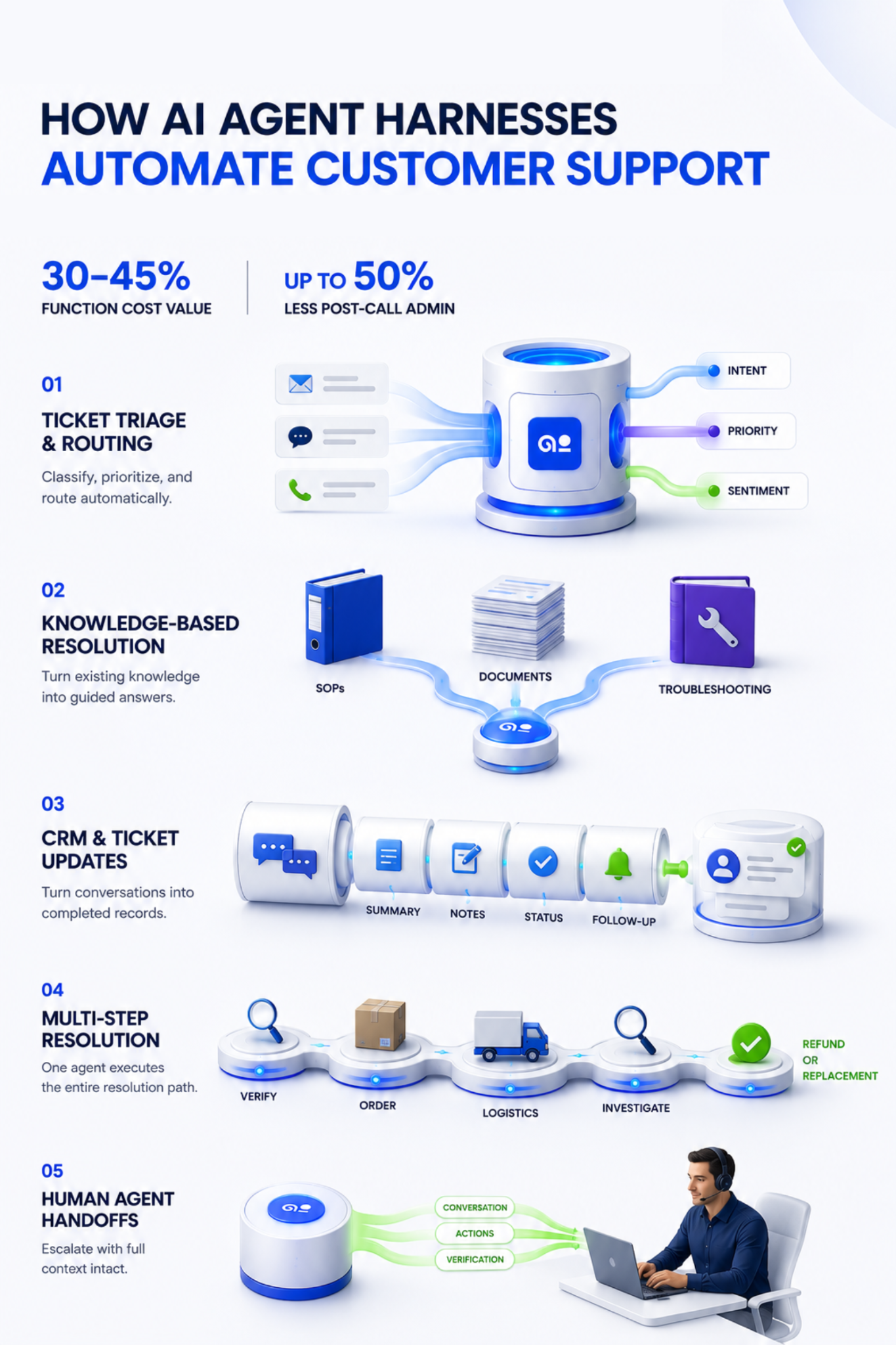
McKinsey estimates that generative AI in customer care can deliver value worth 30 to 45 percent of current function costs. In telecom, AI is cutting post-call admin work by up to 50%.
1. Ticket Triage and Routing
The agent classifies the intent. The agent sets priority using customer tier, urgency, and sentiment.
The agent then routes the ticket to the right workflow or the right specialist team. Manual triage time drops. First response speeds up.
2. Knowledge-Based Resolution
Some questions need no backend change. Here the harness lets the agent pull standard operating procedures and give step-by-step troubleshooting.
The agent gathers details from separate documents. Complex repeat issues close without human research time.
3. CRM and Ticket Updates
Human agents spend real minutes on wrap-up. The AI agent updates records instead.
The agent summarizes the interaction, adds notes, changes ticket status, and creates follow-up tasks.
4. Complex Multi-Step Resolution
Consider a failed delivery. A basic chatbot gives a tracking link. A harnessed agent runs a full path:
- Confirms the customer securely.
- Pulls order details from the commerce backend.
- Queries the logistics API for proof of delivery.
- Works out that the package was lost in transit.
- Logs the investigation on the ticket.
- Creates a replacement or a refund per business rules.
- Sends the customer the confirmed outcome.
5. Human Agent Handoffs
Some cases need approval. Others hit a confidence drop. The harness escalates right away.
The harness passes the whole conversation, every completed API action, and the verification record. The customer does not repeat themselves.
How to Build an AI Agent Harness for Customer Support
Building a harness means moving from prompt writing to system design. Data from Databricks shows that companies with strong evaluation tooling put nearly seven times more AI projects into production.
Companies that prioritize governance deploy twelve times more.
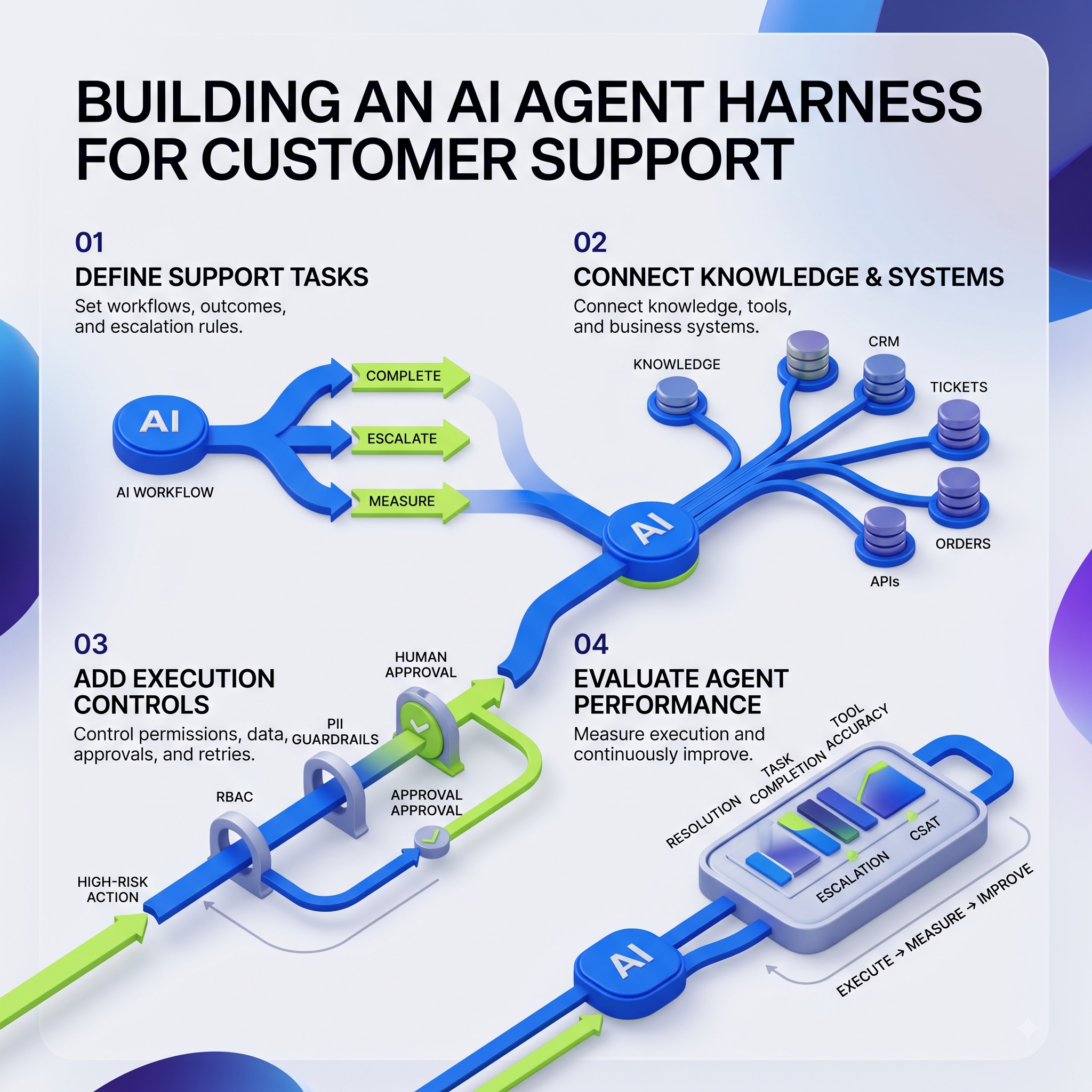
- Define Support Tasks and Outcomes: Decide which workflows the agent can close on its own. Decide which actions need escalation. Decide what counts as a successful resolution. These answers become the check steps you build into the harness.
- Connect Knowledge, Tools and Business Systems: The harness needs wiring to the knowledge base, CRM, ticketing software, order systems, and outside APIs. An MCP server setup avoids custom integration code for every single endpoint.
- Add Execution Controls: Add RBAC permissions. Add guardrails against PII generation. Add human approval for high-risk actions. Retry rules must be hardcoded so the agent never fails silently.
- Evaluate Agent Performance: Track resolution rates, task completion, tool-call accuracy, escalation rates, and CSAT. Capture the agent paths. Run automated evaluations against the execution logs. That loop gives steady improvement.
What Should You Look for in an AI Agent Harness?
Whether you buy a platform or build the layer yourself, some capabilities are not optional.
- Essential capabilities: Deep context and memory management to stop reasoning decay over long chats. Advanced tool calling with native MCP support. Workflow orchestration for sub-agent routing. Observability tracing for failure analysis. Enforced guardrails, human handoff protocols, and automated evaluation frameworks.
- Customer support requirements: True omnichannel coverage across voice, chat, email, and SMS. Real-time agent assist, so the AI can support a human worker instead of replacing one. Two-way CRM sync. Integration with older ticketing systems. Fast knowledge retrieval and the ability to trigger backend workflows.
The Future of AI Agent Harnesses in Customer Support
The main difference in the next decade will be from giving information to completing work.
Support is moving away from pointing a customer to a help article. Support is moving toward finishing the task and confirming the outcome.
- The future also depends on coordinated multi-agent systems rather than one all-purpose AI. Gartner predicts that by 2028, 33% of enterprise software applications will include agentic AI.
- Gartner also expects 60% of brands to use agentic AI for one-to-one interactions by then. IBM research adds that 64% of AI budgets now go to core business functions rather than test projects.
- Gartner further predicts that agentic AI will resolve 80% of common customer service issues on its own by 2029, with a 30% cut in operating costs. That result depends on the harness, not the model.
Using Thunai AI for CX Automation In Place of AI Agent Harnesses
Building a harness from scratch is a serious engineering program. Most support teams do not need to run one.
Thunai is a next-generation Agentic AI Platform that supplies the harness layer as a finished product, built for customer experience teams.
How Thunai Replaces a Custom Harness Build:
- Human-Like AI Agents: Deploy AI voice, chat, and email agents in minutes using Thunai Omni. These agents take the query first and answer from your knowledge base. Escalation happens only when the issue stays unresolved.
- A Centralized Knowledge Hub: The Thunai Brain is a self-learning knowledge layer. The layer processes scattered company data from documents, videos, and databases into one source of truth for AI agents and human agents alike.
- AI Agents with Screen Share: AI voice agents can walk a customer through a process on screen. Support becomes far more interactive.
- Intelligence Dashboards: Get live visibility into agent activity, status, escalations, and issues resolved. You get the observability layer without the tracing build.
- Jira Service Desk Automation: Automate service tickets and Jira tickets with voice and email agents. Support teams get faster turnaround on every request.
- 100% Quality Assurance on Calls: Automated call audits and AI call scoring deliver summaries, sentiment analysis, and performance metrics on every call, not a sampled few.
- Multilingual Global Reach: Support for over 150 languages. One system then covers a global user base.
Get your free Thunai demo today and put a governed agent harness behind your support operation this week.
Frequently Asked Questions About AI Agent Harnesses
What Is the Difference Between an Agent Harness and an Agent Framework?
A framework is a developer toolkit. A framework supplies the building blocks used to write the agent logic, and examples include LangGraph, LangChain, and CrewAI. A harness is the runtime environment that runs that agent safely in production. The framework sets how the agent is structured. The harness sets how the agent runs.
Can an Agent Harness Connect to CRM and Ticketing Systems?
Yes, and that is one of the main functions. The harness makes API calls to CRMs, help desk platforms, order management systems, and ERP databases. The Model Context Protocol has made this much easier. One standard gateway can handle authentication and data access across many systems at once.
What Is the Difference Between an AI Agent and an AI Chatbot?
A chatbot is passive. A chatbot maps a question to a pre-written article and cannot change the state of the business. An AI agent does actual work. The agent pulls customer context, checks live statuses, takes action, verifies the result, updates the ticketing system, and only then replies with confirmed information.