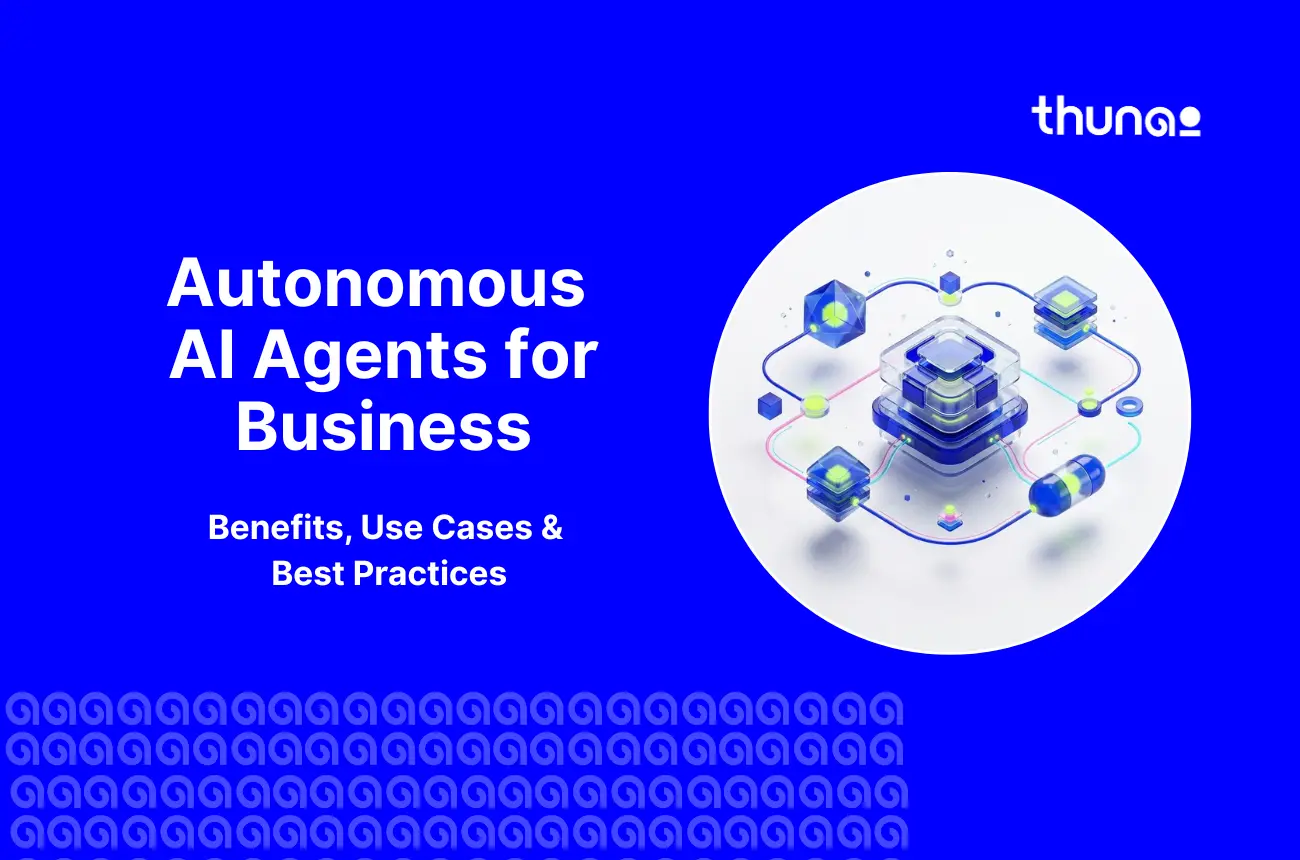

Business-based autonomous AI agents are software solutions that work toward accomplishing a specified objective on their own. They understand what is asked of them, come up with step-by-step plans, access corporate data, use application programming interfaces (APIs), and escalate to human intervention only when there is risk or an unusual case.
Vendors now report agents resolving up to 83% of customer queries without a human after launch.
And with the buzz around AI, chances are you’ve heard only similar things.
That’s why this guide covers the benefits, use cases, operating process, and deployment best practices you need to get there safely.
What Are Autonomous AI Agents?
An autonomous AI agent is when an LLM runs its own process and tool usage in order to accomplish a company’s goal.
These are the enterprise version of agentic AI, the larger class of goal-oriented technologies that learn and correct themselves. They are based on generative AI but go far beyond text generation.
How autonomous AI agents for business differ from traditional AI assistants
Unlike an AI assistant, autonomous AI agents for businesses don’t wait for you to prompt them.
They take action using training data and give you the response or completed task, which you can verify or allow to run automatically.
AI agents act autonomously across many iterations or steps. If you give an agent a high-level goal, it will:
- Plan: Divide the goal into tasks without any further instructions from you.
- Act: Use external APIs and manipulate the state of your systems.
- Adapt: Change course according to each API call response without requiring your intervention.
Autonomous AI Agents vs. Chatbots vs. RPA
Conversational AI chatbots operate with pre-scripted dialogues and rely heavily on keyword matching. When a query goes beyond the script, they fail.
RPA executes hardcoded scripts via interfaces or APIs. Any slight modification in a target system causes an instant failure of the automation process.
Agents use LLM reasoning to read unstructured data, handle undocumented exceptions, and find another path to resolution. No developer has to rewrite a logic tree first.
The Differences Between Autonomous AI Agents and Traditional AI Assistants for Businesses
Control of the execution process itself. In the general case of the generative process setup, the LLM will only follow pre-specified code paths made by engineers. But autonomous AI agents for business can act independently.
The business-based autonomous agents will check their toolset, decide whether they need to use a particular tool, set appropriate parameters, execute the tool, evaluate the outcome, and decide what to do next.
Capability negotiations are managed using protocols such as Model Context Protocol (MCP).
Anthropic's engineering guidance draws the same line between workflows and agents.
Autonomous AI Agents vs. Chatbots vs. RPA vs. AI Assistants Compared
How Do Autonomous AI Agents Work? A 7-Step Process
Automated agents will not execute a fixed set of API calls - Automated agents typically execute a loop.
The loop inputs data, takes action, and verifies the output. That is the process of the loop, broken down into the following steps:
Step 1. Receive a business goal and identify the desired outcome
Every AI agent workflow begins with a trigger. This can be something like an email sent by a client, a message from the system, or just an instruction.
This then gets processed or understood by the LLM to decide what you want to get done.
- Scope and Constraints: The Agent sets the limits of its operation, the mistakes to be avoided, and required permissions.
- Success Criteria: The AI agent then decides when it would be considered successful, e.g. "Refund granted and ticket closed".
Step 2. Retrieve business context from enterprise data or knowledge base
An AI agent without context takes unneeded steps or jumps to conclusions about how to fix and answer questions.
For reliable automation, AI needs to pull information from your existing knowledge base.
Which is exactly why strong enterprise knowledge management decides how accurate this step is.
- RAG: RAG asks questions of connected databases, CRM data, and business documentation in order to provide answers based on the real information rather than training data.
- Agent Memory: MCP provides these sources through stateless JSON-RPC requests, thus isolating each context server from the entire discussion.
Step 3. Split the goal into smaller tasks and create an action plan
Now, the agent formulates a plan from the goal by breaking it down to sub-goals that are easy to perform.
This process is known as multi-step reasoning, where the goal is divided into tasks, sequenced and dependencies are determined.
- Chained Prompting: The tasks are done in succession and the output of one task serves as the input for the next decision.
- Parallelization: Independent tasks can be done simultaneously. Multi-Agent Systems allow a coordinating agent to delegate sub-tasks to appropriate sub-agents.
Step 4. Select tools and decide which actions to take
Next, the agent maps its plan to real tools. Through function calling, it checks which APIs are registered and authorized for this task.
- Parameter Staging: It reads each tool's schema and builds the right payload. Error-proofed tools stop syntax mistakes before they happen.
- Permission Checks: It selects only tools its role allows. Application permissions decide what is possible, not the model's confidence.
Step 5. Complete tasks across connected business applications
This is where the work is performed, and tasks are completed. Workflow automation is essential to make sure that plans are actually put into action.
- Cross-Application Actions: The agent creates tickets, updates fields in the CRM system, initiates refunds, and records notes in one go.
- Workflow Orchestration: The request will flow from the host application to the external server, where it runs in its own security zone.
Step 6. Look at the results and handle exceptions
There are no sure-fire guarantees for an API call. An agent should have some sort of feedback mechanism that can detect any errors before a user does.
- Output Validation: The grader or evaluative sub-agent tests each output for the expected result.
- Retry and Planning: In case of a timeout or error, the agent will retry or come up with a different plan.
- Escalation: If it fails, it stops the process and delegates the task to a human being.
Step 7. Verify task completion and report the outcome
The loop ends only when the goal is verified, not when the last call returns.
- Audit Trails: The agent logs the full trace of its reasoning and actions, then reports the final task status.
- Approval Where Required: Under human-in-the-loop (HITL) rules, a person signs off before high-risk tasks close. Success metrics are recorded for later review.
What Are the Benefits of Autonomous AI Agents for Business?
The benefits of using autonomous AI agents in business go beyond easier work. Here are six benefits operations leaders see first:
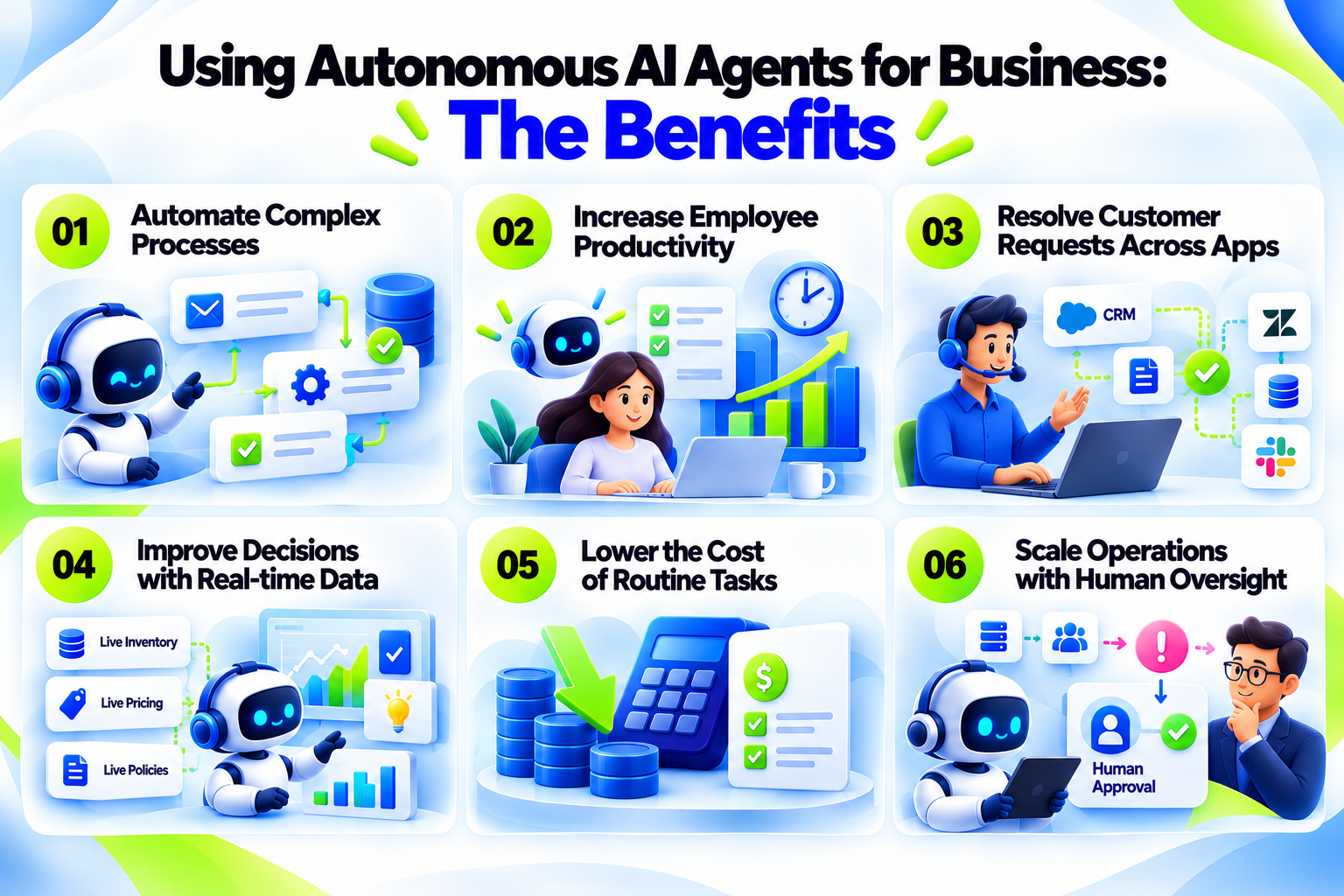
1. Automate complex processes beyond rule-based workflows
Workflows based on rules start falling apart when a single customer requests in an email requires three items.
In case of agents utilizing multi-step reasoning, the email will be broken down into tasks that will be processed separately throughout your backend systems.
There is no need for a predefined decision tree. This is how we get intelligent process automation, not business process automation (BPA) that tries to reinvent itself.
2. Increase employee productivity and reduce workload
Using AI agents helps with solving high-volume, low-complexity work from your team.
By default, the productivity baseline at Microsoft awards six minutes of productivity saved per reference or tool usage by the agent.
This adds up to hours that can be reclaimed for your team each day, and turns productivity from a deck slide into a number that can be measured.
3. Resolve customer requests across multiple apps - ecosystems
Autonomous AI agents for business end swivel-chair work. A single AI agent will be able to look at a policy, authenticate an identity token, and then update the CRM all in one go.
According to Salesforce, its platform handles 83% of cases without human intervention post-implementation.
Consider this a benchmark. On the whole, your goal is to cut down waiting time because there is no need for more tab surfing or switching.
4. Improve decisions with business context and real-time data
Models that exist on their own learn from data that is static in nature. On the other hand, agents using the RAG framework make decisions using live inventory, live pricing, and live policies.
This decreases the probability of making bad decisions. And better yet, every decision has a source to verify.
5. Lower the cost of routine business tasks
The Agent Assisted Value for Microsoft is set at $72 per productive hour saved, which makes it easier to determine the cost savings per transaction.
According to another study conducted by Salesforce with 3,500 clients, there are IT savings of up to 25 percent from CRM automation.
Both numbers serve as directional ROI guidelines, while the performance of your company's KPIs should be measured. Both numbers do not separate the agent's work from the benefits delivered by the entire platform.
6. Increase operations while maintaining human oversight
Emergency hiring will become more and more a thing of the past because during peak hours of the holiday season or the tax deadline period, you do not hire people; you can increase your compute.
Approvals help make sure that people (NOT AI) stay in charge of risky decisions. This is because people, through regulations such as the EU AI Act, should make such decisions.
Autonomous AI Agent Use Cases Across Business Functions
AI Agents help a lot when one task requires using many apps. Here’s how that looks across seven teams:
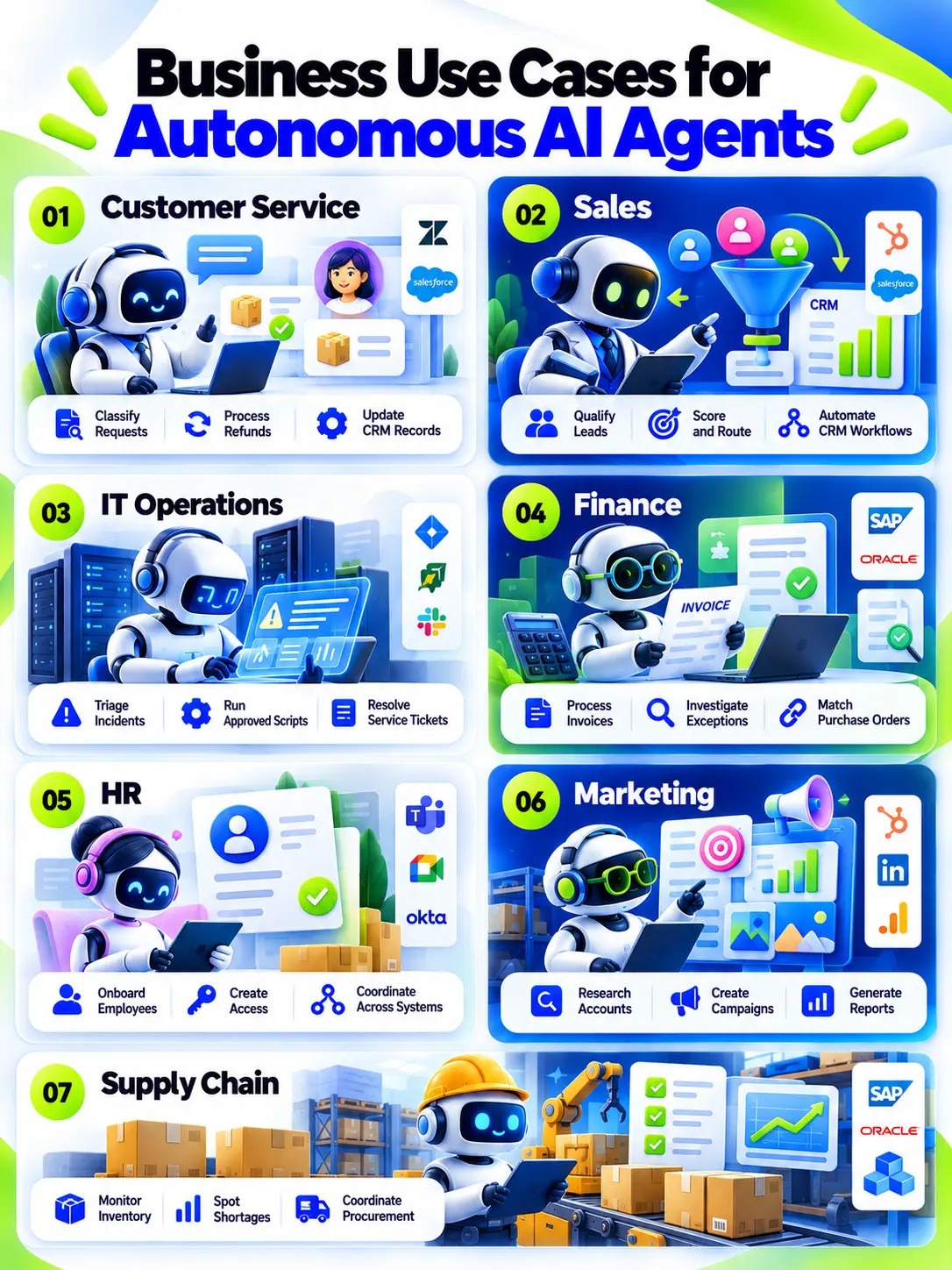
I. Customer Service: Resolve Requests and Update CRM Records
Your queue grows faster than your headcount. Agents take the routine load.
This can begin with a ticket, or a chat can start the process. The agent pulls account history, order data, and policy through RAG.
Your autonomous agent classifies the request, then uses APIs to issue the refund, update the CRM, and reply.
When doing this, refunds above a set limit can go to an agent for approval. Some companies like Wiley report a 40% increase in case resolution over an outdated legacy chatbot.
II. Sales: Qualify Leads and Automate CRM Workflows
As anyone in sales knows, slow follow-up kills good leads. But to solve this, autonomous AI agents for businesses can respond in minutes. This can start with:
- A new inbound lead triggers your autonomous AI agent. The AI agent then checks contact details against market databases and past conversion data.
- The AI agent workflow then scores the lead, routes it to the right rep, and creates the CRM update and first follow-up.
- In this process, human sales reps are the ones that in the end own pricing and contracts. Adecco runs agents around the clock for first candidate contact, so recruiters focus on high-value conversations.
III. IT Operations: Triage Incidents and Resolve Service Desk Tickets
Take, for example, customer support engineers who lose hours to repeated tickets. Using autonomous AI agents for business, you can clear the routine ones first - so they only handle the tough ones.
The workflow for this could look like:
- A system alert or ticket is created that initiates the process. The autonomous AI agent matches error logs against historical documentation.
- The AI then rates severity, runs approved scripts like server restarts or cache clears, and updates the ITSM ticket.
- With this, the non-typical anomalies and production changes go to engineers so that they can solve them the right way. But most of all, if you track time to resolution and tickets closed, your overall CSAT or ticket resolution rate will be higher.
IV. Finance: Process Invoices and Investigate Payment Exceptions
A lot of the time, Invoices raised pile up in inboxes but go unprocessed or are skipped. TO handle this, autonomous AI agents in finance can find them before month-end does and process them. This could look like:
- A vendor raises an invoice for a product, service, or tool subscription. The agent reads it and matches line items against ERP purchase orders.
- The AI agent then flags discrepancies, investigates the payment exception, and drafts the vendor query.
- In the end, payment approval still requires a human, but the overall process is improved. 1-800Accountant reports a 70% resolution rate.
V. HR: Automate Employee Onboarding and Internal Requests
Onboarding spans HR, IT, and payroll. That is why it falls apart.
- Something like a signed offer letter starts your workflow. Your AI agent here can retrieve the role, start date, and access policy.
- AI agents coordinate identity access, payroll registration, and hardware provisioning across each system.
- Sensitive access needs manager approval. For instance, companies like SmartRent report $300,000 and 120 hours saved after removing manual onboarding tasks.
VI. Marketing: Research Accounts and Prepare Campaign Reports
Account research eats the hours meant for strategy. Agents do it in parallel.
- A campaign brief or account list starts the run. Worker agents scan target websites and CRM engagement data.
- The orchestrator drafts personalized copy, translates it, and assembles the campaign report.
- A marketer approves before anything is sent. Measure prep time saved and reports delivered per week.
VII. Supply Chain: Monitor Inventory and Coordinate Procurement
Shortages show up in vendor emails long before they show up in dashboards.
- A low-stock signal or vendor message initiates your AI agent. The agent reads inventory data, supplier updates, and weather patterns.
- The autonomous agent spots the shortage and calls reorder APIs in your ERP.
- Large purchase orders need buyer sign-off. For instance, AstraZeneca uses Amazon Bedrock Agents across R&D and supply data.
Autonomous AI Agents in Action: An End-to-End Business Workflow
But all said and done, theory only goes so far!
Here’s one example from start to finish: an IT service agent handling a password-reset request.
1. The trigger: A business request enters the system
An employee writes in the chat window, “I cannot log in to the finance portal; I require access immediately.”
On receiving this message, the AI agent analyzes the message and understands the intent: it is a high-priority password reset.
A form is not required, and neither is a ticket category. Your employee explains the issue in clear terms, so your AI agent can begin to sort it out.
2. Context retrieval: The agent gathers records and relevant policies
The agent validates the identity of the provider using the live MCP connection and also validates the identity token of the employee.
The agent simultaneously looks up the security policy for the finance portal within the knowledge base and also confirms that the employee has the necessary access rights. Nothing happens until both validations succeed.
3. Planning: The agent determines the next actions
With identity verified, the agent uses multi-step reasoning to build a strict sequence:
- Send a multi-factor authentication (MFA) challenge to the employee's phone.
- Run the reset tool through the API.
- Update the ITSM ticket to show the resolution.
Each action is staged before it runs, so the agent never improvises a step it was not allowed to take.
4. Execution: The agent updates connected applications
Your AI agent then issues an elicitation request before executing an action that requires the confirmation of MFA push from the employee.
Once the MFA is successful, it negotiates the needed capability and executes the reset_password on the targeted system.
Each step remains within the permission boundary. In this, the employee is involved in the process for verification.
5. Exception handling: The agent requests approval or escalates
In case of failure in the process of MFA, or in case the person does not have access to the finance portal, the tool execution is stopped immediately.
Any failure like this is escalated to a human IT security administrator along with all the necessary information about the failed attempt (This is so they can do the needful based on their experience and SOPs).
6. Verification: The agent confirms the outcome and records completion
After a successful API response, the agent sets the ServiceNow or Jira ticket to Closed.
Your AI agent then logs the full execution trace for audit, tells the employee access is restored, and ends the session. Auditors can replay every decision later.
Best Practices for Deploying Autonomous AI Agents
Most agent projects fail on governance, not technology. These six practices keep yours on track:
1. Select workflows with clear goals and measurable outcomes
Start where success is easy to measure. Record cycle time, error rate, and cost per transaction before the agent goes live.
Without a baseline, you cannot prove ROI. Favor structured problems over open-ended, subjective tasks.
2. Set autonomy levels, approval gates, and escalation rules
Full autonomy has no place in mission-critical work. Let the agent act alone on low-risk tasks, ask first on medium-risk ones, and pause for human-in-the-loop (HITL) approval on high-risk actions like large payments.
Article 14 of the EU AI Act calls for human oversight of high-risk systems.
3. Apply least-privilege access and protect sensitive business data
Excessive agency (OWASP LLM08) happens when an agent holds write permissions it does not need.
Use identity and access management to scope each agent to narrow, role-based tools. Filter RAG results by user permissions to stop sensitive data leaks.
4. Test for prompt injection, incorrect actions, and unexpected inputs
Prompt injection tricks a model into overriding its instructions. Red-team before launch with 20 to 50 adversarial edge-case tasks.
Filter inputs by context and use a separate evaluator LLM to check output. Align your AI risk management with NIST AI 600-1.
5. Monitor task success, tool-call errors, latency, and cost per task
Reasoning models use tokens dynamically, so costs can spike without warning.
Microsoft Copilot Studio disables custom agents once usage passes 125% of prepaid capacity. Good observability turns that into a dashboard alert instead of an outage.
6. Expand deployment based on verified business results
Roll out in stages. Begin with internal users, such as your IT service desk, before opening customer-facing channels.
Add tools only after the agent holds to its guardrails and scores well in evaluation. Let verified results decide the next step.
Autonomous AI Agent Deployment and Evaluation Framework
How to Choose an Autonomous AI Agent Platform
Use this six-point checklist before you sign on with an autonomous A agent vendor:
Look into autonomous task execution and workflow orchestration
Ask one question: does the platform reason dynamically, or does it just run predefined dialogue flows? Look for orchestrator-worker support, where a primary LLM splits a big task and hands pieces to parallel sub-agents.
That is real agent orchestration, and it drives speed and accuracy. Many tools sold as autonomous are still deterministic workflows underneath.
Check enterprise knowledge access and data connectivity
An agent without context is useless. Check native RAG, vector database links, and metadata enrichment.
Salesforce leans on its Atlas Reasoning Engine and inline citations. Thunai Brain unifies documents, calls, and records into one knowledge graph and surfaces contradictions for human review.
Check integrations with CRM, ITSM, ERP, and business applications
Look for MCP support. It standardizes JSON-RPC integration and removes custom point-to-point connectors for every new tool.
Thunai MCP connects out of the box with enterprise tools like CRMs and helpdesks, and builds custom connectors for anything unsupported. No system gets left behind, and your engineers skip the custom API work.
Compare security controls, permissions, and auditability
Demand role-based access control, HITL approval routing, full audit logs of API payloads, and clear data retention policies.
The architecture should align with the NIST AI Risk Management Framework. If a vendor cannot show you an audit trail, walk away. Governance cannot be added later.
Look at testing, observability, and human oversight
You need a sandbox. Look for tools that show reasoning traces, debug tool parameters, and benchmark guardrail adherence before launch, like Salesforce's Agentforce Testing Center. Observability should cover task success, fallback rates, and tool-call failures.
Compare deployment options, pricing, and expected ROI
Pricing models vary widely. IBM watsonx charges by Resource Units tied to model tier.
Microsoft Copilot Studio uses credits, and premium reasoning tools cost 10 Copilot Credits per 1,000 tokens. One prompt can trigger 2 to 15 sub-prompts, so forecast volume and tie cost to ROI.
Ready to see autonomous AI agents work inside your own stack? Book a demo and watch Thunai run a live workflow across your tools.
Frequently Asked Questions
What are autonomous AI agents in business?
They are LLM-powered software systems that break a business goal into steps, pull in company knowledge, and execute API calls on their own. Unlike predefined workflows, they adapt to new information. Common homes include customer service, sales, and IT operations.
How do autonomous AI agents work?
They run a loop: parse the goal, retrieve context, plan, pick tools, execute, evaluate, and verify. Through protocols like MCP, the agent negotiates capabilities with external systems, sends the right payloads, and checks each response before moving on.
What is the difference between agentic AI and autonomous AI agents?
Agentic AI is the broad category: any system with goal-directed behavior and adaptability. Autonomous AI agents are a specific enterprise deployment of it. They run multi-step workflows, call tools, and handle errors without real-time prompting.
Can autonomous AI agents operate without human intervention?
Technically, yes. Vendors report agents resolving up to 83% of queries without a human. But best practice, and emerging rules like the EU AI Act, call for HITL oversight on high-risk decisions. Match autonomy to risk, and let the evidence earn the agent more freedom over time.
Which business processes are best suited to autonomous AI agents?
Processes with clear goals, measurable outcomes, and objective quality criteria. Strong fits include Tier-1 IT triage, CRM lead qualification, invoice discrepancy analysis, billing inquiries, and password resets. Leave open-ended, subjective work for later.
How much do autonomous AI agents cost?
It depends on token use and model tier. Microsoft Copilot Studio charges by usage, with premium reasoning at 10 Copilot Credits per 1,000 tokens. Platforms enforce prepaid capacity limits, so forecast volume and watch spend closely. Costs follow how much the agent reasons, not how many users you have.
How do you measure autonomous AI agent ROI?
Compare pre-deployment baselines against post-deployment results. Track touchless rate, case deflection, escalation rate, and cost per transaction. Microsoft's $72 per hour Agent Assisted Value uses U.S. labor data, so adjust it for your market.
What are the security risks of autonomous AI agents?
The main risks are prompt injection (LLM01), excessive agency (LLM08), and sensitive data leaks (LLM02). Counter them with least-privilege access, input filtering, approval gates, red-teaming, and continuous monitoring.