
Does your Webex agent frantically search through a knowledge base while the customer waits on the line?
Like with most CCaaS software, the answer is often yes!
In fact, Cisco's own survey found that 93% of Webex Contact Center users got customer context faster with AI summaries.
And yet the vast majority of teams simply lack the means to find out which Webex product provides this.
Or, if some AI agent assist or copilot from another company does it more effectively.
That’s exactly why we compare built-in Webex Assist with third-party copilots right here in this article.
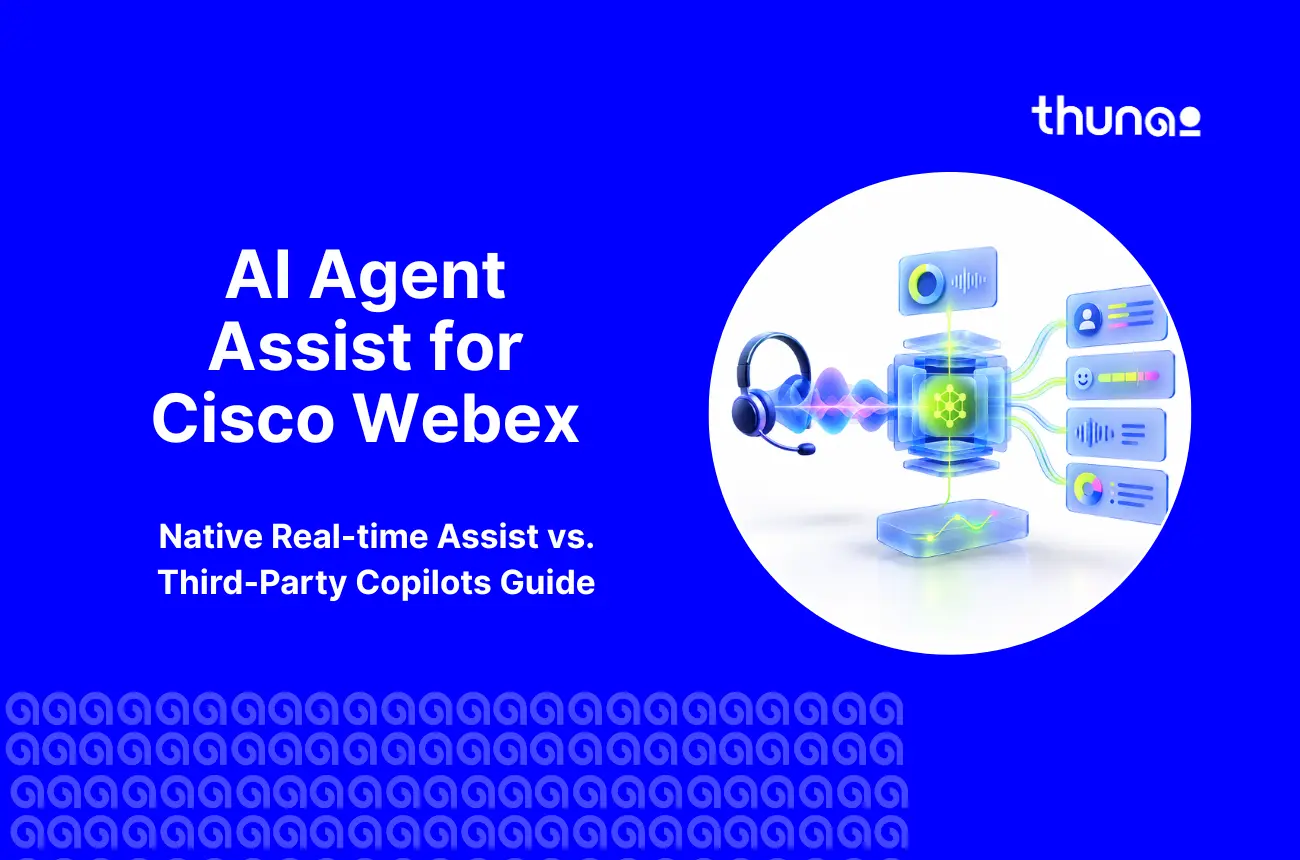
What real-time AI agent assist for Webex does
As an AI tool, a real-time AI agent assist listens to the live session and guides the human agent during the session.
This type of real-time call guidance for Webex agents does not replace human agents. Instead, the process eliminates the search, typing, and any guessing that would usually come with the job.
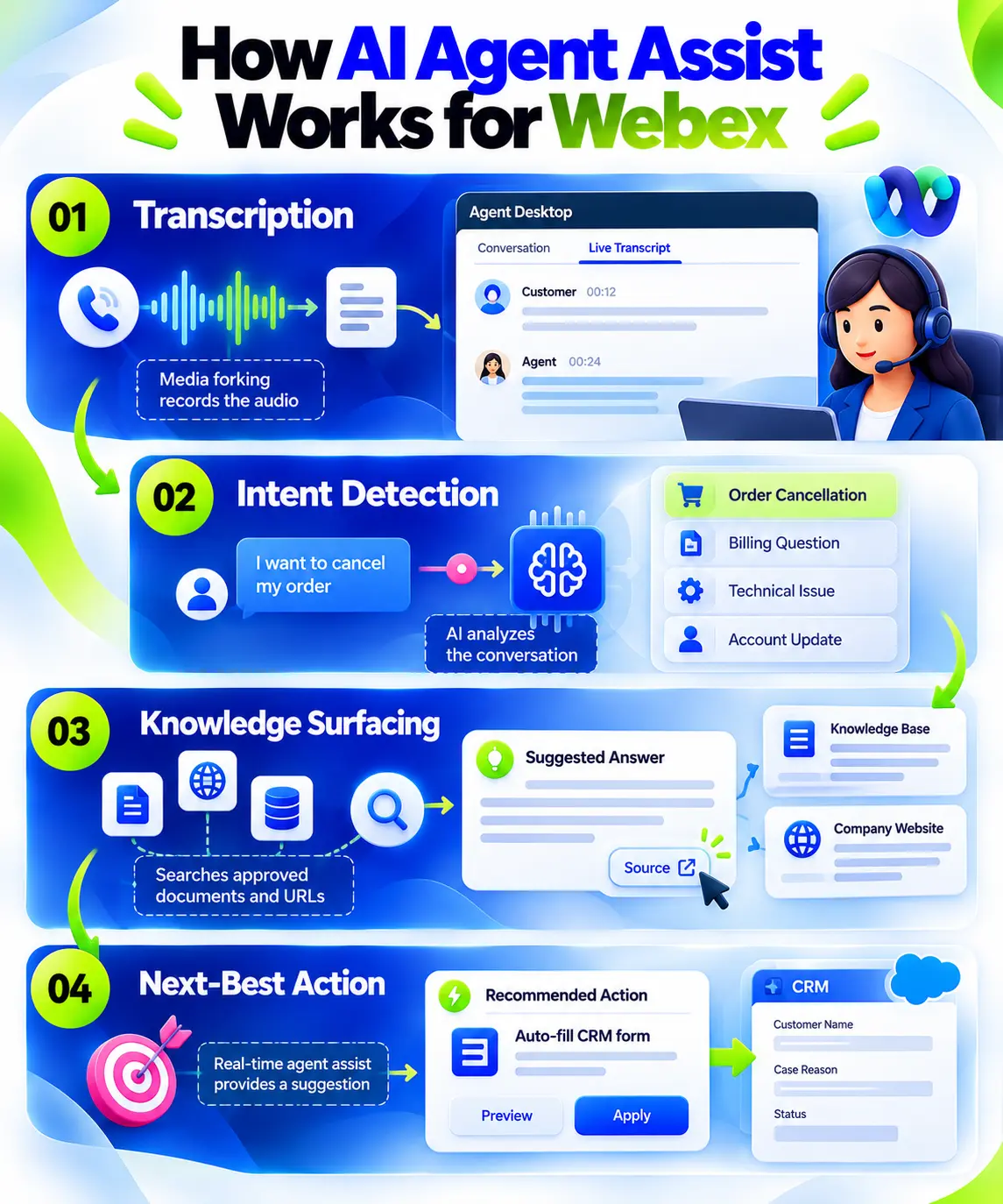
All AI agent assist for Cisco Webex and other CCaaS follow the four steps below:
- Transcription: The media forking process records the audio, and the Live Transcript tab on the Agent Desktop displays it in text form.
- Intent Detection: The AI analyzes the conversation using the AI Assistant Skills attached to the queue.
- Knowledge Surfacing: The AI-based software searches through approved documents and website URLs and produces the response with the Source button feature.
- Next-Best Action: Real-time agent assist then provides a suggestion, such as auto-filling the CRM form based on the ongoing conversation.

Copilot vs. AI agent: Cisco AI Assistant helps humans, while Webex AI Agent handles calls alone
The two tools by Webex cause a lot of confusion (filling most search results). To clear things up, Real-time Assist is a copilot or real-time AI agent assist for Webex. This means it is a tool designed to help your agent immediately respond to customer queries.
An AI Agent created via Cisco AI Agent Studio or some other third-party application is standing in front of the queue and trying to resolve the call on its own, relying on either scripted NLU or an autonomous LLM.
When it cannot, it escalates with a Virtual Agent Transfer Summary, so your human agent never repeats discovery questions.
An AI customer service copilot for Webex chat and email
Voice is not the only mode of communication. The AI customer service copilot for Webex can extract the text from the first chat or email message.
The agents look through the recommended answer and copy the suggestion in one click into a chat, or use the answer in the draft of the email and make changes before sending.
Real-time agent assistance for Cisco Webex: the native option
Native Real-time Assist is built into the Webex cloud. There is no custom development and no extra vendor. But to get it right, this is a checklist we would recommend for real-time agent assistance for Cisco Webex:
What you need: Flex 3.0, A-FLEX-AI-ASST, media forking in Flow Designer, Webex Connect, AI Studio skills
- Licensing: Cisco Collaboration Flex Plan 3.0 (A-FLEX-3), plus the A-FLEX-AI-ASST add-on SKU.
- Media Forking: Switch it on in Flow Designer for every voice queue that needs live transcription.
- Webex Connect: This powers the moderated and unmoderated actions.
- AI Studio Skills: Skills link your knowledge bases and API actions to specific queues. A full administrator then toggles features in Control Hub.
How agents use it: The Get Assistance pull model for moderated vs. unmoderated actions
In the pull model, the agent asks for help through the Real-time Assist widget using Get Assistance. The widget returns an answer, and a thumbs up or down feeds back into the model.
Actions come in two types. With moderated actions, the AI copilot for Webex Contact Center pulls details like account numbers into a form, and the agent clicks Approve. With unmoderated actions, the AI runs routine API calls, like a delivery status check, with no agent input.
What it costs: unit-based add-on with no public price
Cisco does not publish a price for Cisco Webex AI agent assist or A-FLEX-AI-ASST. This is because it’s a unit-based add-on, so your quote depends on volume and partner margin.
Billing for A-FLEX-3 configurations starts up to 7 days after provisioning. Get a written quote before building your business case.
Where native Webex Real-time Assist has issues
Native Webex Real-time Assist is the easiest option. However, AI-powered agent assistance for Webex is not always the right fit for everyone. Here are some issues, based on Cisco's own documentation:
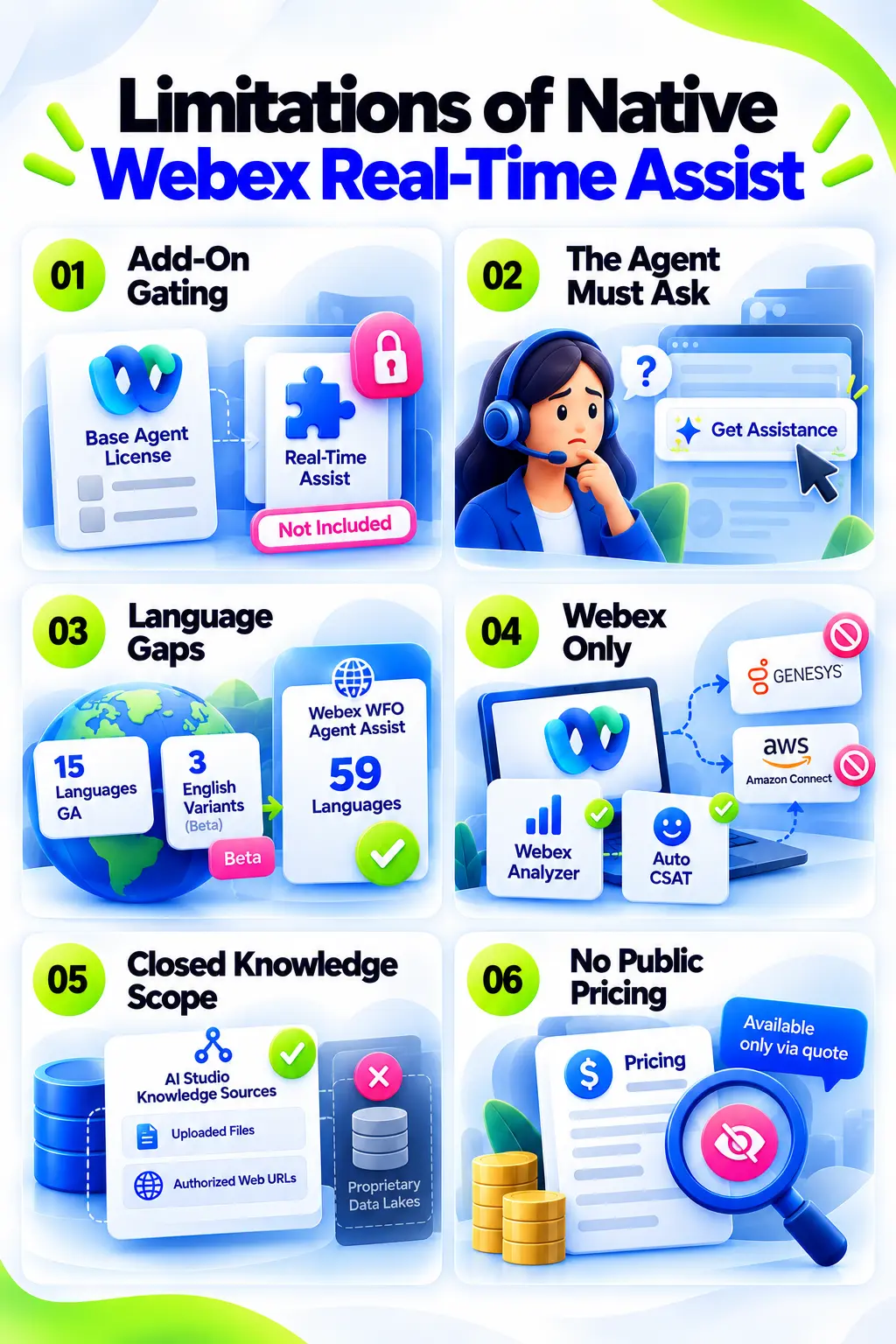
- Add-On Gating: Real-time Assist is not bundled with baseline Webex Contact Center agent licenses. Older non-Flex environments must migrate to Flex 3.0 first.
- The Agent Must Ask: Under the Get Assistance model, a busy agent mid-call may never click. Guidance that waits for a request often arrives late.
- Language Gaps: Only 15 languages are GA, and three English variants are still in beta. Webex WFO Agent Assist covers 59 languages, which makes the contrast clear.
- Webex Only: Native transcripts feed Webex Analyzer and Auto CSAT well. But they cannot follow you to Genesys or Amazon Connect.
- Closed Knowledge Scope: It queries sources set up in AI Studio, like uploaded files and authorized web URLs. Proprietary data lakes sit outside that.
- No Public Pricing: You cannot compare costs until a quote arrives.
None of these is a deal-breaker. Together, they explain why some teams look elsewhere.
Native vs. third-party AI copilot for Webex Contact Center
The trade-off is simple: native removes difficulty or issues that come with CX integration.
However, third-party real-time AI agent assist tools can add reach, flexibility, and many more customizable flows. This table shows where each one wins:
If you run Webex only and your languages are covered, native wins on simplicity. If you run several CCaaS platforms, or need guidance without a click, a third-party copilot deserves a pilot.
How a third-party copilot connects to Webex Contact Center
With third-party tools for Webex, typically, nothing needs to be replaced. A third-party copilot or Webex AI agent assist tool works alongside Webex via developer interfaces. Below are the steps that need to be taken:
- Building the Interface: Develop a Custom Agent Widget using the Webex Contact Center Desktop JS SDK as a Web Component. This component operates in its own Shadow DOM, and hence, no CSS will leak into the desktop.
- Placing the Widget: Modify the layout.json file to allocate a grid for the copilot, for example, a 2x2 grid.
- Feeding the Context: Use Flow Designer HTTP Request nodes or Webex Connect to feed context data (transcription URLs and event webhooks) associated with a call into the AI layer.
- Securing the Link: The HTTP Integration Connector can use OAuth and Basic authentication.
- Pilot Safely: Flow Versioning allows you to route a certain percentage of your traffic. E.g. 40% - to the new integration, while the remaining traffic follows standard routing rules.
All your CRM integrations will be preserved. Salesforce Service Cloud integrations provided by Bucher + Suter and Tenfold, as well as Epic Desktop Connector used in healthcare, are going to work normally.
How Thunai adds real-time agent assist to Webex Contact Center
Thunai does not replace Webex. Instead, it provides the intelligent augmentation of Webex. The Thunai Brain can connect to your CCaaS stack via the Thunai MCP that integrates with over 50 enterprise tools.
In doing so, Thunai connects all conversations, documents, and customer history in one place and also does the following:
1. Live transcription and intent detection with proactive nudges, no click needed
Thunai Omni listens and understands calls across voice, chat, and email while monitoring sentiment as the call progresses.
Real-Time Agent Assist provides guidance to agents without any request for it. Thunai Co-Pilot or Sidekick brings up the customer’s history instantly, so that no customer is put on hold.
2. Thunai Brain: one contradiction-free knowledge source across tools
Policies in the documents often contradict each other. One states the process of return takes 14 days, whereas another policy contradicts it and says it is 30 days.
Thunai Brain analyzes the document and highlights such contradictions for manual review. This means that agents have access to one knowledge source (all in one place) instead of five tools.
3. Real-time multilingual voice translation
Thunai will translate a voice call between the agent and customer in real time. This is available in over 200+ languages and native dialects, while allowing your CRM to be updated in the most common language for your team (the one you choose).
Thanks to this feature, even one team can serve a lot more regions. In addition, it is also useful in case the customer's language is not within native GA capabilities.
4. After-call work handled: summaries, CRM updates, follow-ups
When the call is finished, Thunai makes the summary, updates the CRM, and generates follow-up tasks using two-way MCP sync.
Automatic summary can reduce After Call Work time by 2 to 4 minutes per interaction. The agents make the next call faster.
Measuring the ROI of AI agent assist on Webex
To measure whether your Webex AI agent assist is working well, you’ll need to pick metrics before you pilot. These are the numbers Cisco has published:
- Faster Context: 93% of Webex Contact Center users who used AI summaries found it easier to access customer history.
- Faster Responses: Cisco expects up to 3X faster agent response time by virtue of proactive knowledge acquisition.
- ACW Reduced: The new Drop Call Summary, Mid-Call Summary, and Post-Call Summary replace manual note-taking. These are available via Webex API for 24 hours.
- QA Full Coverage: Auto CSAT allows coverage of 100% of eligible voice calls rather than the single-digit survey participation rate. Auto CSAT requires 250 surveys to be manually done.
- Containment & Handled Separately: 40% containment was achieved by Community Health Network but that is a separate offering called Webex AI Agents. Do not include this in your business case for agent assist.
The native metrics such as Average Handle Time with Real-Time Assist are available in Webex Analyzer. The third-party copilot reports in their own dashboard, so make sure that you set the baseline first.
A 30-day rollout checklist
Thirty days is more than enough to run a controlled pilot for your Webex ecosystem. Here’s the ideal framework or checklist you can use for this rollout:
- Days 1-7: Discovery & Preparation: Configure A-FLEX-AI-ASST under Flex 3.0. Assign complete admin rights within the Control Hub. Review all your documentation and upload approved documents and web links to the AI Studio knowledge bases.
- Days 8-14: Configuration: Allow Real-time Assist in the Control Hub. Create AI Assistant Skills in AI Studio and connect it to the pilot queue. Verify the Media Forking on all voice queues.
- Days 15-21: Integration and Pilot: Create HTTP Request connectors for CRM data. Create moderated actions in Webex Connect. Start with a pilot group of agents using Flow Versioning for 10-20% of your traffic.
- Days 22-30: Measurement and Scaling: Evaluate thumbs up/down from agents. Benchmark Average Wrapup Time using Real-Time Assist versus your baseline on Analyzer. Then roll out for 100% of your traffic. Are you using a copilot application from a third party? Why not test it in parallel with your second queue?
Using Real-Time Agent Assist in Cisco Webex
The AI-powered assistance feature is a tool that moves your call center into a guided interaction rather than a research platform that has delayed resolution rates.
Native Real-time Assist would be the easiest solution when you want limited customization.
A third-party copilot makes sense when you need proactive nudges, live translation, or one assistant across several platforms with automated updates that help keep track of stats 24/7.
Either way, start with a pilot and real numbers.
Want to see how Thunai works alongside Webex? Why not see Thunai in action!
FAQs on Cisco Webex AI Agent Assist
Does Webex Contact Center have real-time agent assist?
Yes, and it’s known as Real-Time Assist, which is an element of Cisco AI Assistant. It analyses live voice and digital conversations and provides recommendations, workflow actions, and knowledge to the agents on the Agent Desktop.
What license do I need for Webex Real-time Assist?
You need to have Cisco Collaboration Flex Plan 3.0 (A-FLEX-3) and the paid add-on A-FLEX-AI-ASST. It’s not included in the basic agent licensing. An administrator sets it up in the Control Hub.
What happened to Webex Suggested Responses?
Webex Suggested Responses was renamed and extended by Cisco. Suggested Responses is now part of Real-time Assist, which includes live transcription, actions, and summaries to the existing recommendation feature.
Does Webex Agent Assist work on chat and email?
Yes. Webex Agent Assist works and analyzes text that is received through chat and email starting from the beginning of the conversation. Suggestions may be copied with one click for chat and inserted into email drafts where they can be edited.
Can I add a third-party AI copilot to Webex Contact Center without replacing it?
Yes, but it will require custom implementation or a dedicated MCP layer. This is to implement the copilot as a Custom Agent Widget based on the Desktop JS SDK, and pass data to it using HTTP Request nodes in Flow Designer.
Which languages does Webex Real-time Assist support?
Cisco AI Assistant supports 15 languages in General Availability and 13 languages in Controlled Availability for transcripts, summaries, and Real-time Assist. English UK, Australia, and India are in beta.