
Is your call center productive enough without being too busy for your agents to feel overworked?
This is all about call center occupancy rate.
Occupancy rate is used to measure the amount of time taken by an agent to handle customer calls and post-call processes during their logged-in hours.
While a high occupancy rate sounds very productive, it is just a matter of time before your agents get exhausted.
A low occupancy rate indicates idle time. Here’s how you can measure occupancy rate.
What Is Call Center Occupancy?
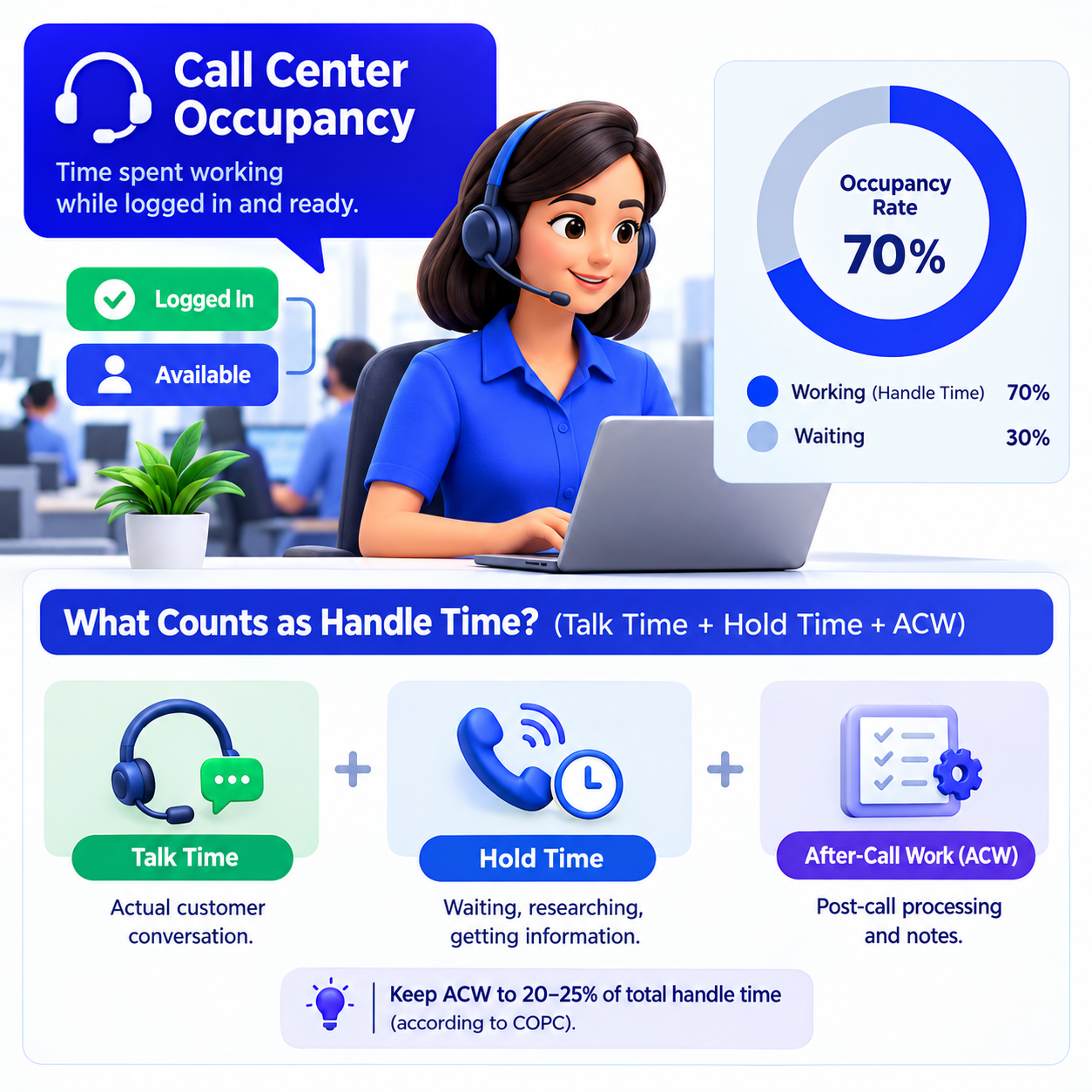
Workforce planners track call center occupancy to answer one narrow question: while an agent is logged in and ready, how much of that time is spent actually working?
Occupancy Rate Definition and What It Actually Measures
- Call center occupancy measures the percentage of logged-in, available time that a rep spends handling customer interactions and closing out the related admin work.
- It's easy to confuse this with attendance or total hours on shift, but that's not what it's tracking.
- It's tracking density: how packed an agent's available time is with actual work, versus how much of it is spent waiting for the next contact to arrive.
- That waiting period isn't wasted time, either. It's the gap that lets someone shake off a rough call before the next one lands.
- A rep's call center occupancy number says more about how the queue and schedule were built than it says about that person's work ethic.
What Counts as Handle Time (Talk Time + Hold Time + ACW)
You can't get an honest call center occupancy figure without an honest handle-time figure first. Three things make up handle time:
- Talk Time: This is the actual face-to-face conversation, whether it’s via phone or other channels, between the customer and the agent.
- Hold Time: This is the amount of time spent by the caller waiting for the agent to browse through the knowledge base, contact their supervisor or even retrieve their account information.
- After-Call Work (ACW): This is the process involved after making a call.
Here, COPC places a limit: post-call processing should not exceed more than 20% to 25% of the total handle time. If it exceeds that limit, then it is no longer about the occupancy of the call center but the amount of paperwork your system is making your employees do.

How to Calculate Occupancy Rate (Formula + Worked Example)
The math behind call center occupancy is simple enough to do on a napkin. The hard part is trusting the inputs.
The Standard Occupancy Rate Formula
Occupancy Rate (%)=(Total Available Logged-In TimeTalk Time + Hold Time + After-Call Work)×100
As logged-in time actually consists of handling time and idle time, it may be calculated like this too:
Occupancy Rate (%)= (Total Handle Time + Idle Time Total Handle Time )x100
This second way is useful since it eliminates shrinkage, coaching, break times and meetings, leaving just the queue time.
Real-World Calculation Walkthrough
The agent will work for 480 minutes for 8 hours. For 480 minutes, 80 minutes will be spent on breaks, lunch, and training. After subtracting this, 400 minutes will remain.
Out of the 400 minutes of active logged-in minutes, the agent will spend:
- 260 minutes speaking to customers
- 20 minutes with customers on hold
- 40 minutes completing after-call work
Conclusion,
This will make it to add up to a total handling time of 320 minutes (260 + 20 + 40).
Idle time will thus be 400 – 320 = 80 minutes.
Occupancy Rate Calculation
Occupancy Rate = (Handle Time / Available Time) × 100
For example:
= (320 / 400) × 100
= 0.80 × 100
= 80%
Eighty percent call center occupancy on this shift. Read that as: four out of every five available minutes went to a customer, and one went to catching a breath.
Occupancy Rate vs. Utilization Rate vs. Adherence — Clearing Up Confusion
I've sat in enough workforce reviews to know this trips people up constantly. Occupancy, utilization, and adherence get used almost interchangeably, and they shouldn't be.
Comparison Table with Definitions, Formulas, and Use Cases
Why You Must Track All Three Together
- Here's a case that shows why one number lies without the others: 88% call center occupancy next to 55% utilization.
- Read only the first figure and you'd assume things are fine. Add the second, and now you know agents are stretched thin during the hours they're logged in, while shrinkage is quietly draining the rest of the day.
- Adherence problems create the opposite trap: when people don't show up on schedule, the ones who did absorb the overflow, and their occupancy spikes through no fault of their own.
- None of these numbers means much in isolation.
What Is a Good Call Center Occupancy Rate?
There is no one-size-fits-all answer, but there is an acceptable range, and it’s a tighter range than most people think.
Benchmark of Industry: 80% to 5% (And Why 100% Makes Your Team Fail)
- The typical range is 80% to 85%, and this is where the Erlang C Queue Modeling comes in to explain why 100% will break your team.
- Once call center occupancy crosses 90%, the recovery gap between calls disappears entirely.
- Agents go straight from one difficult conversation into the next with zero buffer.
- Things go wrong, the tone changes, and people begin to look for new jobs.
- I would prefer managing a floor at 82% efficiency with constant turnover than 95%.
Occupancy Targets by Channel: Voice, Live Chat, Email
The right number of shifts depends on the channel:
Occupancy Targets by Center Type: Inbound, Outbound, Technical Support
The operating model matters just as much as the channel:
A tier-one billing queue and a tier-three technical support desk shouldn't be judged against the same call center occupancy target.
Telling the support engineer fixing the issue of the firmware to accomplish 85 percent occupancy is like asking him to ignore the procedure of addressing the ticket itself.
What Happens When Occupancy Is Too High or Too Low
Both directions cause real damage. Neither gets fixed by staring at the dashboard harder.
High Occupancy (90%+): Burnout, Attrition, and Quality Drops
- Once call center occupancy passes 90%, the decline isn't gradual; it's sharp.
- Harvard Business Review research ties occupancy above 85% to steep drops in customer satisfaction.
- One enterprise case moved from 78% to 88% occupancy and watched CSAT fall 12 points in the process.
- Gallup's research puts a number on the human cost too: sustained overload raises turnover intent by 74%.
- Fatigued agents hurry through the call and neglect to complete one compliance step that they know is important as there’s another call on hold.
Low Occupancy (Below 70%): Wasted Budget and Overstaffing
- The reverse scenario is perhaps less visible but equally costly.
- Under 70% call center occupancy indicates that you have too many staff for the queue size.
- Labor is a significant component of your overhead, accounting for as much as 70%, so downtime does not come cheap.
- The second price of downtime is boredom: it dulls the edge of agents when it comes to dealing with difficult cases.
7 Strategies to Optimize Call Center Occupancy
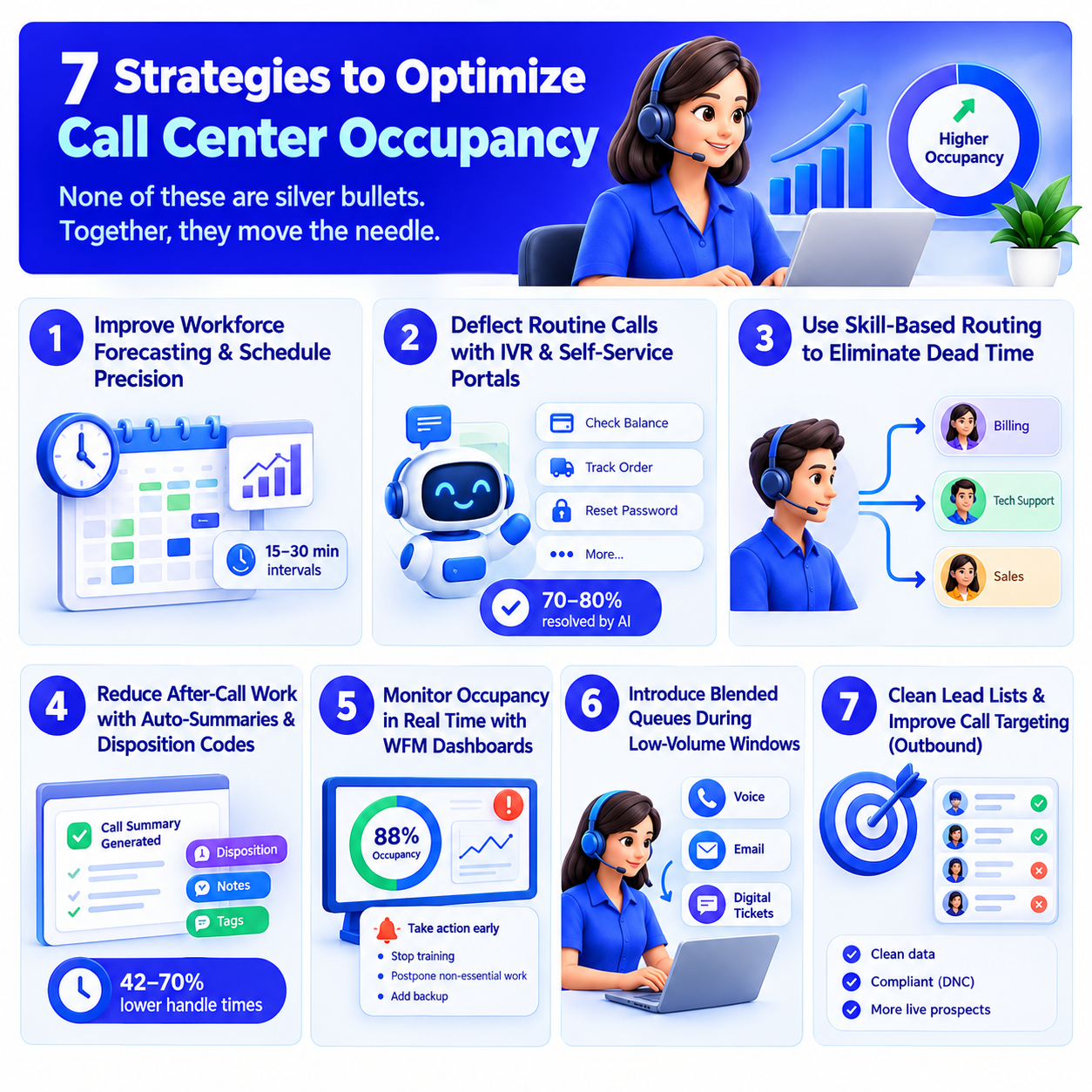
None of these are silver bullets. Together, they move the needle.
1. Improve Workforce Forecasting and Schedule Precision
- Forecast against actual historical patterns, broken into 15 to 30-minute intervals instead of daily averages.
- A center I'd look at skeptically is one still scheduling off daily totals; that's how you get a dead 2 p.m. lull and an understaffed 4 p.m. rush on the same day.
2. Deflect Routine Calls with IVR and Self-Service Portals
- Pull routine tier-one requests out of the live queue, and volume drops, along with the volatility that spikes call center occupancy in the first place.
- Thunai's agentic CX platform resolves 70% to 80% of repetitive inquiries without a human touching them.
- That's not a marginal improvement; it changes what "busy" even means for the agents left handling the harder cases.
- Take a look at Thunai's customer experience platform to see how the self-service layer actually plugs into front-office capacity.
3. Use Skill-Based Routing to Eliminate Dead Time
- Round-robin routing hands a generalist a problem meant for a specialist, and now you've got a hold, a transfer, and a frustrated customer.
- Skill-based routing gets the right agent on the first attempt.
- Handle times drop, and so does the kind of dead time that quietly wrecks call center occupancy numbers.
4. Reduce After-Call Work with Auto-Summaries and Disposition Codes
- Manual wrap-up work can eat 17% to 25% of total interaction time when nobody's automated it; that's nearly a quarter of the shift spent typing notes instead of taking the next call.
- Thunai's contact center automation solutions take the note-taking off agents' plates entirely.
- G2 reviewers back this up, citing hours saved per shift, and enterprise deployments report handle times dropping 42% to 70% once summaries generate themselves.
5. Monitor Occupancy in Real Time with WFM Dashboards
- A report that came in yesterday won't get you out of today's predicament.
- Real-time dashboards will alert you when occupancy is at 88%, even before it goes higher, giving you the chance to take some action like stopping training, postponing non-essential work, or getting an agent to back up.
6. Introduce Blended Queues During Low-Volume Windows
- When voice volume dries up, occupancy drops with it unless you give agents something else to do.
- Blending in email and digital ticket work during quiet windows keeps people productive without the constant pressure of back-to-back calls.
7. Clean Lead Lists and Improve Call Targeting (Outbound)
- Outbound numbers will quickly become inaccurate due to dialers dialing disconnected numbers, fax machines, and voicemail systems.
- Ensure that the CRM lists are kept scrubbed and compliant with the do-not-call requirements; reps should spend their time with live prospects, not chasing dead numbers that skew call center occupancy in the wrong direction.
How AI Is Changing the Occupancy Equation

For years, call center occupancy scaled with call volume in a straight line: more traffic meant more hires, or burnout. That relationship is breaking down.
- AI-enabled agents do all the mundane, tedious work before that information is even presented to the human being.
- Real-time assistance presents the appropriate knowledge base article right during the call, rather than having to look it up himself. The summary and entry into the CRM happen automatically after the call.
- Thunai's AI agents let a team route routine volume to AI while people focus on the conversations that actually need judgment.
- Organizations running Thunai's customer support platform sustain an 80% query deflection rate alongside a 95% CSAT score numbers that would've sounded implausible five years ago.
- There's a catch worth naming: once AI clears out the easy tickets, everything left for human agents is harder by definition.
- That’s why many augmented with AI call centers are secretly adjusting their occupancy goals downwards to 75% to 80%.
- The reason is that the agents require more space since the tasks they do have become more difficult, not less.
Keep call center occupancy healthy, empower your agents, and deliver better customer experiences with Thunai. Book your demo now.
FAQs About Call Center Occupancy
What is call center occupancy?
It's the percentage of logged-in, available time an agent spends handling live interactions and finishing post-call admin, versus sitting idle waiting for the next contact.
What is the primary difference between occupancy and utilization?
Occupancy only counts handling time while logged in and on the queue. Utilization covers the entire paid shift, offline work, including meetings, coaching, the works.
Can high call center occupancy damage customer satisfaction?
Yes, and the data backs it up. Cross 85% to 90%, and you'll see rushed calls, more mistakes, and tired agents. Research ties sustained occupancy above 85% to real, measurable drops in CSAT.
How does after-call work affect the occupancy rate formula?
ACW is baked directly into handle time, so bloated wrap-up work inflates call center occupancy artificially. Automate the summaries and CRM updates, and that time goes back to the queue where it belongs.