
👨💼 CEO 1: Our support costs keep rising 📈, but customers still complain about slow responses, How are enterprises solving this?
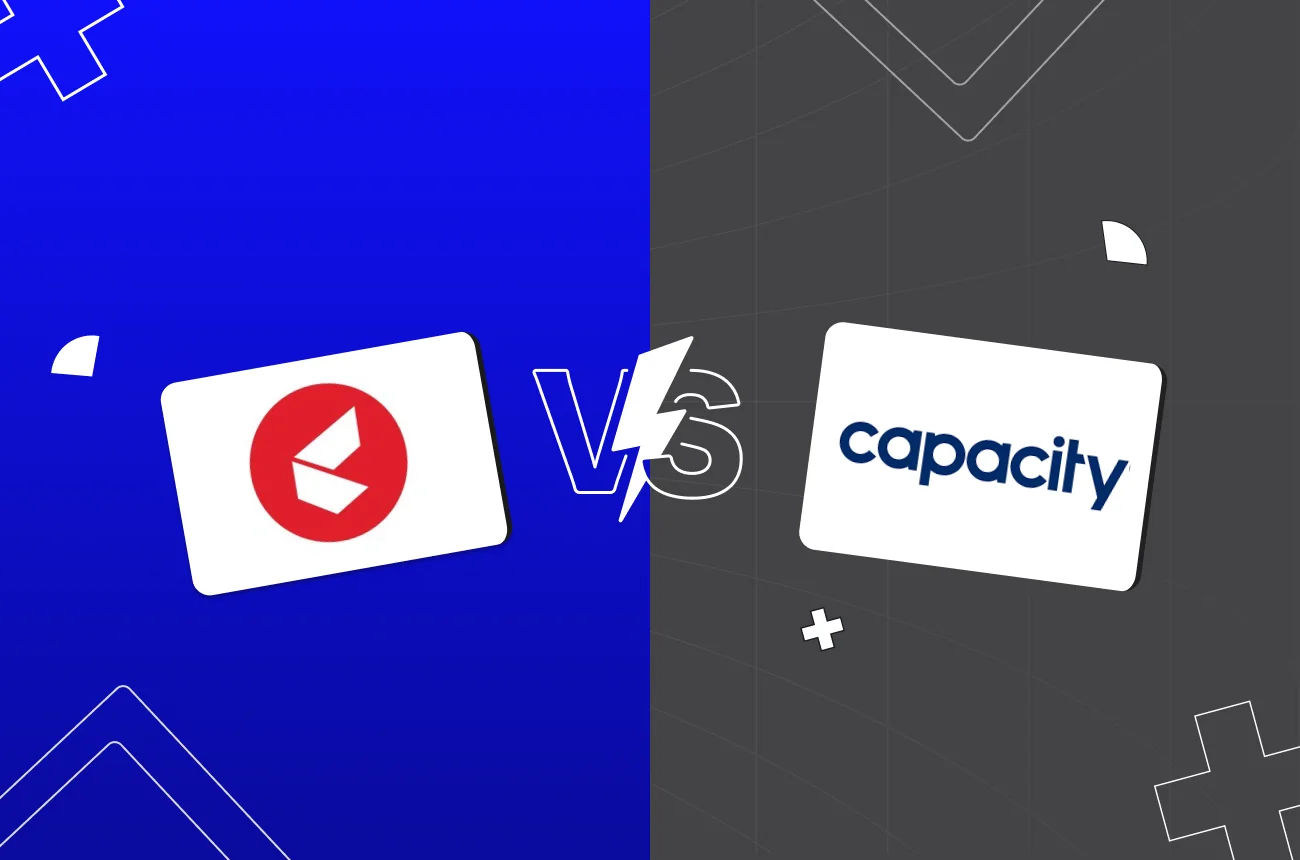
👨💼 CEO 2: That’s why so many companies are comparing Kapture CX vs Capacity. One focuses on managing massive support operations, while the other helps teams automate knowledge search and workflows.
👨💼 CEO 1: But we need faster resolutions, lower costs, and better customer experience all together .
👨💼 CEO 2: Exactly and choosing the wrong platform can create more delays, higher maintenance costs, and frustrated customers. That’s why many enterprises are now looking beyond traditional support tools toward agentic AI platforms like Thunai 🚀.
👨💼 CEO 1: So, which platform actually delivers at scale without all the operational headaches?
👨💼 CEO 2: Let’s see through this guide and uncover what 1,000+ enterprise support teams found out the hard way 👇..
What Kind of Buyer Is Actually Searching Kapture CX vs Capacity?
If you are currently looking at Kapture CX vs Capacity, let me save you some time.
- CEO’s want to compare AI customer support software. They do this to solve a real business problem. Customers expect fast answers but support teams are slow.
- This is why companies need omnichannel support solutions. These tools handle millions of questions. They do this without hiring more staff.
- Buyers of these top customer experience platforms usually fall into two camps. The first camp runs big call centers with many human agents. They work in strict fields like banking, healthcare, and shipping. They need deep ticketing, clear SLA rules, and safe ways to route tickets.
- The second camp wants easy file search and automated help. They want to set up the best AI solutions for customer service automation. In this way, the customer support system and internal process workflow can be integrated using Slack or Teams.
- Is your biggest delay managing human agents? If yes, look at Kapture. Is your delay in finding files scattered across cloud systems? Then look at Capacity, and there is another game changer which is Thunai. This choice between Kapture CX vs Capacity is common for teams trying to automate support.
What Does Kapture CX Actually Do Well And Where Does It Break Down?
To understand the core differences of Kapture CX vs Capacity, we must look closely at Kapture's setup.
- Kapture CX is built for human agent teams. The platform's main strength is its custom ticketing.
- In busy jobs like travel or healthcare, agents can split a single ticket. For example, they can send a billing question to finance, and at the same time, they keep the main ticket open for shipping. This keeps teams accountable.
- The screen is made for busy offices. It brings phone, email, and social chats into one view. This setup helps big companies succeed.
- Stanley Black & Decker cut support times by half across three hundred service centers. Netmeds grouped questions across thirty five thousand items and two hundred makers. Tata 1mg also used Kapture to bring feedback into one place.
- Kapture CX is made to help humans work faster and increase agent productivity. It is not made to automate the support desk completely. If you want to run without agents, Kapture becomes very expensive to keep running.
- The system also has minor limits. You can only search for old tickets using ticket IDs. You cannot search by keywords, which makes finding old data very hard.
- There are no built-in training guides inside the tool. Finally, setup takes weeks or months of moving data. This makes a quick start very hard.

What Does Capacity Actually Do Well — And Where Does It Break Down?
- Capacity is a central business brain. It automates customer chats and internal tasks.
- Its main feature is the Answer Engine. This tool searches files right where they are. You do not have to move your files manually.
- Capacity reads and links slide decks, emails, and files across systems like Salesforce and Google Drive. This lets workers or bots find company rules instantly. It has helped outsourcing centers resolve tickets fifty percent faster and save sixty six percent in costs.
- For internal teams, Capacity connects to Slack and Microsoft Teams. Workers can get fast answers to policy questions without leaving their chat. It also has a strong safety record. It has HIPAA, CCPA, GDPR, and SOC 2 Type II approvals.
- If your main goal is automatic file search without moving files, this part of the Kapture CX vs Capacity debate goes to Capacity.
- But Capacity has limits that affect support, It can translate languages, but the admin screen and support are English only. This is hard for global teams.
- The block-like system is also hard to learn and this needs a dedicated admin to manage it. In real tests, its AI can break when customers go off-script.
- If a caller changes topics, the AI often triggers early agent transfers instead of solving the problem. This lowers your actual deflection rate.
Which Platform Wins for High Volume, Enterprise Grade Support?
For busy, large scale support, the Kapture CX vs Capacity choice is a matter of scale. Both are top customer experience platforms. But they serve different goals. To compare AI customer support software at scale, look at traffic spikes, backend links, and language needs.
If you run a big call center that needs clear ticketing, Kapture CX is the better choice. It splits tickets, tracks agent work, and keeps human teams organized.
But if you want automatic support and internal search across files, Capacity is stronger. Capacity searches files without moving them to help streamline your support.
This table compares Kapture CX vs Capacity to help you decide:
Which Platform Is Faster to Deploy Without a Developer?
As a CEO, I know that speed is everything. This makes setup speed a major part of the Kapture CX vs Capacity debate. Most AI setups get stuck for months because of data integration. Model training is fast. But reshaping old databases to fit a new tool takes a long time.
Kapture CX has a slow, developer heavy setup. Since it is a full CRM, you need weeks of data migration and agent training. Even with ready made templates, it takes weeks or months to get stable.
Capacity is faster to set up. Its Answer Engine reads files in place. It does not force you to move your databases. This lets companies go live in four to six weeks. You do not need deep coding or new database setups.
This setup bottleneck is often the key factor when choosing between Kapture CX vs Capacity to deploy the best AI solutions for customer service automation.
How Kapture CX Handles Post Interaction Intelligence
- Kapture CX tracks what happens after a call with its Conversation Intelligence tool. It transcribes calls and chats to make quick summaries and tags.
- These summaries save to your CRM. They show why customers are unhappy, track call times, and find mood trends. Managers can see these trends on live screens. This helps them automate quality checks and coach agents directly in the workspace.
How Capacity Handles Post Interaction Intelligence
- Capacity tracks what happens after a call using its automatic quality check tool. The system scores every single call and chat.
- It checks agent compliance, detects customer effort, and predicts CSAT scores. The system reads logs across twelve hundred pre-made categories. This helps managers find coaching tips and trace why customers call back.
Why This Gap Is Quietly Costing Enterprises Revenue
- This is the silent cost that teams looking at Kapture CX vs Capacity miss. Dashboards are useful, but past data is a slow signal. Post-call analytics only show frustration after the call is over.
- If a bot gives the wrong price or fails to solve a basic query, the customer leaves. By the time a manager sees the bad score days later, the customer has already quit your business. Delayed checks do not stop real-time drops in CSAT. This costs you silent revenue.
Can Either Platform Connect Support to Sales or Product Decisions?
A big blind spot in the Kapture CX vs Capacity choice is connecting support to sales and product decisions. Both platforms are defensive tools.
They focus on tickets and FAQ deflection, which can make Kapture CX vs Capacity feel very limited. While they write logs back to your CRM, they lack real time sales links.
Neither tool can scan live calls to find buying intent. They do not flag feature gaps, prioritize product updates, or warn you about churn risk.
Product and sales teams must wait for agents to tag tickets. This makes support a cost center instead of a growth driver.
The Numbers Thunai Customers Share After Going Live — Ticket Deflection, CSAT, and Revenue Impact
This is why smart companies are shifting their strategy. They look past Kapture CX vs Capacity and use Thunai. Thunai is built on an event driven agentic AI setup that changes support into a growth engine.
According to reviews on G2 and Product Hunt, Thunai delivers real results:
These stats are backed by great comments from real users:
- On G2, Small Business Admin Saran K. wrote: "The agents automate my email follow-ups and handle lead qualification, which has saved me hours every day, all without the need for scripting. The knowledge-based linking also ensures that responses are context-aware."
- On Product Hunt, user Zagita wrote: "Thunai actually feels human while handling real work! Love the self-learning brain and how it turns chaos into actionable agents. That 99.9% voice accuracy? Game-changer. Can't wait to see teams ditch the busywork and let these agents run wild."
- Guru_nd19 also shared: "Its intelligent meeting summaries, AI-driven chat and voice agents, and seamless integration with tools like Zoom and Teams make collaboration effortless."
When Neither Platform Is Actually the Right Answer
Sometimes, comparing Kapture CX vs Capacity is the wrong path. Neither tool works if your business needs:
- No AI Hallucinations: Standard tools guess when data is old. If you need a system that flags conflicting files instead of guessing, ticketing tools fail.
- Live Call Help: Post call analytics cannot save a call that is already going wrong. Standard helpdesks do not offer real time help or live translation.
- A Multi-Agent System: Most tools use simple bots. If you want specialized agents that transcribe meetings, read videos, and automate tasks natively, you need agentic workflows.
How Thunai Closes the Gaps That Kapture CX and Capacity Leave Open
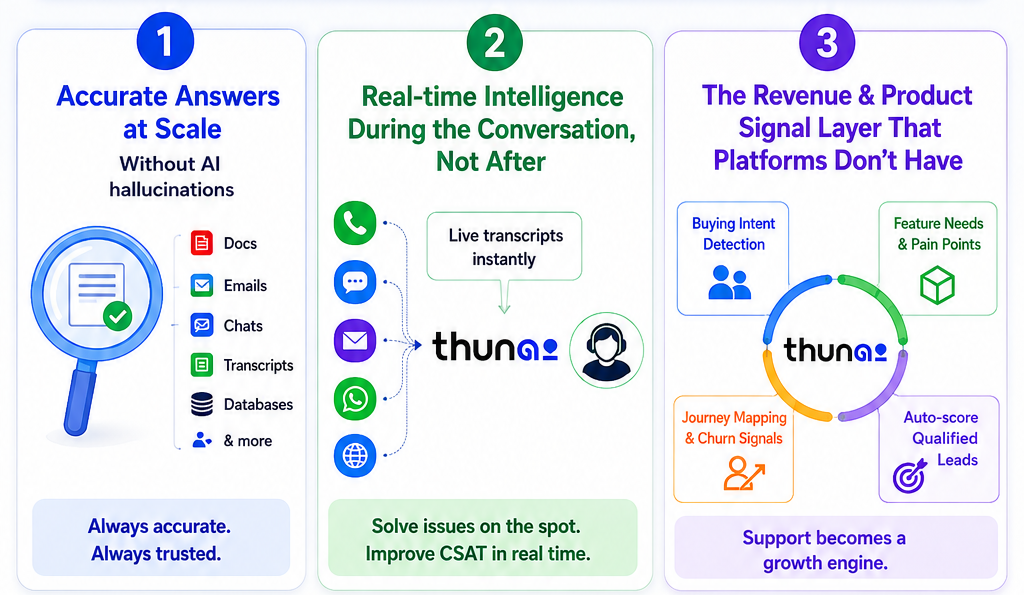
Instead of choosing between human agents or file search in the typical Kapture CX vs Capacity setup, Thunai does both. It is an Enterprise Agentic AI Platform built on a real time data streaming backbone using Apache Kafka and Apache Flink.
Accurate Answers at Scale — Without AI Hallucinations
- AI guessing is a big risk, standard setups fail when files are old.
- Thunai stops this with Thunai Brain, a central knowledge hub that reads files, videos, and transcripts.
- Its contradiction and relationship resolution engine scans your data for conflicts.
- If an old PDF says 'No Refunds' but a Slack post says 'Refunds OK,' Thunai Brain flags the conflict. It does not guess. This keeps your answers safe and correct.
Real Time Intelligence During the Conversation, Not After
- Thunai streams live call transcripts into the Thunai Brain instantly. This lets the AI analyze customer mood during the call.
- This powers Thunai Sidekick. It gives human agents live customer history and suggestions.
- By using Thunai Live Call Translation across 150+ languages with ultra low latency, Thunai solves issues on the spot.
The Revenue and Product Signal Layer That Support Platforms Don't Have
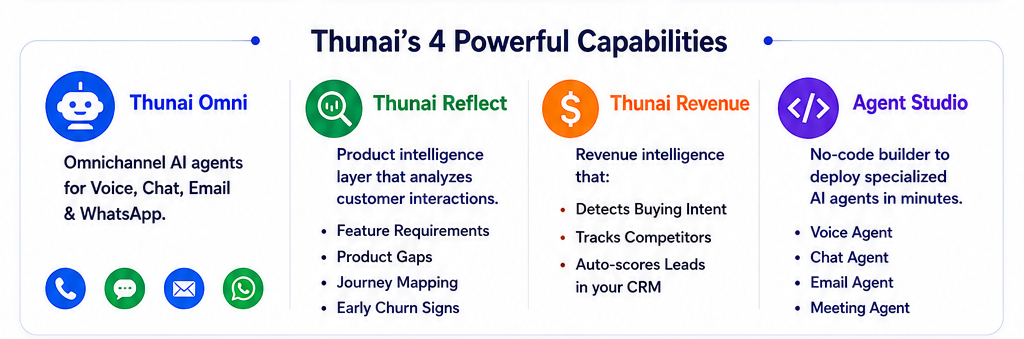
Thunai connects support to sales and product teams using four main features:
- Thunai Omni: Omnichannel automated agent for voice, chat, emails, and WhatsApp that deflects 70 to 80% L1 contacts through AI powered assistants while ensuring a 5 star experience for customers.
- Thunai Reflect: A product intelligence layer that analyses live customer interaction in order to detect feature requirements, product gaps, customer journey mapping, and early signs of churn.
- Thunai Revenue: Acts as a revenue intelligence layer, scanning interactions to detect buying intent, track competitor mentions, and automatically create and score qualified lead opportunities within your CRM system.
- Agent Studio: A completely no code visual builder that allows non technical team members to deploy specialized Voice Agent, Chat Agent, Email Agent, and Meeting Agent workflows in under thirty minutes.
Is Thunai Right for You? Three Questions to Answer Before You Decide
To see if you have outgrown standard ticketing, answer these three questions:
- Are you losing customers to slow analytics?
If you only check call quality after the call is over, you are finding out too late to stop customer churn.
- Is your AI setup stuck in data migration?
If launching an AI bot takes months of coding, you need a system that reads your files in place.
- Is support data just an expense?
If you miss buying signals and product feedback, you are losing easy revenue. This is why looking past Kapture CX vs Capacity is key.
Transform your support operations into a real-time revenue engine with Thunai’s Agentic AI platform. Book your call now..
FAQs on Kapture CX vs Capacity
How does the setup time of Kapture CX vs Capacity compare to Thunai?
Kapture CX takes weeks or months to migrate data and train agents. Capacity takes four to six weeks to index files. Thunai lets you deploy voice and chat agents in thirty minutes without moving any data.
What is the main structural difference when looking at Kapture CX vs Capacity?
Kapture CX is built to help human agents handle tickets. Capacity is built as a search tool to find documents and run internal helpdesks.
Which platform is better for global teams between Kapture CX vs Capacity?
Kapture CX has strong multi-language support. Capacity can translate chats, but its admin screen, guides, and support are strictly english only.