
Still tracking agent time with spreadsheets and guesswork? It's frustrating! like shifts feel busy, but wait times stay high and costs keep climbing.
You can't tell if agents are overworked, or just stuck in the wrong tasks all day. Without clear numbers, every staffing decision feels like a guess.
This guide fixes that by breaking down agent utilization in plain terms, shows you the right formula, and gives simple benchmarks to compare against.
You will get some practical tips on how to improve utilization without overworking your staff. By the end, you'll understand clearly what works, what doesn’t work, and how to make it work.
What Is Agent Utilization in a Call Center?
There are two important things that call center managers have to juggle: customer wait time and operational costs.
To achieve this, they track key agent productivity metrics. One of the most important is agent utilization, which measures how much of an agent’s working time is spent handling customer interactions and other productive tasks during a shift.
Agent Utilization Definition and Core Components
Call center agent utilization measures how much of an agent's paid time goes toward helping customers. This metric covers the entire scheduled shift.
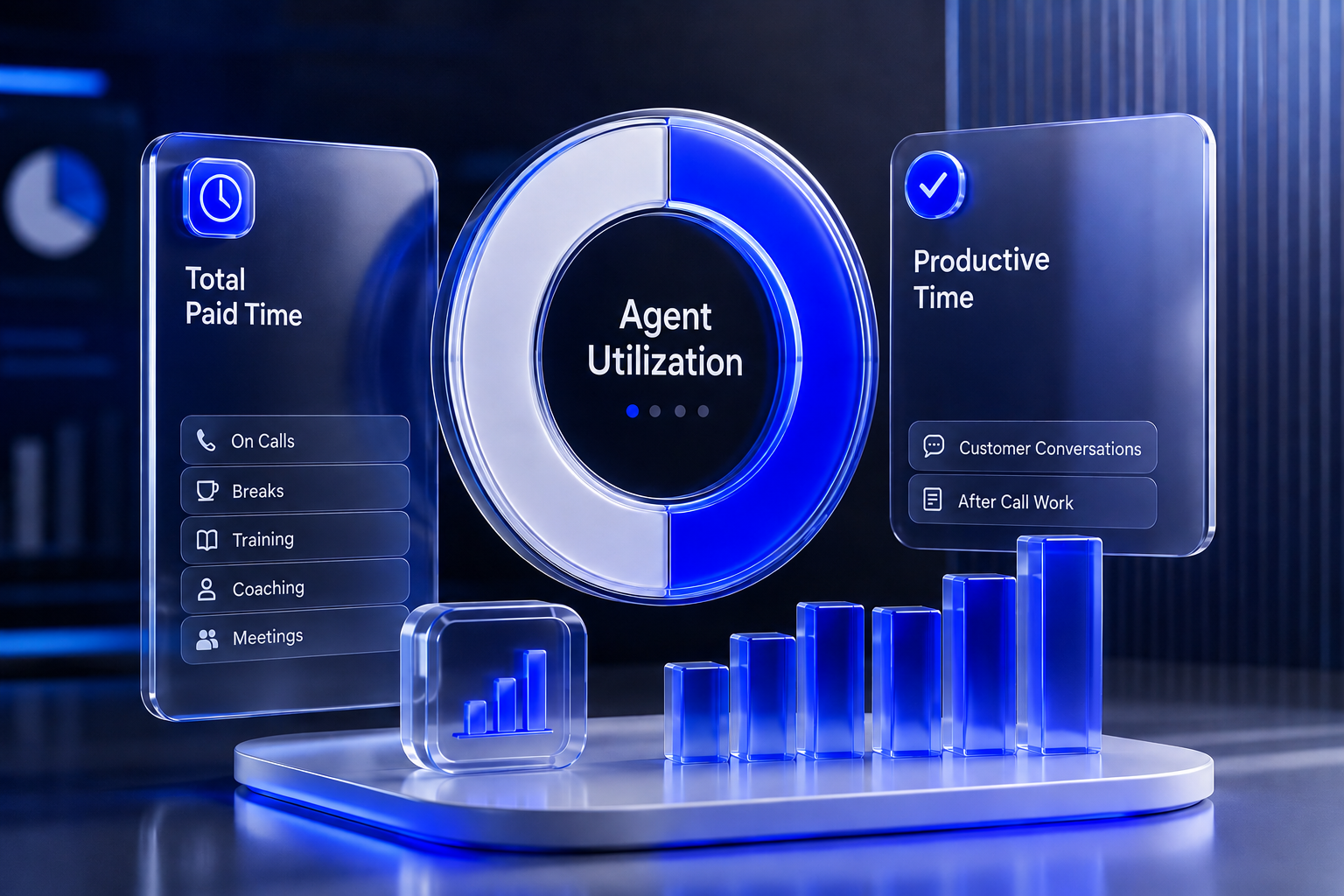
The calculation is based on the following components:
- Total Paid Time: This is comprised of the hours that an agent spends on the clock, including time for calls, paid breaks, training, coaching, and team meetings.
- Productive Time: The productive time consists of the time an agent spends in problem-solving activities.
Why Agent Utilization Is the Foundation of Workforce Efficiency
Agent utilization serves as the base for workforce efficiency because it reveals the true cost of running the business.
Salaries and employee benefits make up the largest expense in any contact center. If the contact center utilization rate is too low, the center pays staff to sit idle.
When there is high occupancy, the agents are left with no time to even take a breather between difficult contacts.
This metric helps in determining whether they have overstaffed the office on a light morning and understaffed it on a busy holiday.
Agent Utilization vs. Occupancy vs. Adherence: Key Differences
Managers often confuse agent utilization vs occupancy, as well as schedule adherence. Mixing these up leads to bad staffing choices. Each metric measures a different part of the agent's workday.
Side-by-Side Comparison Table
When to Track Which Metric
Managers should track agent utilization to understand overall workforce efficiency and plan budgets.
Occupancy measure is a better measure for estimating the workload and measures the time the agent spends in taking care of interactions while being available, thus being an important tool for the identification of overload and risk of burnout.
Schedule adherence is even when all the figures indicate that everything is OK, the waiting time for the customers may go up due to the simultaneous breaks by many agents.
How to Calculate Agent Utilization Rate (Formula + Example)
Figuring out this metric requires clear data. The math is simple, but teams must use the right numbers to get an accurate result.
The Standard Agent Utilization Formula
The agent utilization formula compares the time spent on productive work against the total time paid by the company.
Agent Utilization (%)= Total Productive Time/Total Paid Time × 100.
Experts agree that "productive" time must include talk time, hold time, and after-call wrap-up work.
Step-by-Step Calculation with Real Numbers
Here is how to calculate agent utilization using real numbers. Imagine an agent works a standard 8-hour shift. That equals 480 minutes of total paid time.
During that day, the system tracks the agent's work. The agent spends:
- 300 minutes actively talking to customers.
- 20 minutes with customers on hold.
- 40 minutes typing notes and sending emails after calls end.
- First of all, let us find the handle time for productive time: 300 (discussion) + 20 (holding) + 40 (ending call) = 360 minutes of total handle time.
- Productive time will then be divided by total paid time: 360 minutes ÷ 480 minutes = 0.75.
- Finally, the answer will be multiplied by 100. Utilization of this agent will be 75%.
Multichannel Calculation Differences (Voice, Chat, Email)
The above formula works great for voice calls, as agents tend to process only one call at a time.
Nowadays, contact centers process chats, texts, and emails, and agents can process several tasks at once.This creates chat concurrency and can distort utilization data.
For example, a 10-minute chat handled alongside one other chat has an effective handle time of 5 minutes.
What Is a Good Agent Utilization Rate? (Industry Benchmarks)
Setting the right target requires knowing human limits and looking at the agent utilization benchmark for your industry.
APQC's survey of 461 companies found a median call agent utilization rate of 85%, right at the top of your cited range, now with a real source behind it.
Ideal Range: 75% - 85% and Why 100% Is Dangerous
In case of a normal call center, the right percentage should be somewhere around 75% - 85%.
This implies that the representative is on the phone with a customer three quarters of his time at work.
That is a bad practice to strive for 100% because people are not robots. The representative who works at 100% cannot take bathroom breaks, go to training and breathe.
PwC's 2025 Customer Experience Survey also confirms this: 52% of consumers stopped buying from a company because of a poor experience, while 29% quit buying because of poor customer service.
For those customer support centers seeking to increase this metric to more than 85%, an almost immediate drop in customer satisfaction levels would be experienced because of quick call handling and mistakes being made.
Utilization Standards by Types of Call Center (Inbound, Outbound, Blended)
The standard target depends on the nature of work performed by the call center.
The Burnout Threshold: How High Utilization Drives Attrition
When managers push teams too hard, agent burnout and turnover can increase. This is especially important in technical support, where agents handle complex issues that require sustained mental focus.
In Businesswire research, joint ICMI/Five9 survey found average agent turnover at 58%, with workload cited as the top reason agents leave.
Resolving software problems demands more concentration than handling simple, routine requests.
Therefore, balance productivity with reasonable workloads, breaks, training, and recovery time to maintain long-term team performance.
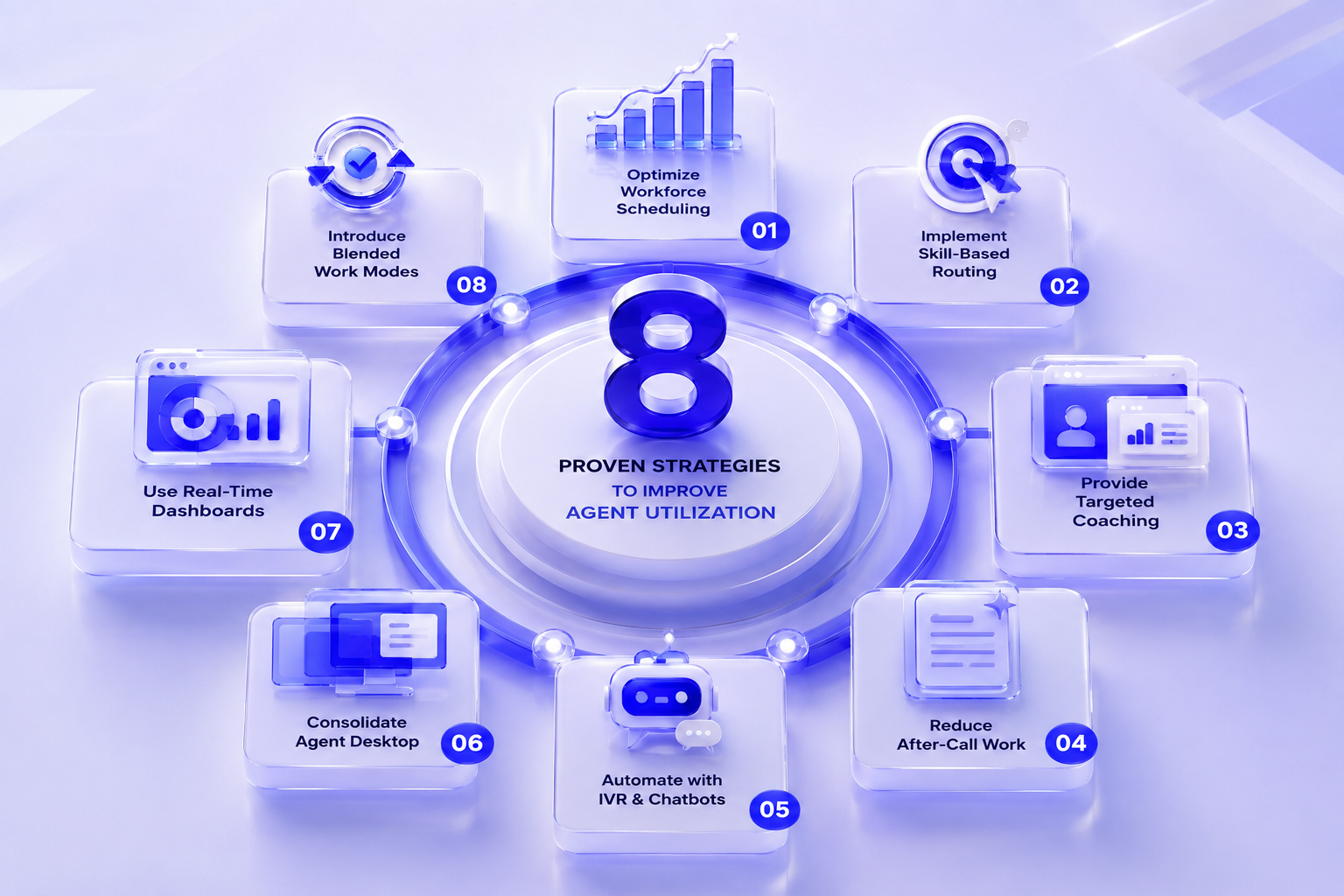
8 Proven Strategies to Improve Agent Utilization
Agent utilization is all about improving agent productivity; it is not about speeding up the process for the agents.
Optimize Workforce Scheduling with Demand Forecasting
Utilize past call data to forecast peak and off-peak hours. Properly schedule your agents depending on the demand level.
Implement Skill-Based Routing to Balance Workloads
Direct customers to agents who have the required skills and experience. This will help to decrease transfers, holds, and wasteful handling times.
Provide Targeted Coaching Based on Utilization Data
Utilize usage data to pinpoint those agents who require support. Offer coaching that can help improve their skill sets and workflow.
McKinsey client data shows that simulation-led onboarding and training has produced 20–30% reductions in the time it takes new agents to reach full proficiency.
Reduce After-Call Work with AI-Powered Summaries
AI may generate summaries of interactions with customers automatically. This saves time spent on writing down information about conversations manually.
Automate Repetitive Tasks with IVR and Chatbots
Use IVR and chatbots to deal with basic inquiries. This way, agents can concentrate only on complex issues that require their attention.
Consolidate Agent Desktop Tools to Cut Idle Time
Combine all important applications into one workspace for agents. This means agents will have fewer screens and clicks while looking for data.
Use Real-Time Dashboards for Live Utilization Monitoring
Dashboard analytics provide an overview of the present demand for support and the availability of agents. Managers can easily manage resources by making quick decisions when necessary.
Introduce Blended Work Modes (Inbound + Outbound + Back-Office)
Blend work processes to maintain agents' productivity levels during times of low demand by allowing the agents to move among inbound, outbound, and back-office calls.
How to Track Agent Utilization with WFM Software
Tracking utilization in spreadsheets is difficult because contact center data changes constantly.
Modern WFM software automates utilization tracking and provides more accurate performance insights.
Key Features to Look for in a Utilization Tracking Tool
A reliable WFM tool should automatically account for chat concurrency and overlapping digital interactions.
WFM should also capture non-ACD and direct calls to provide a complete and accurate view of workload.
Integrating Utilization Metrics with Your QA Scorecard
Tracking utilization can encourage agents to rush through customer interactions. To prevent this, contact centers should combine efficiency metrics with the Quality Assurance (QA) scorecard.
WFM tools should display efficiency metrics alongside quality scores to provide a complete view of agent performance.
Common Mistakes That Hurt Agent Utilization
Contact centers can make simple mistakes that unintentionally reduce team efficiency. One common mistake is treating training time as lost productivity.
Standard utilization formulas may classify training and coaching as "non-productive" time. If performance standards are only centered on utilization, then training programs will be cut or even cancelled in order to boost these numbers.
Accurate utilization tracking requires clear status codes for system outages, technical issues, training, and other types of delays.
FAQs on Agent Utilization
What is the difference between agent utilization and occupancy?
Agent utilization looks at the entire paid shift, including meetings and paid breaks. Occupancy only looks at the time the agent is logged into the system and ready to take calls, ignoring breaks and training time.z
Should unpaid lunches be included in the calculation?
No. Unpaid lunches do not count toward total paid time. Only paid hours belong in the bottom half of the formula.
How often should a call center review this metric?
Managers should look at real-time dashboards daily to move staff around as needed. But formal reviews should happen weekly or monthly. Daily numbers jump around too much based on random call spikes.
Does high agent utilization mean a call center is successful?
Not always. A high rate means the center is keeping labor costs low. This causes agent burnout, high turnover, and poor customer service.