This guide explains what good KYC automation looks like in 2026.
We’ll cover the tech stack, the daily workflow, and a hidden problem called the remediation gap.
The one gap quietly drives away a bank's best customers before they’re even onboarded.
Most banks think they have a technology problem
The reality? It’s mostly just a design problem - The tools exist!
The ACTUAL question is whether a bank wires them together in a way that respects both the regulator and the customer sitting on their phone at 11 p.m., trying to open an account.
What KYC Automation Is (and Is Not)
KYC means "know your customer." In automated KYC systems, the computer system validates the identity of customers without any manual process for each customer.
In a good KYC automation system, documents are provided and analyzed, the facial image is compared with the government database, screened against sanctions and adverse media reports, and finally given a risk score.
The best systems do this again and again over time. This is called perpetual KYC, or pKYC. It checks risk continuously, not just once a year.
- KYC automation is not just OCR bolted onto old software. Early automation tools scanned paper forms and dumped the data into a queue for a human to review by hand. That did not save time.
- Automated KYC is also not fully hands-off. Vendors who promise 90% straight-through processing rarely hold up against real documents, unusual names, or messy company ownership.

Where the Billing Hours With KYC Actually Go
Banks still put 10% to 15% of their staff into KYC and anti-money-laundering (AML) work. The average bank spends $72.9 million a year on this work.
In the UK, it is $78.4 million. In the US, it is $72.2 million (Fenergo). Corporate banking spends even more, from $60 million to $175 million a year per firm.
The problem is not the number of staff size, It’s where the working hours go:
- Chasing documents (35–45%): Emailing customers for missing or blurry files.
- Moving data between systems (20–25%): Copying information between CRMs, file storage, and outside registries.
- Clearing false alarms (15–20%): Checking name matches on sanctions and watchlists that turn out to be wrong.
- Mapping company ownership (10–15%): Tracing who owns more than 25% of a business.
- Writing case notes (10–15%): Typing up reports for regulators by hand.
The KYC Automation Stack, Piece by Piece
A strong KYC system runs as five connected layers. Each layer does one job, then passes clean data to the next.
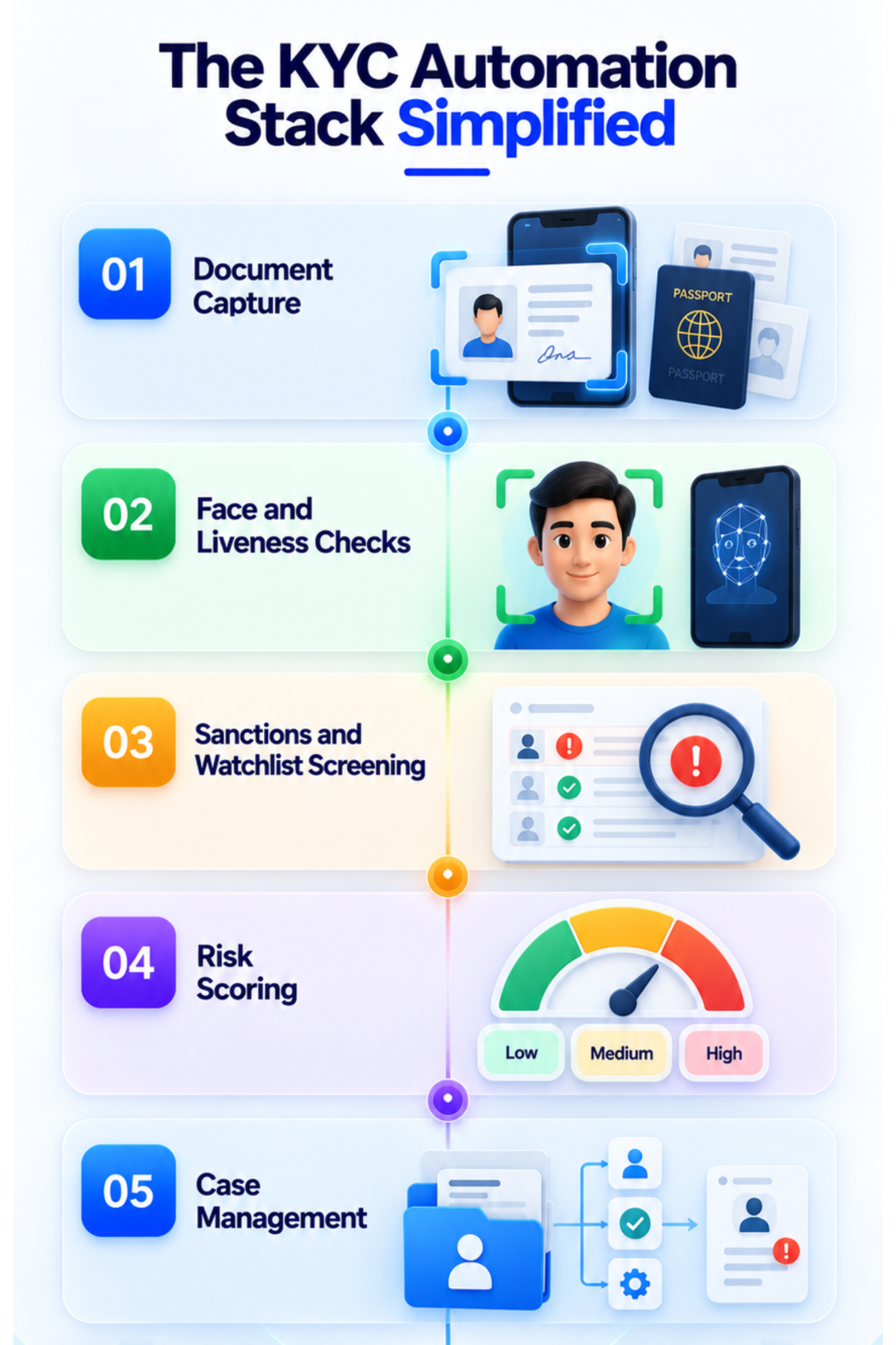
1. Document Capture
This step in KYC automation is where the application uses artificial intelligence to scan ID cards issued by any country. Even before you upload the image, the app scans your photo for blurriness and excessive brightness.
Once the photo is uploaded, the server scans the security code on the card, verifies its validity, and extracts data from it.
2. Face and Liveness Checks
This process in KYC automation verifies that your picture matches your live image. This helps to confirm that you are an actual individual, and not an image that has been taken from somewhere else or a deepfake.
The best authentication systems look at how light interacts with your face and don’t ask you to move your head around.
3. Sanctions and Watchlist Screening
This is the part of the KYC automation process where your name is checked against sanctions lists, politically exposed persons, and law enforcement databases. The old systems just compared names.
This was leading to too many false positives and did not account for name changes. The new systems look at nicknames, birth dates, and more.
4. Risk Scoring
In this way, each customer will get a risk score depending on the country of their residence, type of account, and exposure to sanctions.
The KYC automation system groups people into either Low, Medium, or High Risk categories. The High Risk category will require additional measures like proving the source of funds. Starting in 2026, it will determine the frequency of the bank's checks on the customer.
5. Case Management
This is the command center - It assigns tasks and switches to backup if something fails, so that the customer doesn’t get stuck halfway through signing up.
If there is any threat detected, the KYC automation system aggregates all scores and records into a single screen for human review rather than making him/her dig around five different systems.
Manual vs. Automated KYC
The change from manual to automated KYC changes speed, cost, and accuracy.
The Issues With Automated KYC You Cannot See
Most banks track how fast their back office works. Few track how many customers quit partway through sign-up.
According to Fenergo, last year 70% of banks lost customers to slow onboarding. That is the highest number on record, up from 67% in 2024 and 48% in 2023.
So it’s pretty clear that people give up faster than they used to. The average person now quits a sign-up flow after 18 minutes and 53 seconds.
Four years ago, that number was 26 minutes. Good bank checks now finish in under 30 seconds. Anything slower starts losing people. Four things drive most of the drop-off:
- No ID on hand (38%): The flow asks for a physical ID the user cannot find, and they rarely come back.
- Privacy worry (21%): 92% of people worry about how their data gets stored, and confusing requests make it worse.
- Tired of face scans: Repeated head-turn checks frustrate users and often fail in bad lighting.
- Too many steps: Over 30% of users call the process too complex, and being sent to an unfamiliar third-party site raises doubt.
If you spend $100 to win a customer and lose 15% of them to a clunky sign-up, that money is gone.
The Remediation Gap
The remediation gap is what happens when a check does not get a clean match.
Between 15% and 40% of applicants fall out of automatic approval because of small errors: glare over an expiration date, a hyphenated last name, or a typo between an address and a utility bill. None of this is fraud. Most of it can be fixed in seconds.
- The older and legacy systems handle this badly. The customer sees a vague "Application Pending" message with no timeline and no next step.
- Their case sits in an unsorted queue with hundreds of others, waiting for someone to get to it. Staff can take anywhere from 48 hours to several weeks to follow up and ask for new documents.
- By then, up to 80% of these customers have already given up and moved on. A fixable problem turns into lost business, and the bank never even learns why.
Writing Decline and Pending Messages
Getting this right means balancing a good customer experience with the law. Under rules like the UK's Proceeds of Crime Act and the US Bank Secrecy Act, banks cannot tell a suspect that they are under investigation.
This is called tipping off, so decline messages can never reveal a risk score or the reason behind a flag. Good systems split their messages into three types:
- Fixable issues: For a simple problem like a blurry photo, give clear instructions, like "retake the photo without flash." No human needed.
- Pending review: For cases sent to a human, set a clear expectation, like "you'll hear back within four hours." This alone cuts down on support calls.
- Formal declines: For a real sanctions match or fraud, use plain, approved wording. Staff must state only that the applicant does not meet the bank's criteria, and nothing more.
False Alarms Are the Major Cost in KYC Automation
False alarms waste more money than anything else in this field. Screening tools across the industry flag a false alarm 95% to 99% of the time (FluxForce).
Clearing one false alarm costs $25 to $50 at a mid-size or large bank.
- Multiply that by millions of checks a year, and manual review alone burns through millions of dollars.
- The math is not even, though. Missing a real threat, called a false negative, can bring fines in the billions. TD Bank's $3 billion fine for weak AML controls is the case every compliance officer remembers. Because of that risk, teams cast a wide net and put up with the noise.
- That noise has its own cost. Tired staff start skimming instead of reading closely, and they miss real threats buried in the pile. Common names cause needless alarms and drive honest customers away.
- Backlogs grow faster than staff can clear them, and new alerts pile on top of old ones. Smarter tools cut through this by checking extra details, like birth dates and business records, instead of just matching names. This clears false alarms fast while keeping a full record for regulators to review.
What You Should Not Fully Automate in Your KYC Process
KYC automation is great at high-volume, routine work. But automating judgment is risky, and regulators want a human behind these calls.
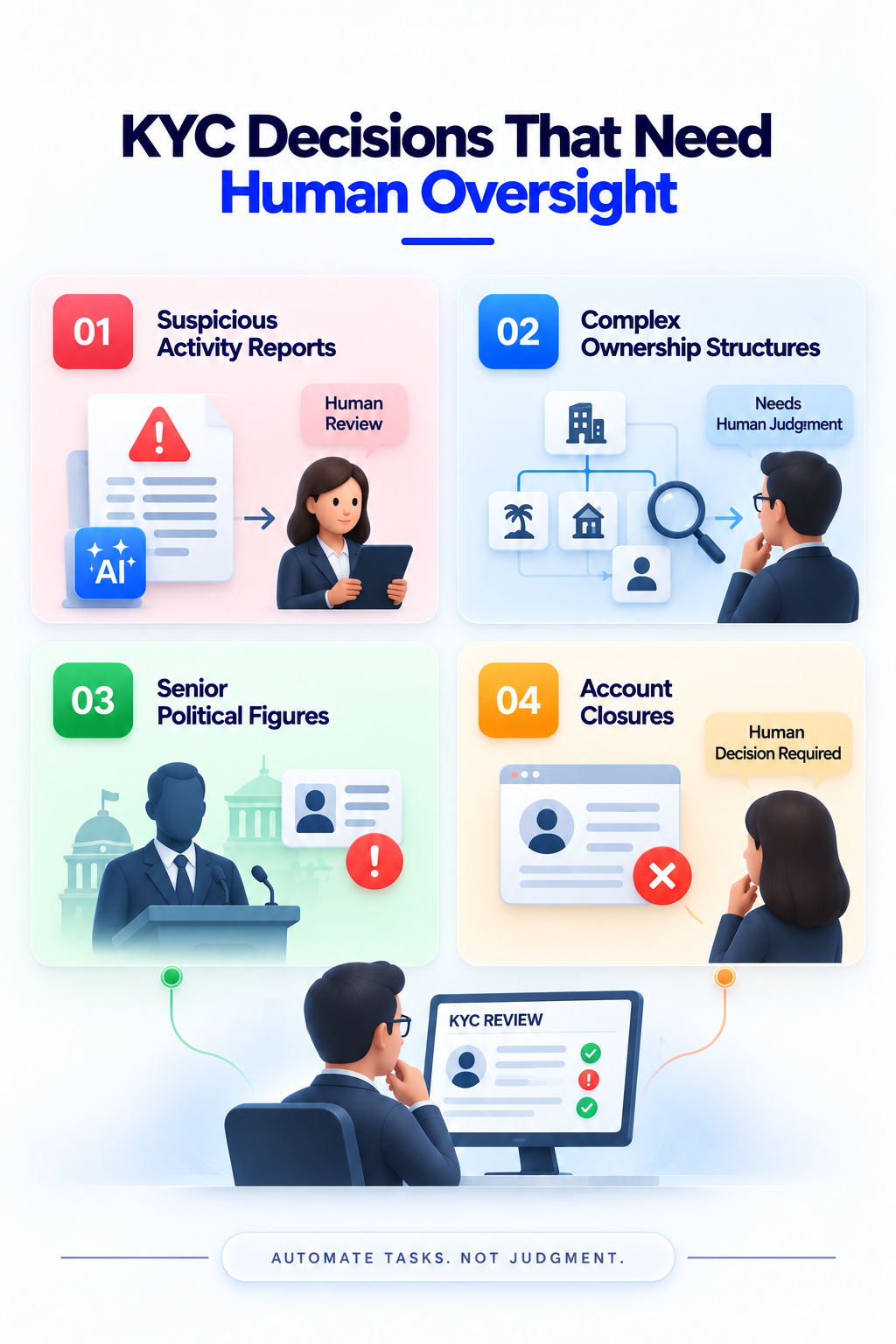
Getting this wrong does not just cost money. It can cost a bank its license to operate:
- Filing suspicious activity reports: AI can gather evidence and draft the report. But a certified compliance officer must make the final call.
- Tricky ownership structures: Automated checks can read basic records. But tracing ownership through offshore trusts still needs a person.
- Senior political figures: Telling a powerful official apart from a low-level one takes context a score cannot capture.
- Closing accounts: Automatic account closures risk unfair treatment and public backlash. A human in the loop makes the decision easier to defend.
The Rules That Shape Your KYC Automation System
Rules around KYC automation vary from one area to another, and you must comply with them.
The latest regulations on anti-money laundering in the EU require traceability of all records for all sign-up methods.
- The AI Act of the EU mandates tough rules about identity-checking AI with explanations and human involvement. According to the GDPR law, customers can always request an explanation of a major decision from a machine by a human being.
- Under the Bank Secrecy Act and the Corporate Transparency Act in the US, banks should check the identity of the person or people who hold at least 25 percent ownership of a business. Also, banks should provide an easy-to-understand explanation of their decisions.
- In the UK, banks should identify the identities of all directors of a business. Internationally, global anti-money laundering laws require risk-based identity verification and traceability of data.
- Every rule points to the same need: a permanent, time-stamped record of every document, score, and decision. If a regulator asks why a system approved or flagged someone, the bank needs a clear answer, not a shrug. That record is what separates a system that can survive an audit from one that cannot.
How to Pick a Vendor in 30 Days, Not Six Months
Most banks waste months testing vendors on clean sample data that never looks like real traffic. A focused 30-day test, built around messy real-world cases, gets you a real answer faster.
- Days 1–10, basic checks: Confirm the vendor holds current security certifications, meets data storage rules, and keeps its app small and fast.
- Days 11–20, stress test: Give every vendor the same set of 100 hard cases: blurry photos, unusual names, and complex ownership structures. Score their accuracy and false alarm rate.
- Days 21–30, audit check: See if each vendor's case files clearly explain their reasoning and keep records that would hold up in an exam.
Score the results against hard targets: under 1.5% wrongly rejected, above 99.5% caught fraud attempts, open and flexible software, clear reasoning behind every score, and setup in under 48 hours.
A 90-Day KYC Automation Rollout Plan
The best way to go about KYC automation is a slow, careful rollout, not a sudden switch.
- Days 1–30, build the base: Connect the new system to your CRM, file storage, and core banking software. Clean up your data and measure your current backlog.
- Days 31–60, run it side by side: Let the new system run next to your human reviewers without acting on its own. Compare results and train your staff.
- Days 61–90, roll it out in stages: Send 10% of low-risk cases through the new system, and watch it closely. Scale up to 25%, then 50%, then 100%.
Track these numbers after rolling out your KYC automation against where you started: automatic approvals should rise from 0% to 65–80%.
How Thunai Fits Into a KYC Automation Workflow
Thunai helps with AI agents for banks, insurers, and other financial firms and does not replace your identity-checking vendor.
Instead, it sits on top, connecting your customer channels, your core banking software, and your compliance team. Thunai closes three gaps:
- Closing the remediation gap: When a check flags a fixable problem, like a blurry photo, Thunai's voice, email, and chat agents walk the customer through the fix in real time, with live AI voice translation in over 150 languages. This solves up to 80% of routine issues and cuts handling time by 42–70%.
- Cutting staff workload: Thunai listens in on tricky cases, pulls up the right records and SOPs using AI agent assist from your other systems, and shows staff the next step, right inside their workspace.
- Keeping records consistent: Thunai connects data across more than 50 platforms, including Salesforce and ServiceNow, cutting errors by up to 95%. It also writes case summaries and builds audit records automatically.
Want to see how Thunai can improve your CX automation for better KYC support?
Book a free demo with our team!
Frequently Asked Questions
1. What is KYC automation?
KYC automation is software that automates how you check a customer's identity, screen them against watchlists, and score their risk, without a human reviewing every case by hand.
2. Can KYC be fully automated?
No. Machines handle most low-risk cases well. But complex cases still need a human. Regulators require a person to sign off on suspicious activity reports, offshore ownership cases, and account closures.
3. How much time does KYC automation save?
KYC automation can cut sign-up time from days to under two minutes for a standard account. For staff, it cuts case review time by 42–70% and removes up to 80% of routine data entry.
4. What is perpetual KYC?
Perpetual KYC is ongoing risk checking. Instead of reviewing a customer every one, three, or five years, the system checks risk any time something changes, like a new business role or a new watchlist hit.
5. What should we look for in a vendor?
Look for open, flexible software, a fast and simple app, and clear reasoning behind every score. Confirm they hold current security certifications, follow local data storage rules, and perform well on messy, real-world documents.