Back-to-back meetings are the new normal for sales reps, founders and customer-facing teams. But writing up EVERY call, updating the CRM and chasing follow-ups can quickly eat half your day!
That’s why AI meeting assistants and AI meeting notetakers have exploded in popularity… and why meeting automation platforms are now part of the conversation.
Two tools keep coming up in 2026. Granola AI focuses on bot-free meeting transcription and AI-generated notes. Thunai Edge combines meeting intelligence with autonomous AI agents, multimodal capture and workflow automation.
In this comparison, we look at functionality, automation, enterprise readiness and productivity.
Granola AI vs Thunai Edge: What Is the Difference?
Most AI meeting assistants do one thing: they turn conversations into text. The fact is that meeting transcription alone doesn’t finish the job, because someone still has to act on it.
Meeting intelligence, multimodal AI and autonomous AI agents are what move a tool from notes to enterprise workflow automation.
What Is Granola AI?
Granola AI is an AI meeting notetaker that captures conversations and generates contextual meeting notes.

- Bot-free audio capture through desktop applications.
- AI meeting transcription, manual note enhancement and automated summaries.
- Granola Chat, meeting history, Spaces and Model Context Protocol (MCP).
- Best suited for individual professionals, founders and product teams that need meeting documentation.
What Is Thunai Edge?
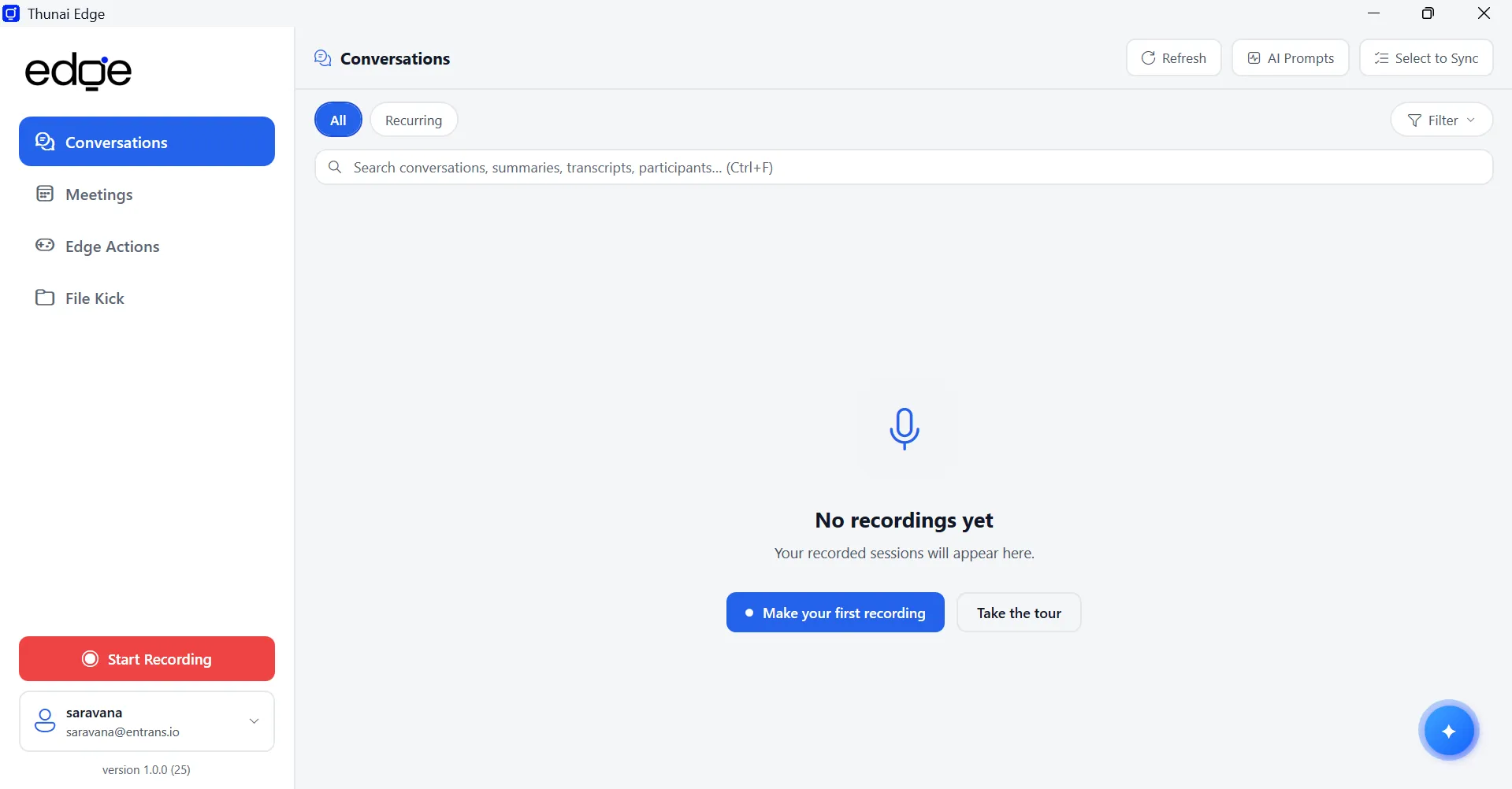
Thunai Edge is an AI-powered desktop assistant that combines conversation intelligence, multimodal capture and autonomous workflows.
- Edge Listen for meeting conversations and real-time transcription.
- Screenkick for connecting spoken conversations with on-screen activity.
- Edge Actions for pre-meeting, post-meeting and always-on automation.
- Ask Edge and Edge File Kick for enterprise knowledge retrieval.
- Teach Edge for custom AI-powered workflow automation.
Granola AI vs Thunai Edge: Core Differences
- Meeting notes versus meeting intelligence and execution.
- Manual recording activation versus Automated Meeting Detection.
- Audio-based context versus multimodal audio and screen context.
- Static AI summaries versus autonomous workflow execution.
- Meeting-based knowledge versus meeting and external document knowledge.
Granola AI vs Thunai Edge: Meeting Recording, Transcription and AI Notes
Nothing is worse than finishing a call and realizing nobody hit record. Capture is where AI meeting transcription either works or fails, so let’s start there.
How Does Granola AI Handle Meeting Recording and Transcription?
- System audio capture through macOS and Windows apps, with bot-free recording across Zoom, Google Meet, Microsoft Teams and Slack Huddles (see Granola’s security page).
- Speech-to-text from third-party transcription providers.
- Recording must be started manually for every meeting.
- Speaker identification can struggle in larger meetings, as noted in the buyer evaluation.
How Does Thunai Edge Improve Meeting Capture?
- Automated Meeting Detection spots meeting environments and prompts you to start recording.
- Universal Recording Control for on-device recording.
- Screenkick captures on-screen activity alongside system audio, with user consent.
- Live Transcript Engine processes audio chunks dynamically for real-time contextual assistance.
Granola AI vs Thunai Edge: Which Provides Better Meeting Context?
- Audio-only capture versus multimodal audio and screen context.
- Manual activation versus automated detection prompts.
- Post-meeting transcription versus live transcript processing.
- Screenkick ties what was said to what was actually done on screen.
- That extra context matters for sales, support and operational workflows.
Granola AI vs Thunai Edge: AI Meeting Summaries and Automated Workflows
A clean summary is great… until you still have to copy action items, draft emails and update the CRM yourself. This is where meeting minutes end and meeting follow-up automation begins. Let’s see what each tool actually does with your call once it ends.
How Does Granola AI Generate Meeting Notes and Action Items?
- Combines your own rough notes with the AI-generated transcript.
- Produces structured summaries, decisions and action items.
- Lets you inspect the transcript passage behind each summary statement.
- Follow-up tasks, CRM updates and emails remain manual.
How Does Thunai Edge Automate Post-Meeting Workflows?
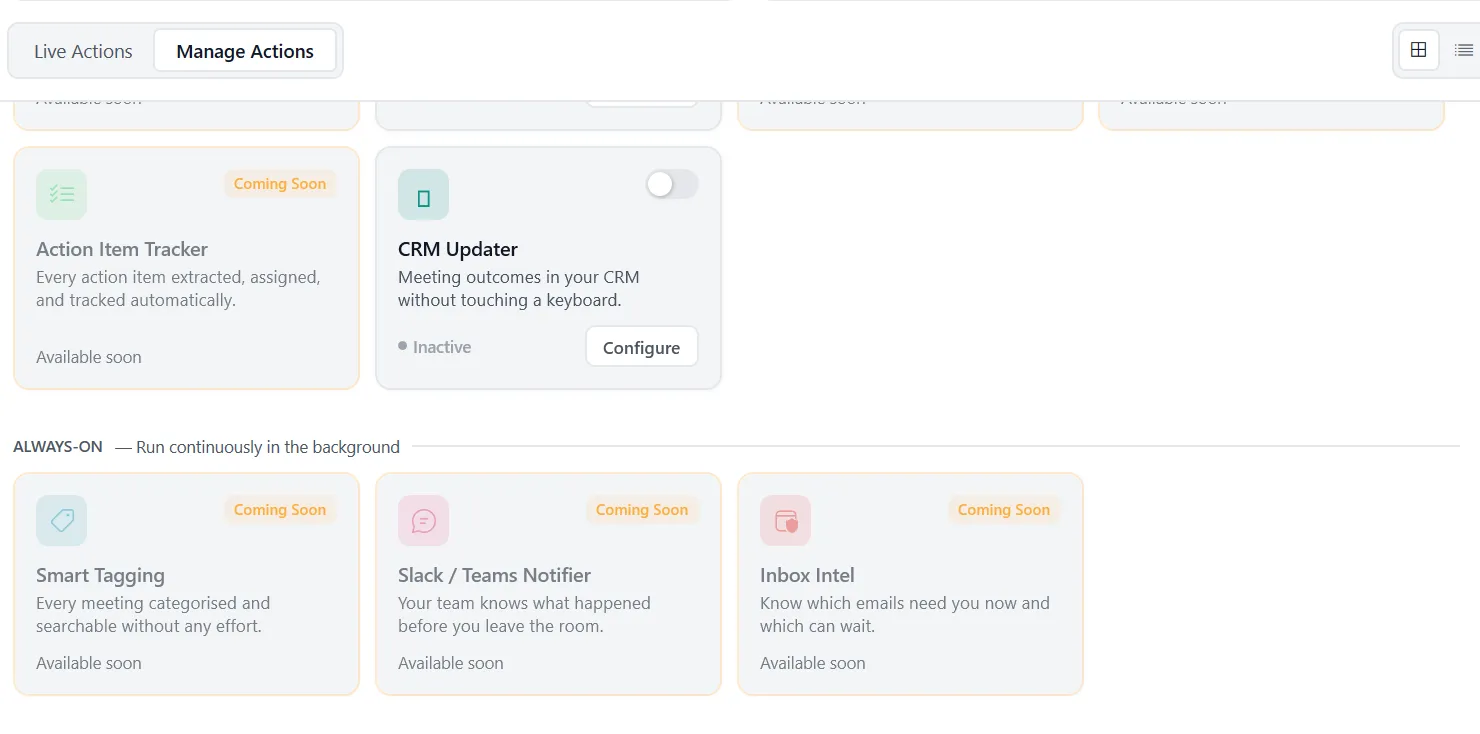
Edge Actions run automated workflows around your meeting schedule.
- MOM Sender prepares and distributes Minutes of Meeting.
- Follow-up Email Drafter writes contextual follow-ups.
- Deadline Reminder Agent extracts commitments and creates reminders.
- Action Item Tracker extracts, assigns and tracks tasks.
- Calendar Assist processes scheduling requirements.
Granola AI vs Thunai Edge: AI Meeting Assistant and Enterprise Knowledge Management
Your best answers rarely live in a single meeting. They’re scattered across calls, PDFs and shared drives. A good AI meeting assistant should connect all of them. Granola Chat is helpful here, but its intelligence stops at the meetings it has transcribed.
What Can Granola Chat Do?
- Ask questions about individual meeting transcripts.
- Search historical meetings and retrieve previous discussions.
- Cross-meeting intelligence through folders and Spaces on eligible plans.
- Retrieve decisions, customer feedback and conversation context.
- Fuller history requires Business or Enterprise, since Basic limits it to 30 days.
How Do Ask Edge and Edge File Kick Extend Meeting Intelligence?
- Ask Edge gives conversational access to meeting and document knowledge.
- Edge File Kick ingests PDFs, Word documents, TXT and Markdown files.
- Supports local uploads, Google Drive and bulk folder uploads.
- Grounds answers in your own documents, similar to RAG-style retrieval.
Granola AI vs Thunai Edge: Meeting Knowledge vs Enterprise Knowledge
- Searching past meeting notes versus querying meetings and external documents.
- Ask Edge can reference company-specific documentation.
- Sales example: compare a customer’s requested feature against specs in an uploaded PDF manual.
- Connecting conversations with organizational knowledge means faster, more accurate answers.
Key takeaway:
Granola provides meeting-centered intelligence. Thunai Edge extends AI knowledge retrieval across conversations and connected enterprise documents.
Granola AI vs Thunai Edge: Customization and AI Workflow Automation
Every team runs meetings differently. Some need a tidy template. Others need the work after the call done for them. Customization means very different things depending on which tool you pick.
How Does Granola AI Customize Meeting Notes?
- Prebuilt templates for sales discovery, stand-ups and one-to-one meetings.
- Custom Recipes control summary structure, tone and format.
- Template-driven AI-generated documentation.
- Useful for matching output to roles, such as PRDs for product managers or candidate rubrics for recruiters.
How Does Teach Edge Create Custom AI Actions?
- You present your screen and narrate each step of a task.
- Multimodal AI captures clicks, navigation and voice instructions.
- It generates a repeatable automated routine from your demonstration.
- You review and confirm the steps before saving.
- Custom actions can be triggered by meeting types or specified keywords, such as the end of a particular call type.
Granola AI vs Thunai Edge: Custom Notes vs Custom Automation
- Customizing AI-generated text versus customizing business workflows.
- Teach Edge converts manual activities into repeatable routines.
- Meeting-triggered automation reduces repetitive desktop tasks, from robotic process automation to data entry.
- Sales reps, support agents and ops teams can automate their own routines without writing code.
Key takeaway:
Granola customizes meeting documentation, while Teach Edge enables users to create repeatable software workflows through visual training.
Granola AI vs Thunai Edge: Integrations, CRM Automation and Productivity
Notes that sit in an app don’t close deals. The real productivity gain comes when meeting outcomes flow into the tools your team already uses.
Disconnected tools mean copy-pasting, and copy-pasting means errors.
Granola AI Integrations and Workflow Capabilities
- Slack, Notion, HubSpot, Linear, Affinity and Attio integrations.
- Zapier connectivity for third-party workflow automation.
- Model Context Protocol (MCP) integration with ChatGPT, Claude and Cursor, as Granola explains.
- Enterprise APIs and webhooks for sharing meeting data.
- Most integrations are limited to the Business and Enterprise plans.
Thunai Edge Integrations and Always-On Workflows
- CRM Updater logs meeting outcomes automatically.
- Slack / Teams Notifier sends automated team updates.
- Inbox Intel triages and prioritizes email.
- Google Drive for knowledge ingestion and cloud backup.
- CCAI credentials connection and live gRPC audio streaming.
- Smart Tagging categorizes every meeting automatically, and Always-On Workflows run in the background without manual triggers.
Which Platform Delivers Better Business Productivity?
- Meeting note exports versus automated CRM updates.
- Manual workflow triggers versus always-on background actions.
- Automated task distribution and communication save hours each week.
- Faster handoffs mean prospects hear back while the conversation is still fresh.
- Sales, customer success and operations teams all benefit.
Thunai Edge is positioned beyond conventional meeting integrations through CRM Updater, Inbox Intel and Always-On Workflows.
Granola AI vs Thunai Edge: Security, Privacy and Enterprise Readiness
Meetings are full of pricing, personnel and customer data. In order to adopt any AI notetaker, your IT team needs to trust where that data goes.
Granola AI Security and Data Processing
- Cloud-based processing on AWS, with third-party transcription and large language model providers.
- Audio files are not retained after transcription; transcripts and notes are stored.
- SOC 2 Type II certification, as Granola reports.
- SSO, SCIM and organizational administration on the Enterprise tier.
- The Chamberlain v. Granola class action alleges its bot-free capture violates wiretap laws. These are allegations, not proven findings.
Thunai Edge Security and AI Model Control
- Bring Your Own Key (BYOK) architecture.
- Granular configuration of text, audio and vision models.
- Support for configurable local Small Language Models (SLMs), though not every deployment is automatically offline or compliant.
- Activity Logs cover authentication, network, transcription, AI analysis and agent events, with timelines and severity filtering.
Granola AI vs Thunai Edge: Which Offers Better Enterprise Control?
- Cloud-dependent AI processing versus configurable model deployment.
- BYOK matters for enterprise AI governance.
- Compare operational visibility and diagnostic capabilities.
- Verify data privacy, access controls and compliance requirements with both vendors.
Key takeaway:
Thunai Edge offers differentiated AI model configuration and operational visibility. Buyers should validate deployment-specific security, data handling and compliance requirements with both vendors.
Granola AI vs Thunai Edge: Pricing, Value and Total Cost of Ownership
Per-seat price is only half the story. The real question is what each tool saves you in hours, handoffs and missed follow-ups. Aside from this, a cheap notetaker that still needs manual cleanup can cost more than it seems.
Granola AI Pricing and Plans
According to Granola’s pricing page and the buyer evaluation:
- Basic: $0 per user per month, with 30-day history.
- Business: $14 per user per month, with unlimited history and integrations.
- Enterprise: $35 per user per month, adding SSO, SCIM and sharing controls.
- No usage-based or per-minute fees, so budgeting is predictable.
Thunai Edge: Evaluating Business Value
- Value comes from autonomous agents and automated workflows.
- Consider fewer manual CRM updates, meeting admin tasks and email follow-ups.
- Weigh the cost of replacing several manual productivity processes at once.
- Request current Thunai Edge pricing directly rather than assuming a figure.
Which Platform Offers Better Value for Businesses?
Compare subscription costs against the business processes actually automated, the time saved and your operational requirements.
A notetaker that documents meetings helps, but a platform that completes the follow-up work helps far more.
For a 100-person team, Granola’s Enterprise tier alone adds up to $42,000 a year, so it pays to know exactly what you’re getting.
Granola AI vs Thunai Edge: Which AI Meeting Assistant Should You Choose?
Both tools are strong. They just solve different problems, so the right pick depends on whether you need notes or execution. Granola holds a 4.6 out of 5 rating from 197 reviews on G2, per the buyer evaluation.
When Should You Choose Granola AI?
- Individual professionals requiring bot-free meeting notes.
- Founders and consultants who prioritize meeting transcription.
- Product and engineering teams using MCP-connected workflows.
- Users who mainly need polished AI-generated summaries.
When Should You Choose Thunai Edge?
- Sales teams requiring automated CRM updates and follow-ups.
- Customer-facing teams requiring real-time meeting assistance.
- Businesses seeking multimodal meeting intelligence.
- Organizations requiring custom desktop workflow automation.
- Enterprises needing configurable AI models and activity logs.
Final Verdict: Why Thunai Edge Is the Better Business AI Assistant
Granola is a capable AI meeting notetaker, but Thunai Edge delivers a broader business productivity proposition.
Automated Meeting Detection, Screenkick, Edge Actions, Teach Edge, Ask Edge, Edge File Kick, BYOK and Activity Logs extend meeting intelligence into business execution.
For organizations evaluating AI tools on workflow automation, contextual intelligence and operational productivity, Thunai Edge is the stronger choice.
Ready to see what your meetings could do after they end? Try Thunai Edge and find out!
FAQs About Granola AI vs Thunai Edge
1. What is the difference between Granola AI and Thunai Edge?
Granola focuses on meeting transcription and AI note generation. Thunai Edge adds multimodal meeting intelligence and autonomous workflow execution.
2. Is Thunai Edge a good alternative to Granola AI?
Yes. Thunai Edge extends meeting capture into automated workflows, CRM updates, document intelligence and custom actions.
3. Does Granola AI automatically record meetings?
No. Granola captures desktop audio without a bot, but recording must be started manually for each meeting.
4. Can Thunai Edge automatically detect meetings?
Yes. Automated Meeting Detection identifies meeting environments and prompts you to start recording.
5. Does Granola AI support automated CRM updates?
Granola integrates with tools like HubSpot, but that is integration-based sharing. Thunai Edge’s CRM Updater logs outcomes automatically.
6. What is Screenkick in Thunai Edge?
Screenkick captures on-screen activity alongside audio, connecting spoken conversations with the actions happening on screen.
7. Can Thunai Edge automate follow-up emails and meeting minutes?
Yes. MOM Sender, Follow-up Email Drafter, Calendar Assist and Deadline Reminder Agent handle these tasks after recording ends.
8. Is Thunai Edge more suitable for enterprise AI automation than Granola?
For automation-heavy teams, yes. It offers autonomous workflows, BYOK, local SLM options, document ingestion and Activity Logs.
9. Does Granola AI support MCP integration?
Yes. Granola’s Model Context Protocol server connects meeting knowledge to external AI clients like Claude, ChatGPT and Cursor.
10. Which is better for sales teams, Granola AI or Thunai Edge?
Thunai Edge, thanks to automated CRM updates, action item tracking, follow-up email generation and meeting-triggered workflow execution.