ServiceNow gives companies a reliable way to manage customer support and automation tasks across different company teams.
In fact, over 8,400 businesses trust this platform, and its users include 85 percent of the biggest companies in the world.
This guide will look at needed features in ServiceNow automation. We will also point out the common issues slowing down your ROI when using ServiceNow automation and how to fix them…
The ServiceNow Automation Gap: Why Most Setups Fall Short
ServiceNow is a top global business software. The system acts as a smart platform for business change. Still, that does not mean ServiceNow automation comes without its own flaws:
The Promise vs. The Reality of ServiceNow Automation
The Promise: The makers built the platform from the start to give a smooth, shared experience. This design limits the number of different digital tools a business needs. The main goal is to get faster results. The tool also aims to lower running costs and improve both the customer and worker experience. Also, by adding smart learning and AI right into tasks, the platform automatically handles hard choices.
The Reality: The same strong features and huge size that make ServiceNow useful also lead to major complaints. Users often describe the platform as a giant software that is very hard to control. The software needs a focused, highly trained IT team to set up and run. As a result, the messy background setup often overwhelms smaller teams.

Why Automation Stops After the First Wave of IT Tasks
Many businesses get quick wins by making basic requests automatic. These Servicenow automations include password resets or software access. But, moving past these normal processes is hard.
- The core of the platform is deeply tied to standard IT rules. By making processes standard to fit these rules, ServiceNow creates a strict, clear work space.
- So, when businesses try to make special tasks automatic for other teams, they face problems. Inside coding for custom links takes up huge amounts of time and money. In fact, 60 percent to 70 percent of total link costs come from ongoing upkeep, updates, and changes to new app links.
- Building custom fixes needs focused coder time, constant safety updates, and threat checks. Teams must do full rebuilds when linked platforms bring in big changes.
The Four Setup Blocks Slowing Every New Task
- The Custom vs. Ready-to-Use Problem: Businesses often try to copy their old ways of working exactly. Teams force ServiceNow to copy the broken steps of older systems. This heavy custom coding creates a huge technical mess. Such changes also block future twice-a-year platform updates. This action goes against the main value of the tool.
- Moving Data and Database Cleaning: Automatic ticket routing and smart guessing rely fully on a clean main database. Bad data cleaning before moving files greatly lowers the success of the platform. Moving years of messy, hidden, and often wrong data from older systems into ServiceNow is full of data errors.
- Coder Trouble and Hard Screens: ServiceNow built a new user screen known as the Next Experience UI Framework. This tool, mostly UI Builder, is often very heavy on computer memory. Reddit users point out that the screen uses up to 8 gigabytes of RAM on local computers. This heavy load leads to browser crashes and general system crashing, annoying coders.
- Hard Links: Linking ServiceNow to hard, custom, local business systems can still need custom coding. This deep tech work slows down new task launches. There are natural limits on what kinds of answers the system can give without grouping and actively reading data from these outside systems.
What ServiceNow Automation Can Do and Where The System Always Struggles
ServiceNow automation works as a system that links tasks across separate apps. The maker gives a shared space designed to grow with business needs - we actually go over it’s full features in our ServiceNow honest review article.
What The Platform Does Best: The software is great at making processes standard to fit IT rules. This creates a clear, steady work space. The service gives a central design that acts as a single source of truth. This setup greatly drops issues between teams by putting HR, IT, and Customer Service on the same data plan. Also, your Servicenow automation system can grow easily, is very reliable, and can cover global business work.
Where The Platform Struggles: ServiceNow struggles when businesses drift far away from standard tasks. Making deep custom changes is full of tech trouble. These changes lead to slow custom screens and lock businesses into huge code problems. Keeping up these custom Servicenow automation setups twice-a-year updates turns into a huge admin headache. Also, advanced AI tools and higher parts need costly premium upgrades. These high costs can drain IT funds.
The Real Cost of Under-Automation: What the Gap Is Actually Costing You
When teams do not grow ServiceNow well, the money hit is hard. High license fees show up as a constant, loud complaint across user reviews. Many users call the platform too costly.
Getting the most value with Servicenow automation often needs hiring costly outside experts or approved partners. This need greatly blows up the starting setup budget.
- Industry guesses suggest that a basic IT worker license ranges from $70 to $100 per user per month. But, branching out into IT Operations pushes this to $150 to $250 per user per month.
- AI add-ons usually drive up total license costs by another 50 percent to 60 percent. A common money risk in this model is buying too much.
- Businesses sign long contracts for top-tier tools they lack the skills to launch. This mistake leads to very costly unused software.
- Also, the starting build makes up only 30 percent to 40 percent of the total cost for custom integrations. The other 60 percent to 70 percent gets eaten up by ongoing upkeep, updates, and changes to new apps.
- Studies always show that large inside IT projects run about 45 percent over budget while giving 56 percent less value than first guessed. But this is due to developer costs - no code platforms like Thunai avoid this COMPLETELY.
Why Scaling ServiceNow Automation Is Harder Than It Should Be
Scaling Servicenow automation needs smooth coder steps and wide user approval. Sadly, ServiceNow update efforts have brought in new hard points.
- The shift to the new user screen has not happened without trouble. Coders point out usability issues. The typing boxes within the screen builder get complaints for being too small, and the logic tools can feel awkward.
- Also, a platform only works as well as its adoption rate. ServiceNow setups deeply change how workers do their jobs, sparking natural pushback. Without clear rules, strong boss support, and endless user training, platforms use stalls.
- If workers find the heavily custom screens or new tasks confusing, they will naturally skip the automatic systems entirely. They fall back on old chat methods like email or direct messages. This step back hurts the whole money bet and stops automation growth completely
- Heavy custom code also makes platform updates hard and piles on massive code mess. Critics argue that the hard learning curve and unclear guides of the UI Builder often drive coders to build things that are too complex. This habit often leads to bad, broken user experiences.
- Using no code AI CX automation platforms like Thunai allows you to automate your full ServiceNow automation journey without the HEAVY overheads that come with AI developers.
Main Types of Automation in ServiceNow and When to Use Each
To run Servicenow automation these are some tools that are typically used. In fact, ServiceNow gives you these highly advanced set of coder tools that range from visual screens to hard coding areas.
1. Flow Designer
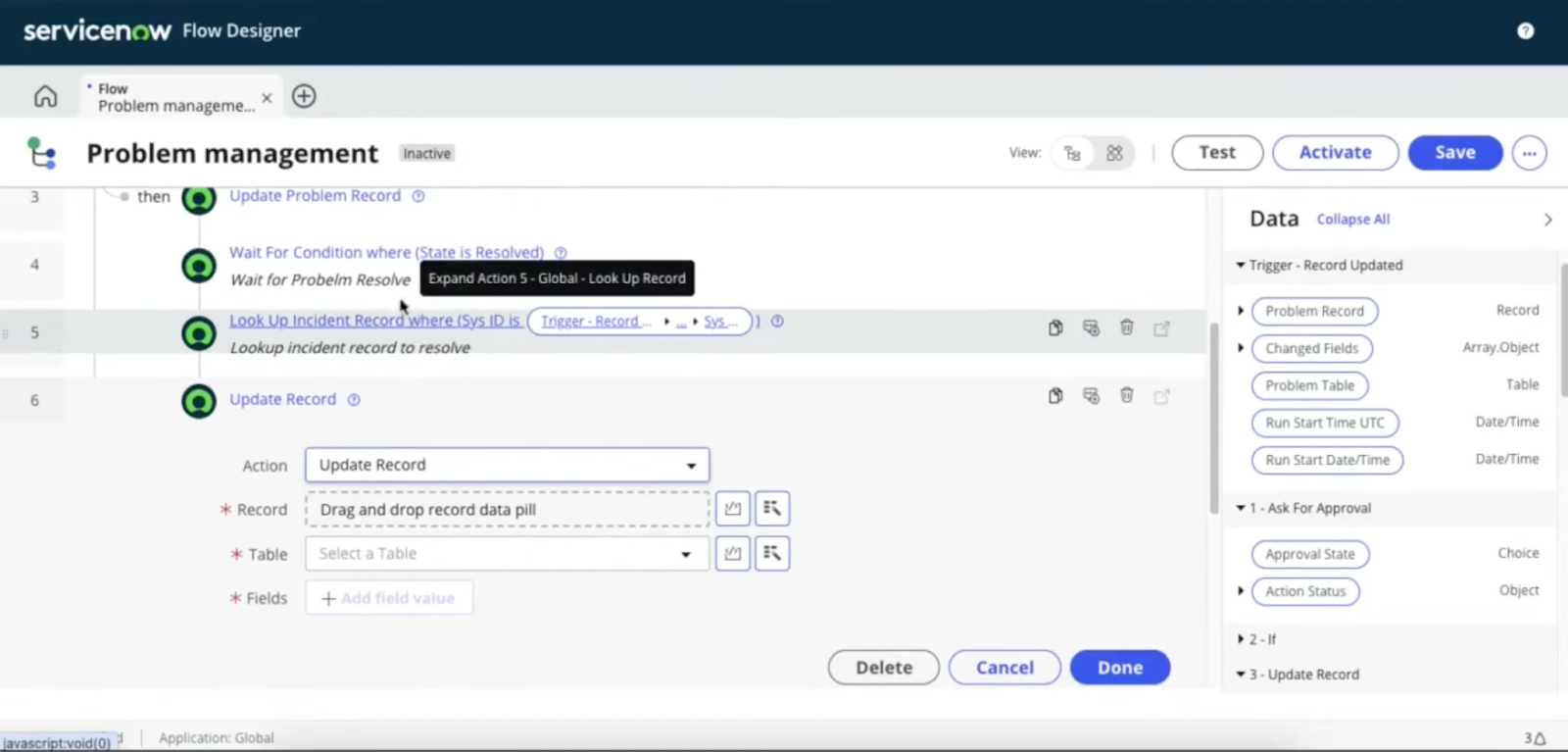
This Servicenow automation tool acts as the core part of the low-code automation plan. Flow Designer is a visual, plain-word tool. Admins use this space to build tasks without writing normal code.
The system relies on Data Pills. These Data Pills are changing data bits made automatically. Coders can easily pass them on to next steps. Businesses bring in this tool for step-by-step okays, standard paths, and lowering trust on weak code.
By using Flow Designer, businesses greatly lower their trust on hard, weak code. This choice makes tasks much easier to keep up, check, and update during platform new releases.
2. Business Rules
For deeper, data-level Servicenow automation that needs strict data safety, the platform uses Business Rules. These rules act as background code bits. Database actions start them right away or later.
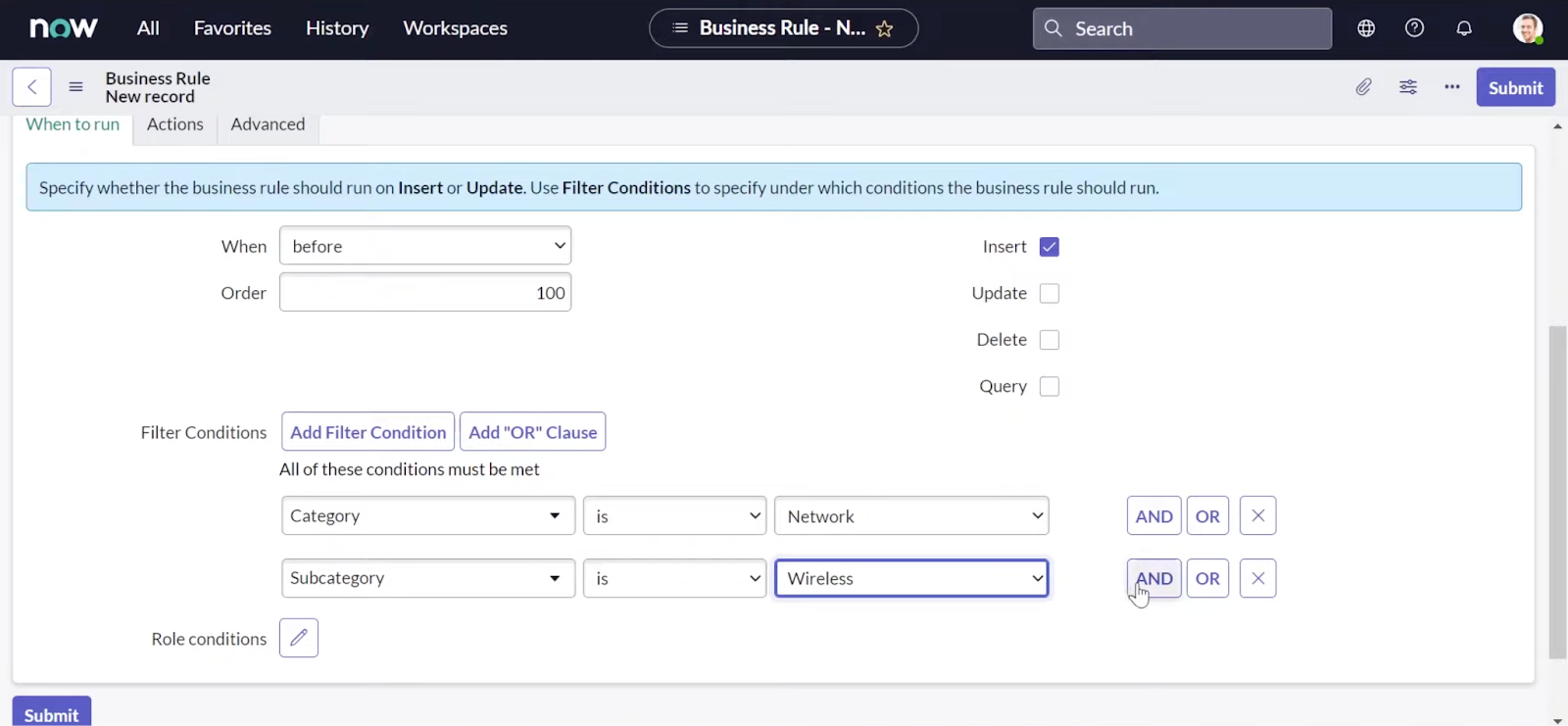
- Mainly, they start when records are added, changed, deleted, or asked for. Admins set up these rules to apply strict data logic close to the database level.
- An example is guessing the urgency of a ticket based on changing facts. Another example involves stopping a problem from being closed if the needed fix notes are empty.
- However, design guides and coder rules advise great caution. Relying too much on hard, instant Business Rules can cause severe speed blocks. They block the user screen from loading until the database action is done.
3. Scheduled Jobs and Script Includes
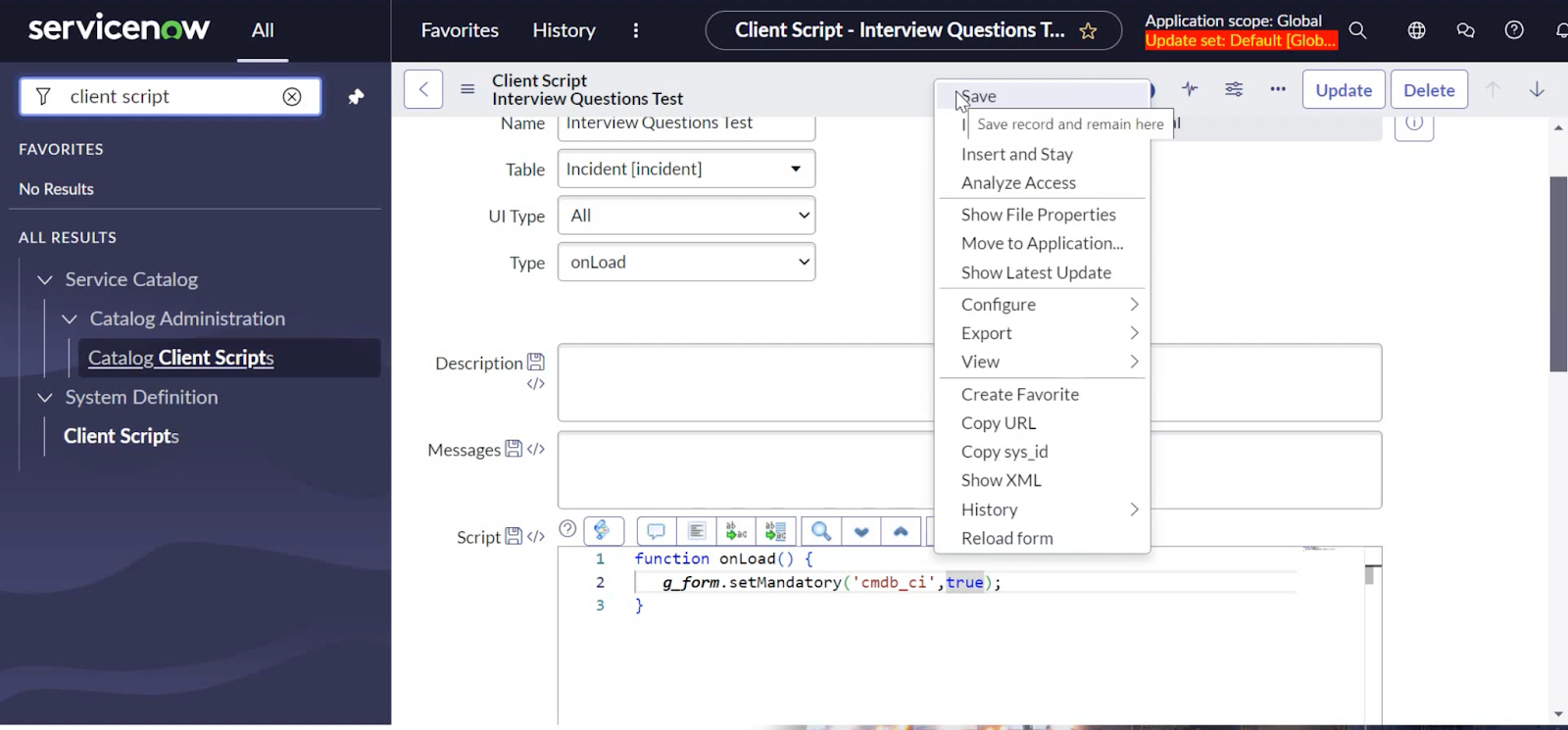
Business Servicenow automation often needs timed, non-event-based actions. Scheduled Jobs make tasks automatic at set times. To keep this logic easy to fix, coders use Script Includes.
- These files act as advanced, reusable sets of background code. System builders can call on them from many areas of the platform.
- Teams count on these scripts to run nightly database cleanups or make monthly safety reports. They also set them up to check an outside supplier app every hour for status updates.
- The use of Script Includes pushes the main coding rule of Don't Repeat Yourself. This habit makes sure that a single logic change flows rightly across all automatic tasks.
Main Tools and Parts Powering ServiceNow Automation
ServiceNow moves away from single-fix tools. The company gives a shared space. This space breaks down into clear product groups. Each group handles a special layer of the business tech stack and Servicenow automation.
1. Integration Hub
Servicenow automation is basically impossible without proper integrations. The Integration Hub acts as a modern app link solution. Designers built this tool to lower the cost and mess of linking ServiceNow to outside, third-party systems. The system uses reusable, ready-made links known as Spokes.
- These parts quickly connect with apps like Microsoft Teams, Jira, and AWS without custom app code. By centrally handling logins, speed limits, and data mapping, the hub greatly lowers code mess.
- This tool lets tasks cross the gap between inside IT systems and outside working systems. The link makes sure that a single start in ServiceNow can carry out hard changes across many different software spaces.
2. Robotic Process Automation Hub
For older systems that lack app links, the RPA Hub makes repeated tasks automatic. The hub copies human clicking and typing directly on standard computer screens.
This Servicenow automation setup supports both Assisted Robots to help human workers and Unseen Robots running automatically in the background for heavy data typing.
By managing these bots right inside the ServiceNow Automation Center, businesses reach a mixed automation plan. This plan covers both modern app links and older screen automation.
3. Process Mining and Document Intelligence
Process Mining uses background action logs to point out hidden slowdowns. Servicenow automation only works well if the base processes are smoothed out. Moving a broken process to computer format merely speeds up bad work.
- Process Mining gives clear, visual maps of how tasks are actually done versus how they were planned to be done. Paired with Document Intelligence, businesses can use AI to grab data from neat and semi-neat forms.
- This tech lets groups turn manual, paper-based processes into digital data and push the pulled data directly into automatic tasks. This setup fully automates steps like reading bills in Accounts Payable and adding new suppliers.
4. Now Assist
ServiceNow has strongly added Smart AI into the platform through the Now Assist tools. These Servicenow automation tools bring a shift from normal step-by-step automation to self-running, smart AI.
This ready-for-business AI sets out to boost human output directly inside the workspace.
- Now Assist can sum up hard IT error records. The tool writes exact fix notes and powers talking Virtual Bots.
- This addition greatly drops the average time to fix issues by saving agents time spent reading long ticket pasts.
- The arrival of self-running AI bots further boosts this tool. The AI lets the platform actively plan, do, and watch multi-step fix tasks with very little human watching.
How Thunai Closes the Gaps ServiceNow Automation Leaves Open
Usefulness in your Servicenow automation system can get quicker to deploy and easier to set up by using the Servicenow automation with Thunai AI.
While the native ServiceNow UI Builder can feel awkward and lead to coder trouble, Thunai steps in as the smooth, smart layer on top.
High-level AI add-ons from ServiceNow carry heavy price tags. Thunai spans the gap between your costly IT service desk buy and the high-value automation you actually need.
- Faster Results: Instead of spending months building custom code and fighting the Custom vs. Ready-to-Use problem, Thunai drops human-like AI bots directly into your tasks. This addition frees up your costly licensed agents for high-value planned work right away.
- Skipping Code Mess: Thunai stops the need to over-build tools inside ServiceNow. The outside layer handles hard routing, instant fact finding, and live teaching outside of strict Business Rules. This setup stops the awful system speed blocks that ruin heavy platform custom setups.
- Getting the Most Money Back: You no longer have to risk buying costly unused software to get top-tier AI. Thunai easily links to your current ServiceNow data sets. This link turns your IT service desk into a smart, self-improving unit from day one.
ServiceNow Automation Case Studies in Real Teams: What Closing the Gap Actually Looks Like
When businesses stop seeing ServiceNow merely as a simple ticket tool and start using the software as a planned automation tool, the math reason to invest becomes clear. Despite the high total cost to own, hard learning curves, and setup hurdles, global brands continue to spend heavily on ServiceNow. This huge money choice makes sense due to deep, trackable money returns. Here is what success looks like in real teams:
- Building and Health Work: Facing hard health and safety check needs, the National Basketball Association launched ServiceNow Workplace Service Delivery. They used the software to fully rebuild building systems. By moving away from scattered Microsoft Office tools and older building fixes, the group hit a 51 percent ROI. They fully won back their spent cash within just two years of setup.
- Global IT Support: A global shop business fighting with broken support systems used ServiceNow ITSM to map tasks and make ticket routing automatic. Within just one month of setup, the IT team hit a 25 percent drop in fix times. They also saw a 30 percent drop in pushed-up tickets. This change greatly improved the end-user experience.
- Product Building and Rule Following: Another large company used Customer Service Management to test and build new business tools. By using ready-made tasks instead of custom coding, they fully automated 95 percent of safety rule checks. They brought business apps to users in half the normal build time. This sped-up timeline boosted company profits.
- Inside Smart AI Use: ServiceNow's own inside use of AI brought a $5.5 million ROI in savings. Through AI-powered search results on the help site, the company hit a ticket skip rate of nearly 20 percent. Also, by making task summing and fix notes automatic, they correctly added up massive output gains. They figured out these savings by comparing the time logs of human reading speeds against AI summing speed.
Benefits of Going Beyond Basic ServiceNow Automation
Moving past standard Servicenow automation setups brings in massive business wins. Teams can stop fighting slow tools and finally cash in on real money returns.
Bringing in outside smart systems helps companies speed up work and cut down on hand-done tasks. With Thunai, you get to speed up your ServiceNow tools WITHOUT using ANY code with ready-built pieces
- Thunai Brain syncs live app data to put together a single fact base and put out instant answers.
- Thunai MCP sets up a two-way data flow to read and write files straight back to your main system.
- Thunai Omni takes over early customer chats to cut down on hand-done work and free up your skilled agents.
- Thunai Common Agent lets you build AI bots with no code to do actions across all linked apps.
Want to see Thunai in action? Book a free demo!
FAQs for ServiceNow Automation
Why is our ServiceNow automation not giving the expected money returns?
Often, money returns stop due to the urge to over-customize the platform. Businesses use a direct move to copy broken older tasks. This habit creates massive code mess. The heavy coding ruins the value of keeping to ServiceNow's smooth, standard baseline rules. Also, automatic ticket routing will fail if your base asset data is wrong.
What can actually be automated in ServiceNow beyond ticket routing?
ServiceNow reaches far beyond normal IT help desks. The platform can automate HR service delivery, customer service tools, and safety work. Using Document Intelligence, businesses can even digitize hand-done, paper-based tasks. This tool fully automates reading bills in Accounts Payable and checking new suppliers.
Is ServiceNow automation only for IT teams?
No. The modern goal of ServiceNow covers company-wide deep automation. The platform fixes hidden blocks across teams such as IT, HR, Legal, and Finance. These teams normally rely on split software tools. By putting many teams on the same data plan, the platform greatly lowers team-to-team problems.
How is AI automation different from ServiceNow native Flow Designer?
Flow Designer works as a step-by-step, visual tool. The builder relies on an ordered list of preset Actions based on clear Starts. In contrast, the ServiceNow AI tools bring a shift to self-running, smart AI. Self-running AI bots can actively plan, do, and watch multi-step fix tasks.
What is the ServiceNow Automation Engine and what are its limits?
The Automation Engine acts as a deep set of tools built to grow with business needs. The set mainly features app link tools for modern apps and RPA Hub for older computer screens. The main limits center around linking trouble. Connecting to highly custom, local business systems can still need deep tech mapping and custom coding.
Can you grow ServiceNow AI tools without swapping the platform?
Yes. The app-first design of the platform via the link hub allows for smooth links to outside tools. You can use advanced outside tools like Thunai to push AI math and self-running bots directly into your current ServiceNow setup. You do not have to fully rebuild your systems or jump right away to ServiceNow's most costly license levels.
How do you track money returns on ServiceNow automation?
Business leaders rate the platform on three points. These areas cover Lowering Costs, Making Value, and Break-Even Speed. The main math centers on boosting output. Tracking marks include the Cost to Serve. This number tracks worker hours saved by automating high-volume requests.
How quickly can you grow ServiceNow automation without a huge setup project?
Companies can spread automation quickly if you look at ready-to-use tools for normal tasks rather than custom building. Businesses that balance fast early wins with clear rules can often hit their break-even marks within 6 to 24 months.