Is your shared inbox growing faster than your team can keep up? When customer volume spikes, manual sorting, tagging, and pasting templates fall apart, and replies slow down just when customers expect speed.
The fix isn't more headcount. It's an AI email agent that reads each message, finds the right answer, and handles routine requests on its own.
At Thunai, we built exactly that. In this article, I'll explain how it works, how it compares to autoresponders, and how to set it up.
What is an AI email agent?
An AI email agent reads incoming emails, understands customer requests, drafts or sends replies using approved knowledge, escalates complex queries, and triggers follow-up actions.
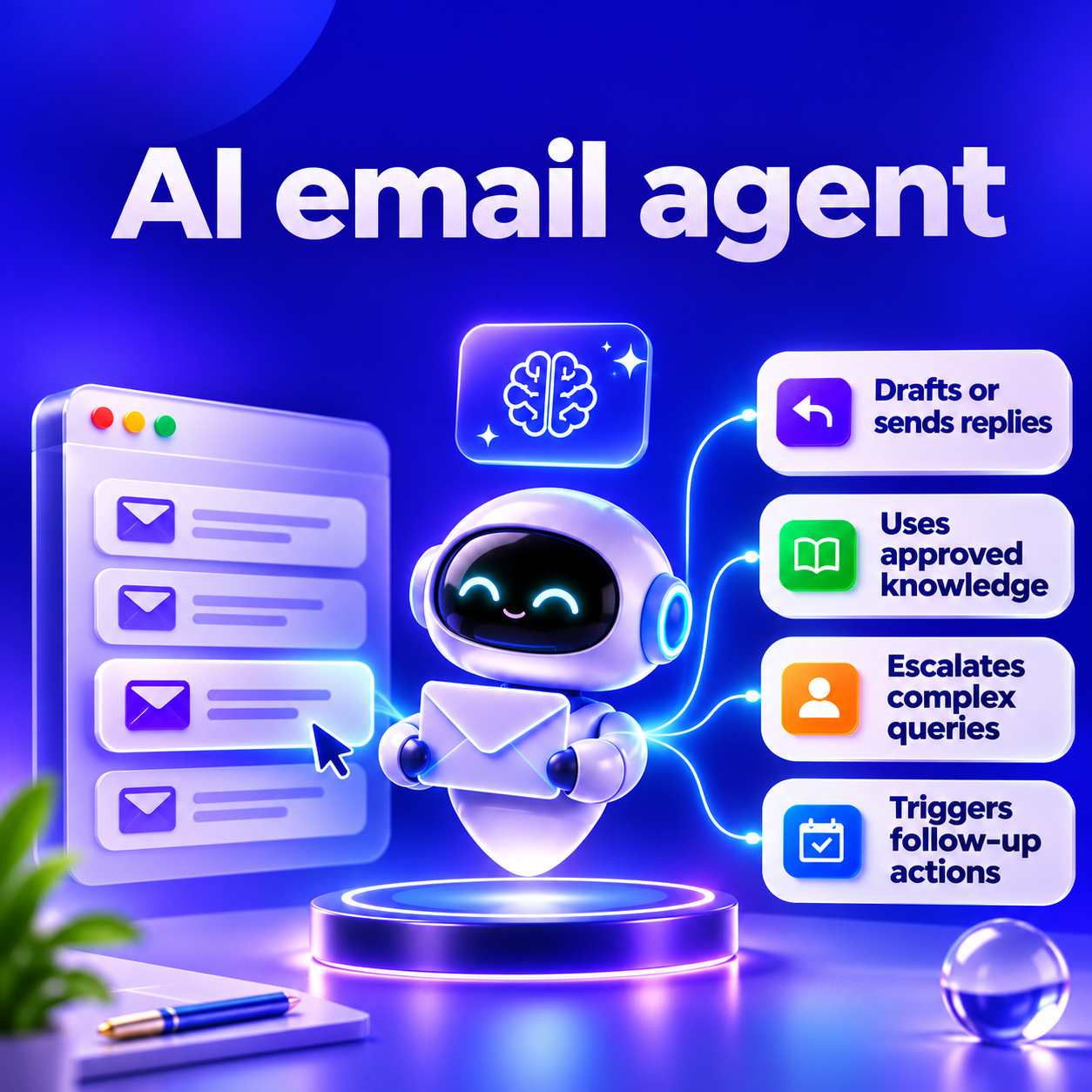
Unlike a basic writing tool or autoresponder, it acts as an autonomous worker that manages your inbox. Curious about the broader role of AI in everyday business tasks? Our breakdown of AI assistants and their capabilities covers where they fit into modern workflows.
The three things people mean by 'email agent'
The software industry uses the exact same phrase for three different products. Google search results mix all three together. Naming them keeps every reader on this page aligned.
- A personal inbox assistant for one person. This is a consumer tool. It summarizes daily newsletters and helps a single user write messages faster.
- A team agent for a customer-facing mailbox. This one is built for businesses. You connect it to a shared company inbox, like the one your support or sales team uses, and it works like an extra team member, handling customer questions and resolving them on its own.
- Inbox infrastructure that lets other AI agents send and receive email. This is a developer tool. It provides APIs so engineers can build custom applications that read and write raw email payloads.

AI email agent vs autoresponder vs AI email assistant
Software vendors blur the lines between basic automation and true artificial intelligence. Understanding the mechanical differences prevents you from buying the wrong tool.
An autoresponder relies on rigid rules that break when customers ask complex questions. An AI email assistant speeds up human typing but does not reduce the actual number of tickets a human must touch. An AI email agent takes full ownership of the interaction, completing the work from start to finish to reduce your total queue volume.
How an AI email agent works, step by step
Modern inbox automation executes a sequence of distinct technical operations. It requires more than just a large language model. The process relies on an orchestration engine moving data across six steps.
1. Connect the mailbox
- The agent is given access to a mailbox in Gmail or Outlook. The system requests specific permission scopes, such as the ability to read messages, manage drafts, and send mail.
- The mailbox address stays the same for customers. The agent simply monitors the server via API or secure IMAP connections, fetching new unread messages the second they arrive.
2. Read and classify each email
- The system cleans raw emails by removing HTML, signatures, and tracking pixels before analyzing the message.
- The AI classifies intent, urgency, and sentiment, identifying requests such as billing disputes, technical issues, and sales inquiries.
3. Find the answer
- The agent uses Retrieval-Augmented Generation (RAG) to find answers from connected knowledge bases, approved templates, and past messages.
- Answer accuracy depends on the quality and freshness of the source content.
4. Draft or send the reply
- The agent generates brand-aligned replies using configured tone and persona settings.
- Draft mode requires human approval, while auto-send mode handles approved email types automatically, such as password resets.
5. Route and escalate
- The agent escalates sensitive or complex emails to the right human team when confidence is low.
- It also provides a brief summary, helping staff handle legal threats, frustrated customers, and unanswered queries safely.
6. Act and log
- The agent triggers actions across tools, such as sending Slack alerts, scheduling meetings, and updating Salesforce records.
- A concise thread summary and immutable audit log document every action for compliance and accountability.
What an AI email agent does for support teams
Customer support teams face massive, repetitive volume. Email is just one part of the support workload. Customer service automation takes this further by streamlining repetitive interactions across multiple customer touchpoints. Deploying AI email agents detaches your ticket resolution capacity from your headcount. Here are four use cases demonstrating how this changes daily operations.
- Routine questions answered outright
The AI extracts the order number, checks the shipping API, and instantly sends the tracking link, resolving routine shipping queries without human intervention.
Order tracking is only one way AI can improve the online shopping experience. From handling returns to managing customer queries, these AI tools for ecommerce highlight other ways retailers can streamline operations.
- Routing by topic
The AI analyzes the bug report, identifies severe technical issues, and routes them directly to Tier 3 engineers, bypassing general support and reducing resolution time.
- Thread summaries for handoff
The AI summarizes lengthy support threads into three concise bullets, giving senior managers instant context without reading the entire conversation history.
- Cover outside working hours
The AI instantly locks compromised cards through API integration and emails confirmation, providing round-the-clock fraud response without requiring human intervention.
What an AI email agent does for sales teams
Sales teams win on velocity. An AI sales email agent acts as a digital development representative, ensuring speed to lead and relentless follow-up.
Replies to new enquiries:
A prospect emails a generic sales address requesting pricing. The agent replies within three minutes. The agent guarantees an immediate first touch, capturing interest while the prospect is still at their desk.
Answers product questions from approved content:
A potential buyer asks if your software integrates with a specific legacy system. The agent searches your technical documentation, confirms the integration exists, and sends a detailed reply outlining the connection process.
Proposes meeting times:
If a lead expresses interest in a demonstration, the agent accesses the assigned account executive's calendar. It drafts an email proposing three available time slots. When the prospect selects a time, the agent generates the calendar invitation and video link autonomously.
Follows up when there is no reply:
If a prospect requests a proposal but fails to reply to the sent document, the agent tracks the stalled thread. After three days, it drafts and sends a polite, context-aware follow-up email.
Where AI email agents fail, and how to guard against it
Total autonomy is a myth. Enterprise systems require strict governance because machine learning models fail in predictable ways. Be honest about these limitations.
An AI email agent is only as good as the data behind it. If you change a policy on your website but forget to update the internal knowledge base, it will confidently send customers the old information, and error rates range from 4% to over 70% depending on the model and task.
Long forward chains, signature blocks, and messy scanned PDFs can bury the real request. And some topics, like legal threats, compliance issues, medical emergencies, and big financial disputes, should always go to a human. Strong guardrails are essential.
- Start in draft mode: During the first month of deployment, configure the system strictly to draft responses. Human representatives must review, edit, and manually send every email.
- Set rules for escalation: Build deterministic logic gates. If an email contains words like lawyer, cancel, or angry, the system must bypass the AI and route the message directly to a human.
- Sample replies weekly: Quality assurance teams must read a random sample of auto-sent emails every week. This audits the model's performance and identifies subtle drift.
- Keep a human owner for the mailbox: No mailbox should operate entirely unsupervised. A designated manager must monitor the analytics dashboard and update the knowledge base when the agent flags missing information.
How to choose an AI email agent: 8 questions to ask
The market floods with vendors claiming autonomous capabilities. Evaluating the underlying architecture is critical. Use this checklist to identify the best AI email agent for your operations.
- Which mailboxes does it support? Does the platform integrate natively with Google Workspace and Microsoft Exchange? Does it support shared group addresses or only individual user accounts?
- Where do the answers come from? Does the vendor rely on public training data, or does it strictly confine the LLM to your internal knowledge base using RAG?.
- What is the draft versus auto-send control? Can administrators set granular permissions per intent? For example, can shipping questions auto-send while billing questions remain in draft mode?.
- How do routing rules work? Can the system identify sentiment and escalate automatically? Does it integrate with existing IT Service Management (ITSM) tools like Zendesk or ServiceNow for complex routing?.
- What integrations are available? An agent must take action. Does the platform offer out-of-the-box connectors for Salesforce, HubSpot, Slack, and internal databases?.
- Are logs and audit trails immutable? Does the system maintain a read-only log of every single action, intent classification, and API call? Compliance teams require this for regulatory audits.
- What are the security and data handling policies? Does the vendor train its global models on your private email data? Is the platform SOC 2 Type II compliant? Does it mask sensitive data?.
- What is the pricing model? Does the vendor charge per seat, per email processed, or per successful resolution? Resolution-based pricing aligns the vendor's incentives with your operational success.
How to set up an AI email agent in Thunai
Deploying the technology requires methodical configuration. Follow the product docs to connect the system securely. For a step-by-step guide to setting up a Thunai AI email agent, explore our detailed setup tutorial.
- Connect Gmail or Outlook: Administrators begin in the Application Directory. Locate the Google Workspace or Microsoft Exchange card and initiate the connection. The system redirects to the authorization page. The interface confirms a successful cryptographic connection.
- Choose the agent type: The setup interface displays a toggle switch. Select either Support or Sales. This selection pre-configures the underlying intent models and baseline routing behaviors suited for those specific departments.
- Set the persona and mail ID prefix: Define how the agent presents itself. Assign a name, a role, and a specific tonal instruction. Configure the mail ID prefix to route the correct inbound traffic to the agent's monitoring queue.
- Add workflow applications: To enable actions beyond typing, connect third-party tools. Use the integration menu to authorize connections to applications like Salesforce or Shopify.
- Customize templates: Upload internal policy documents, link to public FAQ pages, and define specific fallback templates for edge cases. This builds the knowledge base the agent relies on.
- Review inbox summaries and logs: Once activated, navigate to the unified dashboard. Review the automated inbox summaries, inspect the detailed execution logs, and monitor the confidence scores of recently drafted messages.
To see the business impact of this exact setup, explore the success story of how Neuberg uses Thunai to transform its support workflows.
How to measure results
Implementation means nothing without quantifiable metrics. Traditional contact center analytics must evolve to measure autonomous systems. Response time and resolution rates are only part of the picture. A wider look at Thunai’s customer support KPIs helps teams understand service quality, agent efficiency, and overall performance.
- First response time (FRT)
- This measures the gap between customer submission and the first meaningful reply. In 2026, the industry median for manual email support sits between 4 and 8 hours.
- By deploying automation, first response time drops to under 5 minutes. Customers receive immediate answers rather than automated acknowledgments.
- Share of emails resolved without a person
- Often called the Autonomous Resolution Rate, this metric tracks how many threads the agent closes completely without human intervention.
- A well-tuned system managing structured inquiries should target a resolution rate between 60% and 75%. This is a stricter, more valuable metric than basic ticket deflection.
- Escalation rate
- This tracks the percentage of emails the agent hands off to human staff. A high escalation rate indicates missing documentation in the knowledge base or overly sensitive routing rules.
- Tracking the reasons for escalation shows exactly which internal documents need updating.
- Customer satisfaction (CSAT)
- Speed does not equal quality. You must measure CSAT specifically on threads handled entirely by the agent.
- If resolution rates rise but CSAT collapses, the agent is providing fast but unhelpful answers. Industry benchmarks show AI-handled CSAT typically runs slightly below human-handled CSAT, averaging around 78/100.
- Hours returned to the team
- Multiply the volume of autonomously resolved emails by your historical Average Handle Time (AHT) to calculate the exact number of labor hours saved.
- Technical teams exploring deeper integrations rely on external architectural references to optimize these outcomes.
So, what's next? Book a demo and see how Thunai's AI email agent turns your shared inbox into a task queue that clears itself.
FAQs about AI Email Agent
What is an email agent?
An email agent is software that connects to an inbox to read, sort, and reply to messages. It uses artificial intelligence to determine what the sender wants, finds the correct answer in your company data, and drafts a response.
What are the best AI agents for email?
The best agent depends on your goal. Personal assistants (like Superhuman) are best for individual users. Team agents (like Thunai) are best for customer-facing support and sales mailboxes. Developer infrastructure platforms (like AgentMail or Nuntly) are best for engineers building custom applications.
Can ChatGPT reply to emails?
ChatGPT is a chat interface that generates text when a human asks it a question. An AI email agent connects directly to your mailbox, monitors incoming traffic automatically, and can send replies without a human copying and pasting text.
Is there a free AI email agent?
Many platforms offer free tiers or trials, but they limit capacity. Free plans usually restrict the number of emails you can process per month, limit access to advanced CRM integrations, and exclude enterprise security features like SOC 2 compliance and audit logging.
What is the difference between an AI email agent and a chatbot?
A chatbot lives on a website widget and handles short, back-and-forth instant messages. An email agent operates asynchronously in your inbox. Email requires a complete, fully formatted answer in a single reply, demanding deeper data retrieval.
Is an AI email agent safe to use with customer email?
An agent is safe if the vendor provides strict controls. Look for systems that require human approval before sending (draft mode), restrict access using OAuth permissions, mask sensitive data, and maintain immutable audit logs of every action.