Imagine your sales team is getting an email from a prospect at 6 p.m., but there will be no reply until the following afternoon.
It means that you are missing out on opportunities before your sales representative even opens their mailbox.
Ineffective follow-ups, failure to engage in conversation, and inability to qualify leads cost companies money.
Our AI follow-up for leads solves this problem.
What is AI lead follow-up?
AI lead follow-up is software that watches your inbound sales inbox. It reads each new inquiry and replies in minutes, using only approved company facts. It answers product and pricing questions. It asks a few qualifying questions. It books meetings. And it keeps nudging until a human rep steps in.
Why speed and persistence decide who wins the lead
- Speed wins the first real conversation, and fast AI lead follow-up closes the gap. Look at the Harvard Business Review study "The Short Life of Online Sales Leads" (March 2011). Researchers sent a web test lead to 2,241 U.S. companies. Here's what they found:
- "Although 37% responded to their lead within an hour, and 16% responded within one to 24 hours, 24% took more than 24 hours and 23% of the companies never responded at all. The average response time, among companies that responded within 30 days, was 42 hours."
- The same article studied 1.25 million leads. Firms that reached buyers within an hour were nearly seven times as likely to qualify the lead as firms that waited one hour longer. Against firms that waited 24 hours or more, the gap grew past 60 times.
- Older phone research points the same way. Dr. James Oldroyd at MIT and InsideSales.com studied 15,000+ leads in 2007. Contact odds were 100 times higher at 5 minutes than at 30. Only 31% of leads got a call at all.
- One caveat, though. Both datasets are over a decade old, and both measured phone outreach. So treat those multipliers as a signal, not as current email averages.
- A separate Drift test of 433 B2B companies, reported in sales blogs, found just 7% replied within five minutes. Over half missed a five-day window.
- Persistence is the other weak spot. Nearly a quarter (23%) of firms in the HBR audit never replied once. Sales blogs love to say that 44% of reps quit after one follow-up, and that 80% of deals need five or more touches.
- The proof for that 44% figure varies by vendor, so take it lightly. Still, we all know busy reps drop threads. Manual work breaks when queues spike. That's where AI lead follow-up helps.
How AI lead follow-up works on email
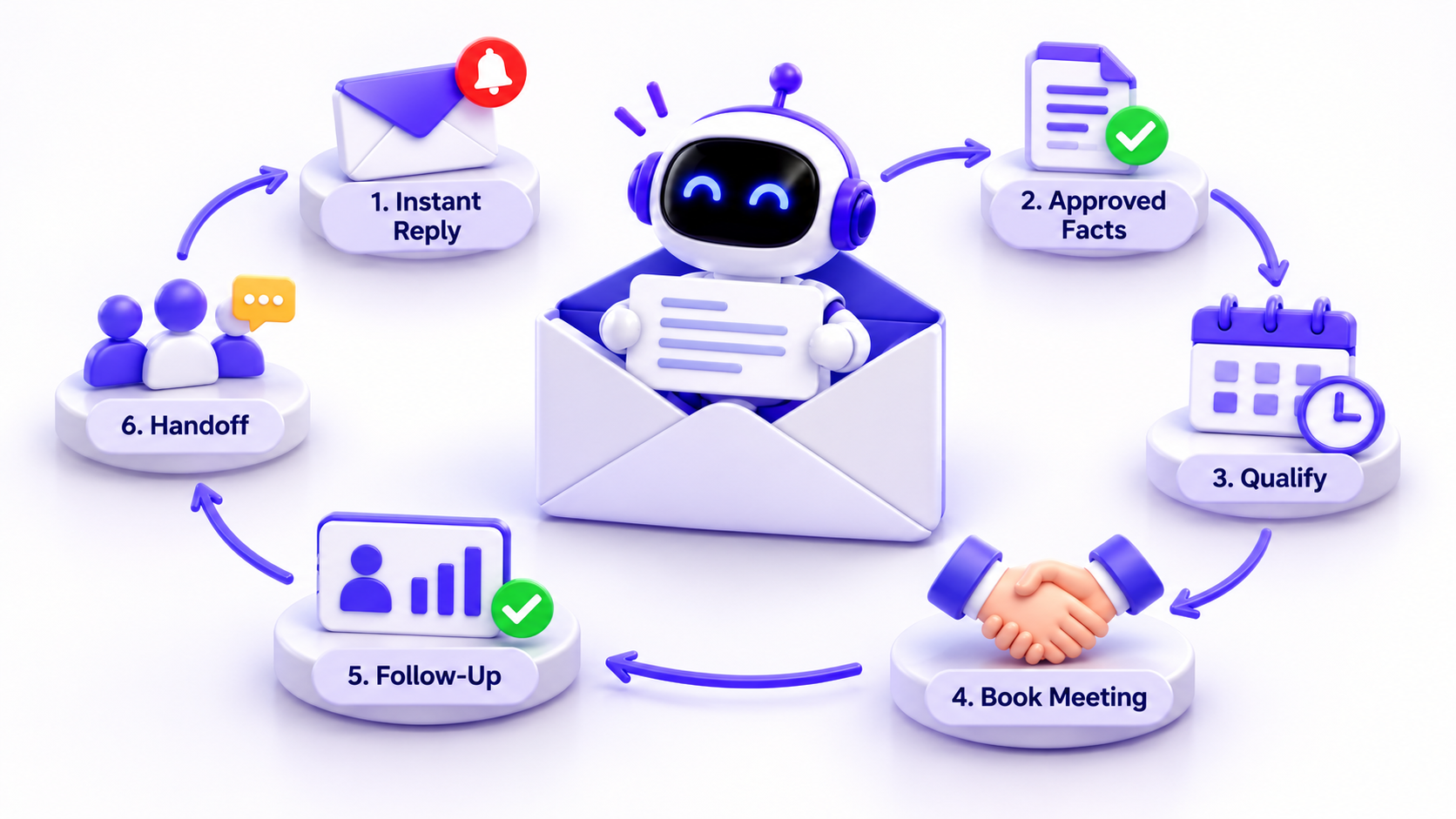
An email agent sits on your sales@ mailbox. It runs a clear six-step loop.
An instant, specific first reply
- Strong AI lead follow-up starts with a fast, specific reply.
- A canned "We got your message" won't stop a buyer from emailing two rivals.
- The agent strips out signatures and clutter, finds the real question, and answers in minutes. Even at 6 p.m.
Answers from approved content
- Speed hurts trust if the agent guesses.
- So modern AI lead follow-up tools use Retrieval-Augmented Generation (RAG).
- It pulls pricing tiers, integration facts, and policy rules only from approved docs and templates.
Qualifying questions
- Don't grill the buyer.
- The agent folds two or three light questions into a helpful answer.
- Think seat count, timeline, or current tools.
Booking the meeting
- Say a buyer fits and wants a call.
- The agent checks the rep's calendar.
- Then it offers open slots or sends an invite right from the thread.
Following up until there is an answer
- Buyers get busy.
- They miss emails.
- The agent watches silent threads and sends short, spaced reminders.
- Those stop the moment the buyer replies or opts out.
Handing over to a rep
- A call gets booked, or a question needs a human.
- Either way, the agent posts a clean thread summary to Slack, logs the answers in your CRM, and assigns an owner.
Inbound vs outbound: where an email agent fits
Most email automation articles cover cold outbound tools. Those sequencers write first to cold lists.
An inbound email agent does something else. It handles AI lead follow-up for warm buyers who wrote to you.
5 follow-up emails an AI agent can send, with examples
Good AI lead follow-up reads like a helpful teammate wrote it. Here's a five-step flow an agent can send.
1. First reply (within 5 minutes)
Subject: Re: Question about SSO and team pricing
Body:
Hi Maya, thanks for reaching out.
Yes, SAML SSO comes with our Enterprise plan. Standard Okta setup takes under an hour.
Roughly how many seats do you need? Are you planning a rollout this quarter?
I can share times for a 15-minute walkthrough if that helps.
2. Answer plus next step (after prospect replies)
Subject: Re: Question about SSO and team pricing
Body:
Thanks, Maya.
For 45 seats on an annual plan, Enterprise fits best. Alex is free Tuesday at 10:00 a.m. or Wednesday at 2:30 p.m. EST.
Does either time work for a quick pricing and security chat?
3. Day 2 nudge (if no reply)
Subject: Re: Question about SSO and team pricing
Body:
Hi Maya, I am checking back in case your week got busy.
Do Tuesday or Wednesday still work? Or is next week better for your team?
4. Day 5 added value
Subject: Okta setup guide + quick check-in
Body:
Hi Maya,
your team is reviewing options, so here is our two-page Okta SSO checklist for your IT lead.
When you want to review pricing for 45 seats, just reply. I will lock in a slot.
5. Closing the file (Day 10)
Subject: Should I close this out for now?
Body:
Hi Maya,
I have not heard back, so I figure your timeline shifted. I will pause follow-ups here so I do not crowd your inbox.
Reply anytime if you want to pick this back up.
Challenges and guardrails
- Even strong AI lead follow-up needs tight rules. Skip them, and you'll pay for it.
- Never let an agent invent discounts, SLAs, or legal terms.
- Limit answers to approved content. A human rep should approve every quote and anything contractual.
- Cap the volume, too. Buyers shouldn't feel spammed.
- Good AI lead follow-up keeps nudges brief: a short reminder series over a couple of days, or five to eight spaced touches at most. Gains drop off after eight attempts.
- Set plain-English tone rules so messages never sound stiff or pushy. Respect consent and opt-out rules as well.
- Answering a question doesn't give you leave to send marketing blasts. And any "stop" request must halt outreach at once.
For more on safe automation, see the Thunai blog on AI email agent guardrails
How to choose an AI lead follow-up tool
Most serious vendors cover the basics. Treat this AI lead follow-up checklist as table stakes:
- Lead arrival: Gathers all @sales email, form leads, and responses in one place.
- Inbox & CRM integration: Links seamlessly with Gmail or Outlook and keeps your CRM updated.
- Content management: Retrieves content solely from approved knowledge bases and templates.
- Draft mode & automatic sending: Can be configured for manual approval or auto-send per topic.
- Handover: Transitions difficult leads to designated reps with concise lead summary.
- Tracking: Documents everything that happens and records email response times.
How to set up a Sales Email Agent in Thunai
Thunai makes AI lead follow-up simple. It plugs into Gmail and Outlook, so your team keeps its current inbox. The agent handles triage, replies, and handoffs.
On G2, users praise how Thunai automates email follow-ups and lead qualification without scripting. Answers stay tied to one central knowledge base. One reviewer did note that setup takes planning.
Product Hunt voters also named Thunai #1 Product of the Day, with a 5.0 score across 24 reviews. And retail brands like Bazooka Candy use Thunai Email AI Agents to tame heavy inboxes.
Based on Thunai's product guide, setup takes five no-code steps:
- Create the agent: Name your agent and pick the Sales agent type.
- Write the persona: Add plain-English instructions for your AI lead follow-up agent. Cover tone, style, and escalation rules.
- Set the mail ID prefix: Choose the email prefix the agent uses in Gmail or Outlook.
- Add templates and docs: Load approved product files into Thunai Brain. Edit shared templates once so every reply stays on message.
- Connect workflow apps: Link Gmail (enable_mail_read and enable_mail_send) or Outlook. Add Slack, Calendar, and your CRM. Then check mailbox summaries and logs.
A quick note. Thunai's help portal lists Email Agents setup - Version 1 next to workflow and access controls.
Its product pages cover triage, template replies, calendar invites, Slack summaries, and CRM updates.
Before you turn on full auto-send, confirm the live multi-step follow-up rules with the Thunai product team.
Want to see it work? Book a Thunai demo and send a test email. Watch an inbox agent read a live inquiry, pull an approved answer, and send a meeting invite. That's AI lead follow-up in action.
FAQs
What is the best way to follow up with a lead?
The best AI lead follow-up replies within minutes. Answer what the buyer asked. Add two or three light qualifying questions. Offer one clear next step, like open meeting times. If they go quiet, run a short, spaced sequence. Stop when they reply or opt out.
What is AI lead qualification?
AI lead qualification is one core part of AI lead follow-up. It uses automated conversations to check whether a new inbound buyer fits your ideal customer profile. That happens before a rep joins the call. In an email thread, the agent asks two or three short questions about team size, budget, or timeline. It scores intent and routes good fits straight to booking.
How fast should you reply to a new lead?
Aim for under five minutes. Fast AI lead follow-up gives a useful first reply in that window. The 2007 MIT/InsideSales study found contact odds were 100 times higher at 5 minutes than at 30. HBR's 2011 study found firms that replied within an hour were nearly seven times as likely to qualify the lead.
Can AI book meetings from email?
Yes, once it's connected to a calendar. AI lead follow-up can book meetings from the thread itself. As Thunai's product pages document, a connected Calendar lets the Email Agent send invites straight from incoming sales emails. Say a buyer asks about pricing. The agent can send a call invite right then. No copy-and-paste.